Repository navigation
Wide Character problem / Space Between Character problem #790
Description

macvim version:
$ brew info macvim
macvim: stable 8.1-151 (bottled), HEAD
GUI for vim, made for macOS
https://github.com/macvim-dev/macvim
/usr/local/Cellar/macvim/8.1-151 (2,173 files, 34.9MB) *
  Poured from bottle on 2018-11-01 at 21:00:51
From: https://github.com/Homebrew/homebrew-core/blob/master/Formula/macvim.rb
I am running macvim on:
macOS Mojave version 10.14.1
Issue:
I updated macvim to 8.1-151 after Mojave, space in between wide character is not display properly.
For example, when I am trying to display this ascii diagram:
┌───────────────┐              ┌──────────────┐
│               │              │              │
│               │              │              │
│               │              │              │
│               ├─────────────▶│              │
│               │              │              │
│               │              │              │
│               │              │              │
│               │              │              │
└───────────────┘              │              │
                               └──────────────┘
where '┌' ,'└', ','┘', '┐', ' ─', and '▶' are wide character; while '│', and ' ' (space) are normal character.
The rendering in MacVim shows:

my font setting are:
guifont=Inconsolata:h14
guifontwide=
encoding=utf-8
ambiwidth=single
Inconsolata is fix width font the width of charecter should be identical, but the rendering clearly shown otherwise.
Expected correct behaviour
I am expected this to be displayed like:

The above is running vim in terminal that using the same font but different size: Inconsolata Regular 17pt.
I have tried:
set guifontwide=Menlo Regular:h14
Because help: guifontwide seem to indicates that macvim will use font specified in guifontwide when displaying wide character. But setting this does not help either.
I don't think this has to do with guifontwide, it is more likely due to the how macvim render the space between character and I believe that the rendering behaviour has changed since Mojave update..
Here is another example of where wide character display that result in misalignment:

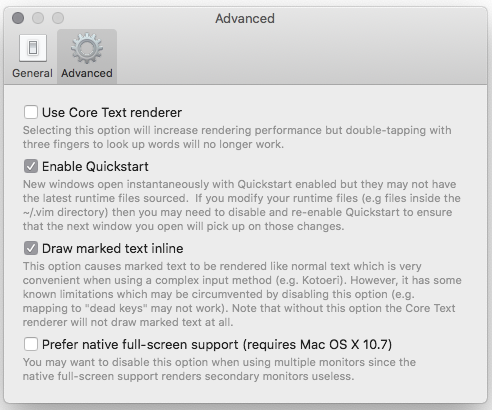
I am not using 'Core Text renderer', here is my preference for macvim:

Activity
ApolloTang commentedon Nov 26, 2018
possibly relate to #455, #726 ?
[-]Wide Character problem [/-][+]Wide Character problem / Space Between Character problem [/+]ychin commentedon Nov 26, 2018
What's the actual text you tried to display? Do you mind pasting it in a comment within a code block? It's a little hard to tell where the actual wide character is.
Also, are you using Core Text renderer?
ApolloTang commentedon Nov 26, 2018
@ychin, I have update my description for the information you requested.
ychin commentedon Nov 27, 2018
Thanks @ApolloTang. Did you turn off "Core Text renderer" to deal with the rendering issues in Mojave (#751)? Right now, the non-Core Text renderer doesn't deal with the CJK full-width characters in the exact same way as the Core Text renderer (which behaves more like how normal Vim) would.
In this case, I would recommend one of the following:
For (2). I was hoping to get it fixed by last week but it slipped so we should really be pushing out the rendering fixes by the end of this week.
ApolloTang commentedon Nov 28, 2018
@ychin thanks for your response.
I will wait and watch for #751, since it is so close to release.
For now I'll keep this open for reference in case other search for the same issue, but will close it on the release of #751.
ApolloTang commentedon Nov 28, 2018
Thank you so much for everyone who is working on #751 !
ychin commentedon Nov 28, 2018
Please ping me if this doesn't get fixed by end of week.
ychin commentedon Dec 4, 2018
#757 fixed Core Text renderer in Mojave. Please turn that on and try again. The non-Core Text renderer is mostly used as a backup and therefore not all text layout features and functionalities are as supported. If it fixed the issue please close the issue.
ApolloTang commentedon Dec 5, 2018
@ychin I brew upgrade macvim.
now using /usr/local/Cellar/macvim/8.1-151_2/bin/mvim
turn off core text rendering.
But it is still flashing :(
Am I missing something ? perhaps some dependency I have to update ?
ApolloTang commentedon Dec 5, 2018
This is indeed fixed, but has not added to brew yet. So
will not install the correct the latest fix version, you will need to install the HEAD
However, this is a problem, because ruby/config.h is missing after Mojave update:
So for those of you like me, if you have the same problem you will have to download the correction version of Command Line Tool from https://developer.apple.com/download/more/ (for me this is
Command_Line_Tools_macOS_10.14_for_Xcode_10.1) and install it.But that does not give you ruby/config.h, you have to cd into
and execute macOS_SDK_headers_for_macOS_10.14.pkg:
Now you can run
$ brew install macvim --HEADReference
https://stackoverflow.com/a/53194299/3136861
https://stackoverflow.com/a/53388305/3136861
ruby/json#255
#751 (comment)
ApolloTang commentedon Dec 5, 2018
Please let me know when the HEAD commit is added to brew, and I will close this issue.
ychin commentedon Dec 5, 2018
Yeah you are right it's not deployed yet. I'll let you know when the official formula is updated.
ychin commentedon Dec 20, 2018
Homebrew should have been updated to snapshot 153. Feel free to verify.