This repository was archived by the owner on Apr 14, 2022. It is now read-only.
Strange parsing errors #1543

Description

Environment data
- Language Server version: 0.4.10.0
- OS and version:Windows 10
- Python version (& distribution if applicable, e.g. Anaconda): 3.6.4 64-bit
Expected behaviour
Actual behaviour
There are strange parsing errors, occurring on an empty line, and complaining about a non-existent token. Could this be because of some synchronization issue? As shown in the log below, the file formatted by python black is sometimes not the original file.
Also, this behavior does not show up immediately after reload, but after some time it starts to pop up. There is no syntax error in the code as it can be run successfully.
Logs
Output from Python Panel:
User belongs to experiment group 'ShowPlayIcon - runFile'
User belongs to experiment group 'ShowExtensionSurveyPrompt - enabled'
> conda --version
> pyenv root
> python3.7 -c "import sys;print(sys.executable)"
> python3.6 -c "import sys;print(sys.executable)"
> python3 -c "import sys;print(sys.executable)"
> python2 -c "import sys;print(sys.executable)"
> python -c "import sys;print(sys.executable)"
> py -3.7 -c "import sys;print(sys.executable)"
> py -3.6 -c "import sys;print(sys.executable)"
> py -3 -c "import sys;print(sys.executable)"
> py -2 -c "import sys;print(sys.executable)"
> C:\Programs\Python3.6\python.exe -c "import sys;print(sys.executable)"
> conda info --json
> ~\AppData\Local\Microsoft\WindowsApps\python.exe ~\.vscode\extensions\ms-python.python-2019.9.34911\pythonFiles\interpreterInfo.py
> ~\AppData\Local\Microsoft\WindowsApps\python.exe ~\.vscode\extensions\ms-python.python-2019.9.34911\pythonFiles\interpreterInfo.py
> ~\AppData\Local\Microsoft\WindowsApps\python3.exe ~\.vscode\extensions\ms-python.python-2019.9.34911\pythonFiles\interpreterInfo.py
> ~\AppData\Local\Microsoft\WindowsApps\python3.exe ~\.vscode\extensions\ms-python.python-2019.9.34911\pythonFiles\interpreterInfo.py
> ~\AppData\Local\Microsoft\WindowsApps\python.exe ~\.vscode\extensions\ms-python.python-2019.9.34911\pythonFiles\interpreterInfo.py
> ~\AppData\Local\Microsoft\WindowsApps\python.exe ~\.vscode\extensions\ms-python.python-2019.9.34911\pythonFiles\interpreterInfo.py
> ~\AppData\Local\Microsoft\WindowsApps\python3.exe ~\.vscode\extensions\ms-python.python-2019.9.34911\pythonFiles\interpreterInfo.py
> ~\AppData\Local\Microsoft\WindowsApps\python3.exe ~\.vscode\extensions\ms-python.python-2019.9.34911\pythonFiles\interpreterInfo.py
Starting Microsoft Python language server.
> C:\Programs\Python3.6\python.exe -m black -S --diff --quiet <project_root>\1001-1100\1093\sol.py
cwd: <project_root>
> C:\Programs\Python3.6\python.exe -m black -S --diff --quiet <project_root>\1001-1100\1093\sol.py
cwd: <project_root>
> conda info --json
> conda --version
> C:\Programs\Python3.6\python.exe -m black -S --diff --quiet <project_root>\1001-1100\1093\sol.py
cwd: <project_root>
...
> C:\Programs\Python3.6\python.exe -m black -S --diff --quiet <project_root>\1001-1100\1093\sol.py.1155b78ffef3cae68e5d7f36d7c73122.py
...
Output from Python Language Server Panel:
[Info  - 6:20:35 PM] Microsoft Python Language Server version 0.4.10.0
[Info  - 6:20:35 PM] Workspace root: <project_root>
[Info  - 6:20:35 PM] Analysis cache path: C:\Users\<username>\AppData\Local\Microsoft\Python Language Server
[Info  - 6:20:35 PM] GetCurrentSearchPaths C:\Programs\Python3.6\python.exe
[Info  - 6:20:35 PM] Interpreter search paths:
[Info  - 6:20:35 PM]     c:\programs\python3.6\dlls
[Info  - 6:20:35 PM]     c:\programs\python3.6\lib
[Info  - 6:20:35 PM]     c:\programs\python3.6
[Info  - 6:20:35 PM]     c:\users\<username>\appdata\roaming\python\python36\site-packages
[Info  - 6:20:35 PM]     c:\programs\python3.6\lib\site-packages
[Info  - 6:20:35 PM] User search paths:
[Info  - 6:20:38 PM] Initializing for C:\Programs\Python3.6\python.exe
Watching c:\programs\python3.6
Watching c:\users\<username>\appdata\roaming\python\python36\site-packages
Opening document file:///<project_root>/1001-1100/1093/sol.py
Analysis of sol(User) queued
Analysis version 2 of 1 entries has started.
Analysis of sol (User) on depth 0 completed in 22.763 ms.
Analysis complete: 1 modules in 23.4171 ms.
Analysis version 2 of 1 entries has been completed in 22.9905 ms.
...
Analysis version 693 of 1 entries has started.
Analysis of sol (User) on depth 0 completed in 0.5606 ms.
Analysis complete: 1 modules in 0.7808 ms.
Analysis version 693 of 1 entries has been completed in 0.6874 ms.
Hover in file:///<project_root>/1001-1100/1093/sol.py at (46, 35)
Hover in file:///<project_root>/1001-1100/1093/sol.py at (46, 15)
Hover in file:///<project_root>/1001-1100/1093/sol.py at (48, 21)
Hover in file:///<project_root>/1001-1100/1093/sol.py at (35, 8)
Code Snippet / Additional lnformation
There are multiple issues on line 48, which is an empty line. Also, there is no 'tluserer' token in the file.
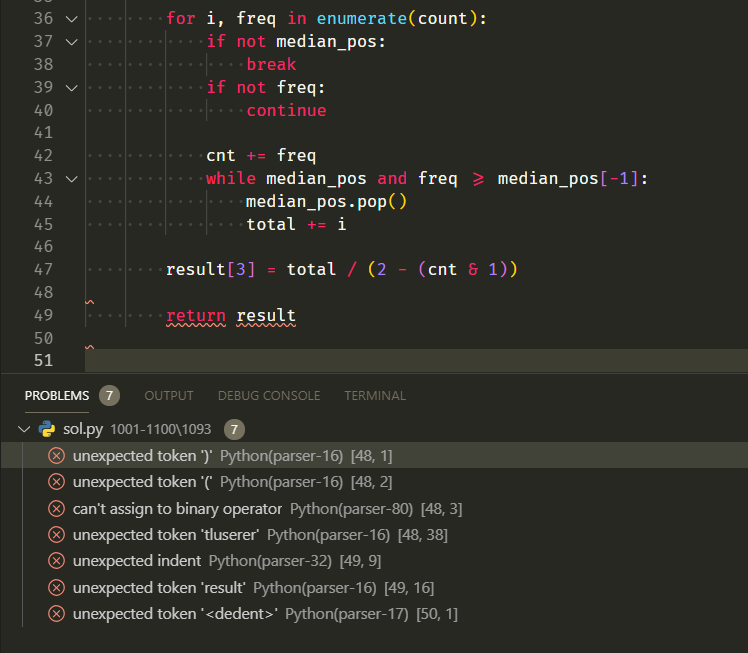
        for i, freq in enumerate(count):
            if not median_pos:
                break
            if not freq:
                continue

            cnt += freq
            while median_pos and freq >= median_pos[-1]:
                median_pos.pop()
                total += i

        result[3] = total / (2 - (cnt & 1))

        return result
Activity
jakebailey commentedon Sep 16, 2019
For reference: #1479 (comment)
MikhailArkhipov commentedon Sep 16, 2019
This is going to be in 0.4.12+
haollhao commentedon Sep 19, 2019
Hi thanks for following up. I am using 0.4.20.0 and unfortunately this problem still exists. Below is a screenshot and a code sample, although I do not think it has anything to do with this specific code.
MikhailArkhipov commentedon Oct 1, 2019
0.4.34+ has additional fixes
Ark-kun commentedon Sep 27, 2020
It's not fixed.
It has happened to me many times in 2020.
#2026 (comment)
Happened again on