Repository navigation
3/4 of window is gray until resize #728
Description

on the command line i run mvim path/to/file.rb
this results in a screen that looks like this
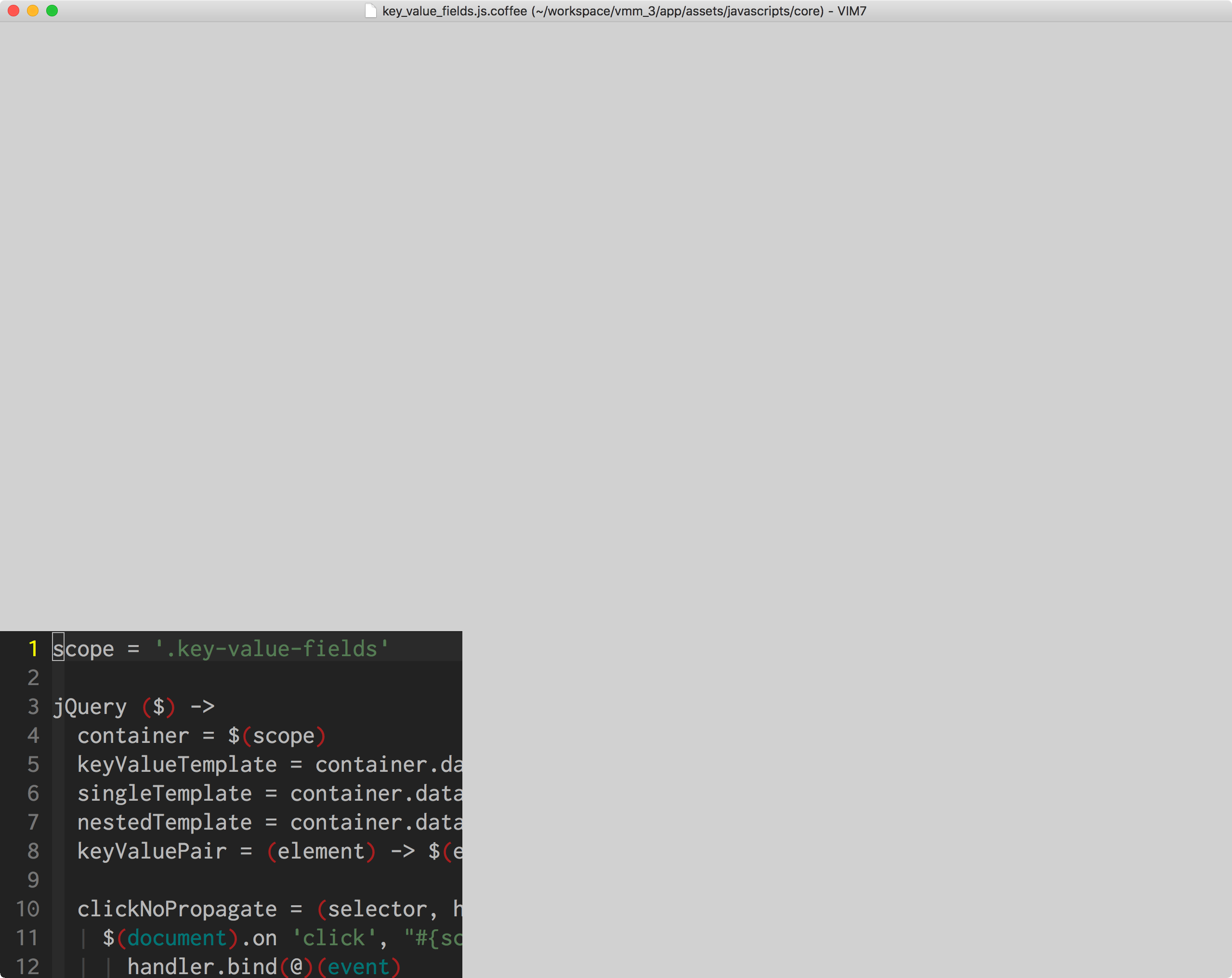
scrolling, page up, page down don't seem to affect the gray. the only solution appears to be to resize the window.
I suspect this is related to the fact that i'm running an external monitor, as that seems to create various window issues with apps. The initial window opens on the laptop screen.
running high sierra on a touchbar mackbook pro
Reacted by Lucas Caton, Étienne Barrié, Bryan Germann, Luca Da Rin Fioretto and Rob Moore
Activity
jelammers commentedon Aug 10, 2018
I have this problem too. It is usable only after resizing. Started today after it updated itself.
I moved my .vimrc and .gvimrc files out of the way - problem remains.
I reinstalled macvim - problem remains.
I'm running the latest macOS 10.13.6 (High Sierra) also on a touchbar MacBook Pro.
I really don't think it's my Mac. Macvim was working fine until it updated today.
Version info:
$ /usr/local/bin/mvim --version
VIM - Vi IMproved 8.1 (2018 May 18, compiled Aug 4 2018 07:04:41)
macOS version
Included patches: 1-235
Compiled by Homebrew
Huge version with MacVim GUI. Features included (+) or not (-):
+acl +farsi +mouse_sgr -tag_any_white
+arabic +file_in_path -mouse_sysmouse +tcl
+autocmd +find_in_path +mouse_urxvt +termguicolors
+autochdir +float +mouse_xterm +terminal
-autoservername +folding +multi_byte +terminfo
+balloon_eval -footer +multi_lang +termresponse
+balloon_eval_term +fork() -mzscheme +textobjects
+browse +fullscreen +netbeans_intg +timers
++builtin_terms -gettext +num64 +title
+byte_offset -hangul_input +odbeditor +toolbar
+channel +iconv +packages +transparency
+cindent +insert_expand +path_extra +user_commands
+clientserver +job +perl +vartabs
+clipboard +jumplist +persistent_undo +vertsplit
+cmdline_compl +keymap +postscript +virtualedit
+cmdline_hist +lambda +printer +visual
+cmdline_info +langmap +profile +visualextra
+comments +libcall -python +viminfo
+conceal +linebreak +python3 +vreplace
+cryptv +lispindent +quickfix +wildignore
+cscope +listcmds +reltime +wildmenu
+cursorbind +localmap +rightleft +windows
+cursorshape -lua +ruby +writebackup
+dialog_con_gui +menu +scrollbind -X11
+diff +mksession +signs -xfontset
+digraphs +modify_fname +smartindent +xim
+dnd +mouse +startuptime -xpm
-ebcdic +mouseshape +statusline -xsmp
+emacs_tags +mouse_dec -sun_workshop -xterm_clipboard
+eval -mouse_gpm +syntax -xterm_save
+ex_extra -mouse_jsbterm +tag_binary
+extra_search +mouse_netterm +tag_old_static
system vimrc file: "$VIM/vimrc"
user vimrc file: "$HOME/.vimrc"
2nd user vimrc file: "
/.vim/vimrc"/.vim/gvimrc"user exrc file: "$HOME/.exrc"
system gvimrc file: "$VIM/gvimrc"
user gvimrc file: "$HOME/.gvimrc"
2nd user gvimrc file: "
defaults file: "$VIMRUNTIME/defaults.vim"
system menu file: "$VIMRUNTIME/menu.vim"
fall-back for $VIM: "/Applications/MacVim.app/Contents/Resources/vim"
Compilation: clang -c -I. -Iproto -DHAVE_CONFIG_H -DFEAT_GUI_MACVIM -Wall -Wno-unknown-pragmas -pipe -DMACOS_X -DMACOS_X_DARWIN -g -O2 -U_FORTIFY_SOURCE -D_FORTIFY_SOURCE=1
Linking: clang -L. -L /BuildRoot/Applications/Xcode.app/Contents/Developer/Platforms/MacOSX.platform/Developer/SDKs/MacOSX10.13.Internal.sdk/usr/local/libressl/lib -L/BuildRoot/Applications/Xcode.app/Contents/Developer/Platforms/MacOSX.platform/Developer/SDKs/MacOSX10.13.Internal.sdk/usr/local/lib -L. -L /BuildRoot/Applications/Xcode.app/Contents/Developer/Platforms/MacOSX.platform/Developer/SDKs/MacOSX10.13.Internal.sdk/usr/local/libressl/lib -L/BuildRoot/Applications/Xcode.app/Contents/Developer/Platforms/MacOSX.platform/Developer/SDKs/MacOSX10.13.Internal.sdk/usr/local/lib -L/usr/local/lib -o Vim -framework Cocoa -framework Carbon -lm -lncurses -liconv -framework AppKit -fstack-protector -L/System/Library/Perl/5.18/darwin-thread-multi-2level/CORE -lperl -L/usr/local/opt/python/Frameworks/Python.framework/Versions/3.7/lib/python3.7/config-3.7m-darwin -lpython3.7m -framework CoreFoundation -F/System/Library/Frameworks -framework Tcl -framework CoreFoundation -framework Ruby
tdwong commentedon Aug 10, 2018
I have the same problem with 8.1.235 (150) build. and I second masukomi's observation, this symptom only occurs when MacVIM opens its initial window on the separate monitor.
MacVIM:version
VIM - Vi IMproved 8.1 (2018 May 18, compiled Aug 3 2018 05:14:32)
macOS version
Included patches: 1-235
Compiled by travis@Traviss-Mac-1044.local
macOSmacOS High Sierra
Version 10.13.6
hardwareMacBook Pro (15-inch, 2016)
jelammers commentedon Aug 10, 2018
Here's another clue / characteristic of the problem:
I have a MacBook Pro and 2 external monitors. The problem does not occur on the "primary" display, only on the other 2 displays.
Go to System Preferences -> Displays -> Arrangement. The problem does not occur on whichever display has the menu bar (i.e. it occurs on the other 2 displays)
jelammers commentedon Aug 10, 2018
tdwong is correct. It occurs when macvim opens on a display which is not the primary display.
eirnym commentedon Aug 11, 2018
#727 is the source of the problem
This ticket also duplicates #721 and #724
shirriff commentedon Aug 11, 2018
I am also having this problem. Is there a fix/workaround? I didn't see any action in #727 that I could do.
ychin commentedon Aug 11, 2018
@shirriff You can probably download an earlier snapshot to 149 (https://github.com/macvim-dev/macvim/releases/tag/snapshot-149) to avoid having this issue, then wait for the next update (snapshot 151) which will address this. If you don't mind building MacVim yourself you could sync to master now and build it (but it's probably easier to just download snapshot 149 for now)
Otherwise there are some mitigation steps in #721 that mostly rely on a Vim script to resize the window for you on launch.
ianwjhalliday commentedon Aug 14, 2018
I just updated today to 8.1.280 (151) which has fixed the view not using the entire window bug, but now moving a macvim window from one monitor to another flickers the window a bunch when it appears on the next screen.
I don't recall seeing this flicker prior to the update that included #727
ychin commentedon Aug 14, 2018
@ianwjhalliday huh that’s weird. So you never saw that in snapshot 149? The revert was a pretty straightforward revert and should have removed all the changes from the original PR.
Did you update to beta macOS Mojave or changed configurations in any way?
Also wondering if this particular case is related to #557
giftig commentedon Aug 28, 2018
I've been trying to find any reference to this problem since I started a new job and fresh mac 3 weeks ago and started being plagued by this issue :( I tried again to fix it today, upgraded to the latest release, and it's finally gone.
I haven't experienced the flickering between monitors, though i've only been on 151 for a day. I think this can be closed, though; I'd be curious to know what caused the problem but it seems it's fixed.
Given the release notes for 151 mentioning #731 I'm guessing it was related to that.
ychin commentedon Aug 28, 2018
Release snapshot 151 reverted my change which is not #731.
#731 is a pending pull request to re-implement the change (guioptions “k”) while fixing the original issues (including this one). You can read the pull request for more details on what caused the original issue.
But yes I think the flickering issue is something else unrelated to this.
giftig commentedon Aug 28, 2018
Yeah I'm aware #731 is open, but given it was mentioned in the latest release notes I gathered what was reverted was the original version of it.
eirnym commentedon Aug 29, 2018
I found that I've set the option
MMUseCGLayerAlwayswhich did this for me. This options is intended to help, but it did the opposite.ychin commentedon Sep 15, 2018
I recommend closing this bug as it refers to the original secondary monitor issue introduced by guioptions-k. We should open another issue if there are other rendering issues.