Repository navigation
💬 Identify Preferences Design #34
Description

How do we want to manage preferences? Let's get a discussion going so we can arrive to the best solution for our users.
Do we want to sync via iCloud between devices?
Can project specific settings override global settings?
How do we want to display these settings?
Option A

Option B

Option C

Activity
lukepistrol commentedon Mar 17, 2022
Option B for global settings and option C for per-project settings that override global settings. iCloud sounds nice but I think giving an option between iCloud and a .codeedit folder in the user directory is the best way to go.
jasonplatts commentedon Mar 17, 2022
I personally prefer option B since it is how xCode implements the preferences.
jasonplatts commentedon Mar 17, 2022
I agree with @lukepistrol. Option C would make sense for project settings. I also think iCloud storage of global settings would be nice with project settings stored in a .codeedit. This is how Nova and VS Code both store project specific settings.
austincondiff commentedon Mar 17, 2022
We could always start with option B since that is how it is in Xcode, but I was considering option C because it may be easy to switch between project specific and global settings while keeping both consistent. There is no sense it having two different ways to change the same settings, that would also be more work and require the user to learn two separate ways of managing settings.
jasonplatts commentedon Mar 17, 2022
We may also want to consider adding the ability to sync installed extension between computers through iCloud. Many extensions also have global and project-specific settings. It would be nice to save those the same way.
austincondiff commentedon Mar 17, 2022
I also think about how the user goes from this preferences view to editing the settings json file when that link is clicked from the preferences view. If it is in it's own window, does that window close? If it is already in an editor tab, it wouldn't need to be closed. Another tab would just be opened.
jasonplatts commentedon Mar 17, 2022
Good point.
Would there be any preferences that would not be retained in the cloud? Any that might be system specific?
If so, perhaps those preferences could be made available like in option B. Global and project-specific settings that are retained in iCloud could then be made available like in option C.
I really like the simple global/workspace toggle you have in the option C design.
jasonplatts commentedon Mar 17, 2022
This might also help prevent confusion between what settings are available in JSON. Option B preferences are not JSON configurable, option C preferences are also configurable using JSON.
Just a few thoughts...Not sure how others feel about it.
lukepistrol commentedon Mar 17, 2022
I'm actually happy with any option as long as it's not editing weird JSON like in VSCode 😄
austincondiff commentedon Mar 17, 2022
Maybe I'm weird but I'd like that option 😅
jasonplatts commentedon Mar 17, 2022
I agree 😄 I would get used to any option.
lukepistrol commentedon Mar 17, 2022
I just don't want to rely on documentation for preferences. I also want to scroll through and see what options there are with easy on/off toggling and so on. To be fair most options in VSCode have a GUI but some specific options like coloring of the terminal don't.
lukepistrol commentedon Mar 17, 2022
I mean at least you could have an option like Xcodes plist editor
austincondiff commentedon Mar 17, 2022
Yeah, let's make it a rule that if there is a setting, it HAS to be in the GUI, unless it is super advanced or for internal use, etc.
jeff-h commentedon Mar 17, 2022
Not sure if you're really after random strangers' input at this stage but if so... I wonder if you could mimic Xcode's project-level settings. I guess this is pretty similar to option C.
Behind the scenes this would essentially be a GUI for the values inside the
.codeeditfolder.Perhaps any folder containing a
.codeeditcould be represented in the sidebar with a "project" icon; clicking on that could bring up the project-level config.Xcconfigfiles would be another precedent to consider.1 remaining item
[-]Preferences Management[/-][+][FEAT] - Preferences Management[/+]austincondiff commentedon Mar 25, 2022
@jeff-h that is exactly what I was going for with option C.
We need to make a final plan here because PR's are submitted like in #205 and I do not want people doing work that will ultimately be thrown out. That is not fair to our awesome contributors. I know it is not exactly how Xcode does it, but does anyone have any objection to moving forward with option C?
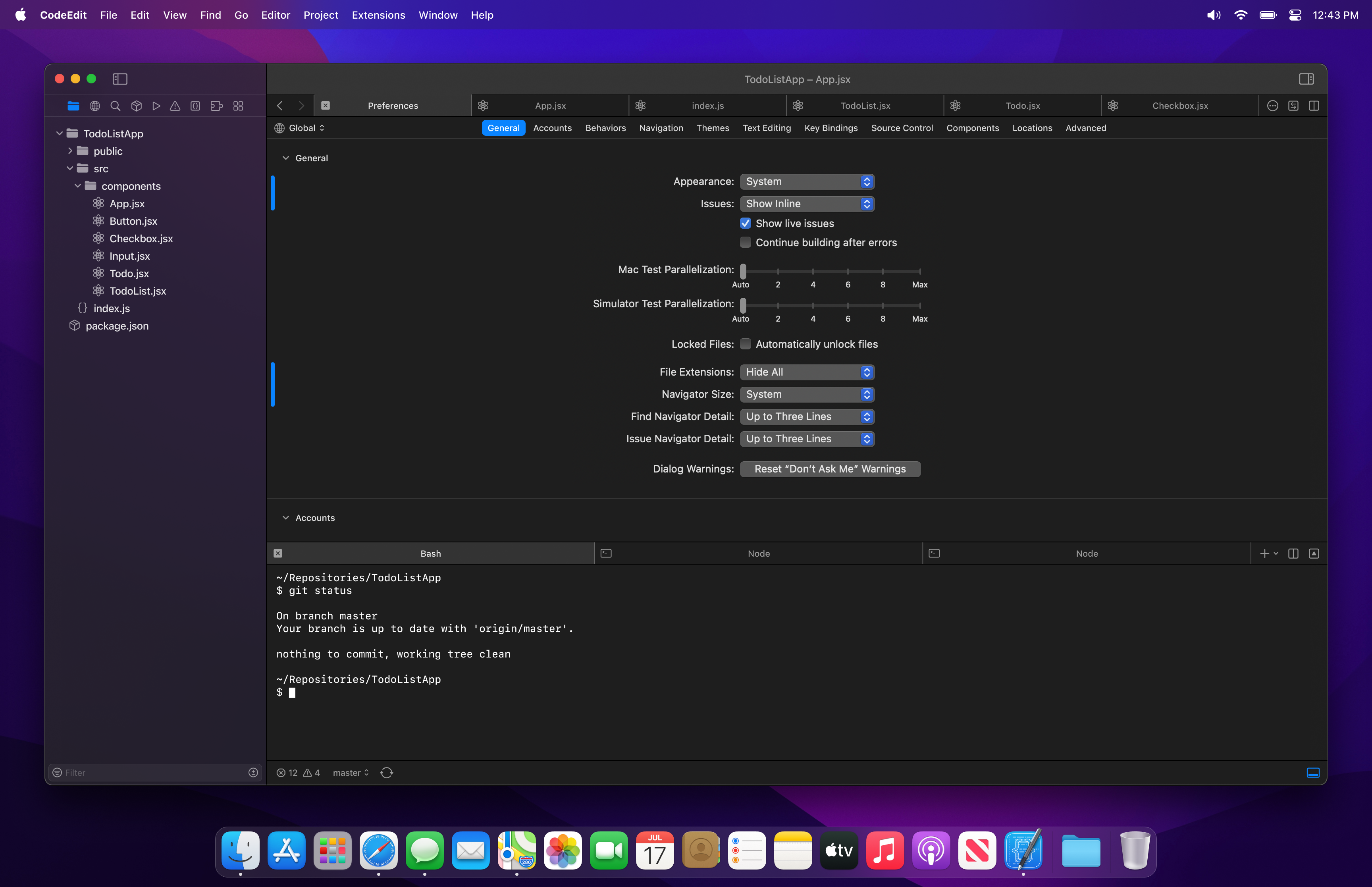
I think option C provides for a better user experience because it allows you to navigate settings while not being interruptive to your workflow. It also allows for easy switching between project specific preferences and global application preferences. We do however need a good way to reset certain settings to default, and a good way to indicate which global app settings have changed from the default and which project specific settings have changed from the system settings. I am thinking we show this in a similar way to how we indicate change in our editor, with a blue line to the left of the settings that when clicked, you can see the difference of what is changed and what is the original. I'd love to get feedback on this.
I'd love to explore further what this might look like from a design point of view. Please standby for updated designs to better visualize how this might end up looking.
austincondiff commentedon Mar 25, 2022
I'd have to go a little further in depth for each preferences category, but I was thinking something like this from the above description.
underthestars-zhy commentedon Mar 26, 2022
I think optionB is the best. Because it looks like Xcode. And option C more like a project settings. Instead of a app settings. OptionA need users click more, when they change settings. We are a developer tools, we need avoid this.
austincondiff commentedon Mar 26, 2022
You make a pretty compelling case and I am honestly waffling back-and-forth between the two.
underthestars-zhy commentedon Mar 26, 2022
As a just start app, we need choose apple's design language. Our app very looks like Xcode. The users will think that the things I know about the Xcode it also suitable for this app. This reduces the burden on users to migrate development tools. And also our developers have reference.
jeff-h commentedon Mar 26, 2022
My opinion is both b and c 😁 This is how Xcode does it.
b) for settings that are not project-specific (eg light / dark mode)
c) for project-specific settings that are stored as json inside the
.codeeditproject folder and couldjust as easilypotentially also be edited as raw json. These settings will likely go in git, be shared with a team etcProject-level settings could perhaps inherit defaults from a hierarchy of config files (again Xcode does this) but it seems perhaps overkill here?
Incidentally, Xcode handles the display of settings overrides pretty neatly, once you understand what it's showing you. Settings which are inherited from a higher level are shown as textfield placeholders (in light grey), In my screenshot above, you can see (at the very bottom edge) the Deployment Target is inheriting the value of 12.0.
[-][FEAT] - Preferences Management[/-][+]✨ Preferences Management[/+][-]✨ Preferences Management[/-][+]💬 Identify Preferences Design[/+]