Repository navigation
Conversation


This comment was marked as outdated.
This comment was marked as outdated.

|
… |
tell me you haven’t read the PR without telling me you haven’t read the PR |
|
"tell me you haven’t read the PR without telling me you haven’t read the PR" |
|
Im dumb and just realized doors aren't machines |

|
Cautiously interested, seems like Network Administrators would still be able to make their own scripts during downtime when the A.I. didn't need shit done. |

Voting doesn't matter in the current HC regime |
|
His vote matters. |

|
seems cool, appreciate reviving the ai being possible rather than permadeath being a constant for AI. Also, i imagine if the time ends up feeling too short, it can be tweaked easily. |

|
Oh boy |

|
I don't understand what this means but I think it makes malf and AI theft even more miserable for all involved so at least we've got a clear direction figured out and we're sticking to it |
"i dont understand what this means, but im still going to have an opinion on it (no im not going to try to understand it)" |
from a glance it might bring Ai out of the weird in-between limbo it currently is, which even if this PR makes those worse, it should make it easier to then make PRs improving it. My only problem with the previous PR was the gutting of sigtech to being an AI's slave |
|
Letting rigs contribute to research is interesting, gives an alternative to toxins. Can netmin enter the room to put stacks in the holder? I remember that being a problem the round i played as them |

|
I enjoy this change but I would like another way of getting ai research so netmin work isnt just a waiting game until you can start snowballing with more servers |

|
always like this |

|
Say sike right now |
|
but why, I enjoyed this idea |

|
this is cool though |
|
Really hope this gets reopened I enjoyed making bitcoin farms and leasing computing space to the AI |

|
In addition to this it allows you to remotely control networking machines in the local network. |


Document the changes in your pull request
All AI machines now need to wired up using ethernet cables into a network.
A data core will require a locally connected server with at least 1THz and 1TB to be functional.
A network consists of all the locally connected machines.
Two networks can be connected using a networking machine. This allows the AI and Netmin to use the resources and cores in both networks.
Changes to the AI data core
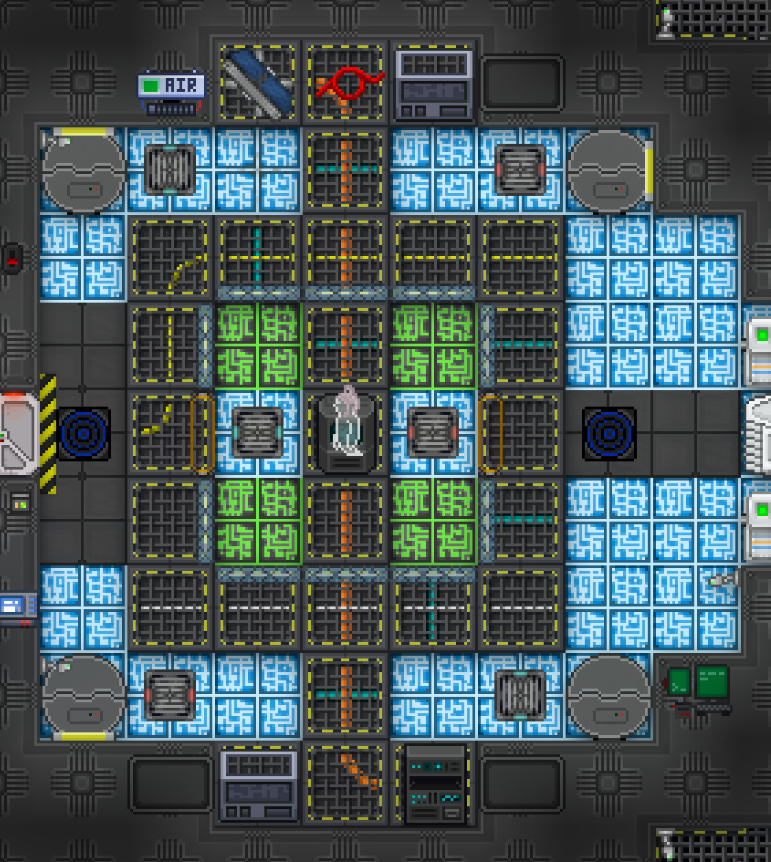
The AI Core now looks like this with the "solar panels" (sprite pending) being networking machines. They point towards the one they're connected to if you want to snoop out where other networks might be
Changes to the Netmin
The Network Admin now lives in Science in the new Computer Science room.
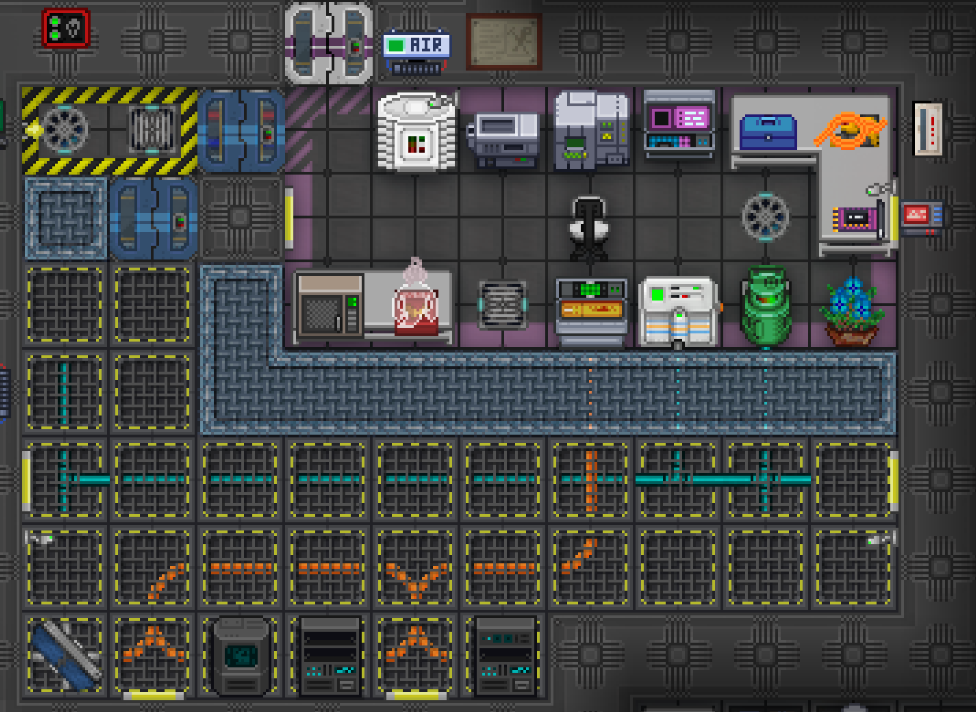
Their tool to interact with a network is now either the laptop they spawn with, or a modular computer connected with an ethernet cable.
Accessing the network using such a console allows for (at present) 3 actions. These all work based on the CPU assigned to the local network.
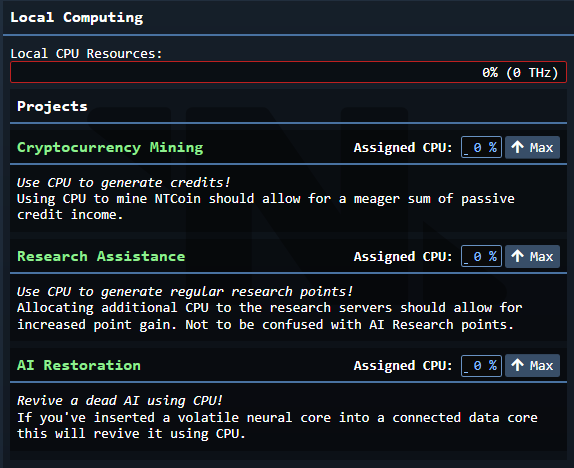
In addition to this it allows you to remotely control networking machines in the local network.
It allows allows the distribution of networking resources to either the connected AIs, or the network itself.
This is also the way you'll be uploading and downloading AIs now.
If you're uploading you need to upload to a network that either has a data core locally, or one connected through a networking machine. Likewise for downloading.
One other minor feature added is a leaderboard program you can download. If connected to a network this will show the persistent five highest CPU and RAM records.
Networking Machines
If the AI has an unconnected network machine you can force access to it using your own machine. To do this you rotate it using a wrench within 20 degrees of the other machine. Then you use a multitool and select the machine you want to connect to. After this is all done you use a screwdriver to finalize the connection. You can disconnect manually by using a wirecutter, or the UI.
Misc Additions
The new local networks will change and allow a few new things.
New project - Room Lockdown
Allows the AI, after a delay of 2 seconds, to close all working airlocks in a room and bolt them for 20 seconds. Also triggers the firealarm. Doesn't work in maint and announces itself at the start of the 2 second delay.
AI Revival
No longer is the AI permanently dead when its last core is destroyed. Instead it spawns a black box at the last core it was in.
This core is active for 5 minutes. After these 5 minutes the AI is permanently dead.
You can revive the AI by inserting it into a working AI data core. (This also stops the 5 minute timer)
After its been inserted the local network the core is connected to must be set to AI Revival and the AI will then be revived after enough CPU cycles have been spent.
Super Misc.
Added an easy way to use the TGUI login screen seen in the Security Console.
Use tgui_login_data in ui_data and tgui_login_act in ui_act. Use LoginScreen.js in the UI. See how the security console does it. (Only requires a var to keep track of being logged in/out)
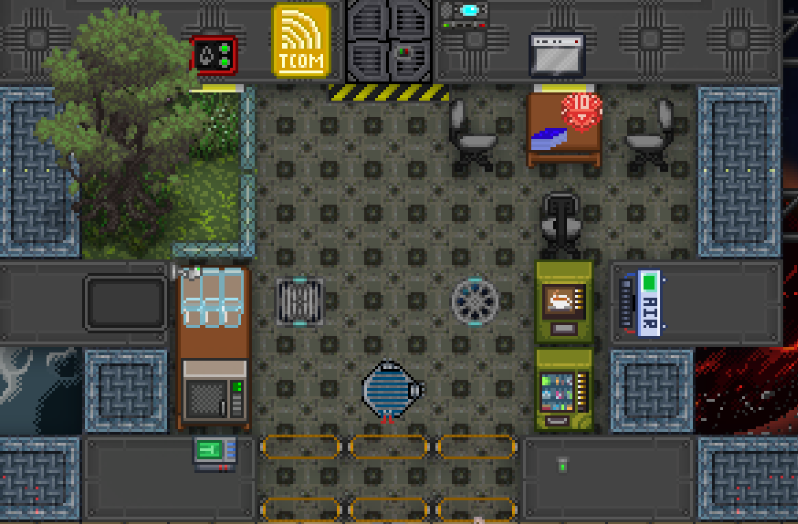
Netmin retains access to Comms and the Tcomms satellite. NTSL equipment has been moved to the satellite and the old Hardware Workshop has been replaced by a small lounge
##TODO
Changelog
🆑
rscadd: AIs are now housed in physical networks connected by ethernet cables. Networks can be remotely connected using networking machines. AIs can only switch between cores in networks they're connected to.
rscadd: AI upload and download is now done by hooking up a laptop or modular computer to an ethernet cable and using the AI Network Interface program
rscadd: It is now possible to revive an AI by inserting the dropped black box into a functioning data core and allocating CPU using the AI Network Interface program
rscadd: Added a new program, Room Lockdown, for the AI. Allows the AI to click an area and lock all working airlocks after a 2 second delay. An announcement is made beforehand.
/:cl: