Repository navigation
CustomTypes improvement #1
Description

the Exported UTIs in Xcode are filled out properly when using the CustomTypes asset to define a custom file type, however to have the files not greyed out when picking a file they also need to be added to Document Types
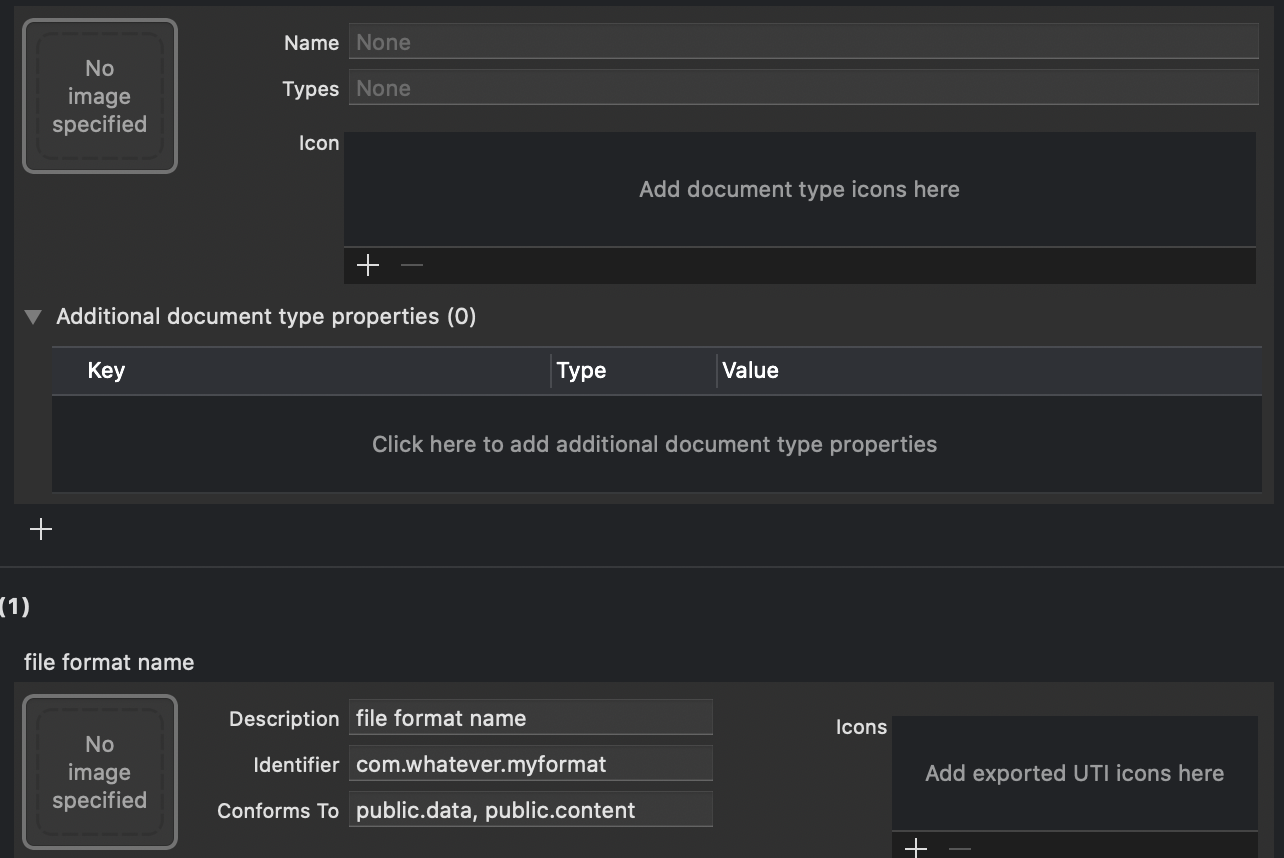
in this case the values to fix this are all already present in Exported UTIs
Name = Description from Exported UTI
Types = Identifier from Exported UTI
Additional document type properties
key: LSHandlerRank
type: String
value: Owner
great work on the feature - with this improvement it would work without having to change anything manually in Xcode, thanks and keep up the great work
Activity
yasirkula commentedon Jun 16, 2020
I had the grey out issue when setting "Conforms To" to public.content but if I set it to public.data or public.image, I can pick files without any issues while not having to fill the "Document Types". Actually, while testing the system with public.content, I did try filling "Document Types" to resolve the grey out issue but it didn't help in my case. I guess the issue is related to public.content somehow.
Eisenhuth commentedon Jun 16, 2020
removing
public.contentfixes the greyed out files and lets me select them as expected - so I'll have to keep that in mind.the one nice part about having document types defined is that your app icon will show up for supported formats, instead of just a white file but in the grand scheme of things that's just a "nice to have"
yasirkula commentedon Jun 16, 2020
I've heard that "Document Types" adds the app to the list of applications presented in the file's "Open With" list. Since that option will simply launch the Unity app instead of launching the Unity app and then automatically opening the document, it may lead to bad UX.
Eisenhuth commentedon Jun 16, 2020
good point - I agree, as it is right now the plugin is clean and does everything it sets out to do 👍