Skip to content

php artisan winter:env config conversion breaks in certain cases #335

Closed

Description

@AIC-BV

Winter CMS Build

1.1

PHP Version

8.0

Database engine

MySQL/MariaDB

Plugins installed

Winter.Sitemap, Winter.Pages, Winter.TinyPNG, Winter.Translate

Issue description

I want a local database and a live database.
When running php artisan winter:env in my CMDline, the website stops working and the pages return '500 internal server error'.

Documentation: https://wintercms.com/docs/setup/configuration#dotenv-configuration

Steps to replicate

Run the following command in the CMD: php artisan winter:env

Workaround

No response

Any further details?

I looked at the changes in my files, using Visual Studio Code - Source Control, and this was broken. I fixed it but I am still getting 500 error.
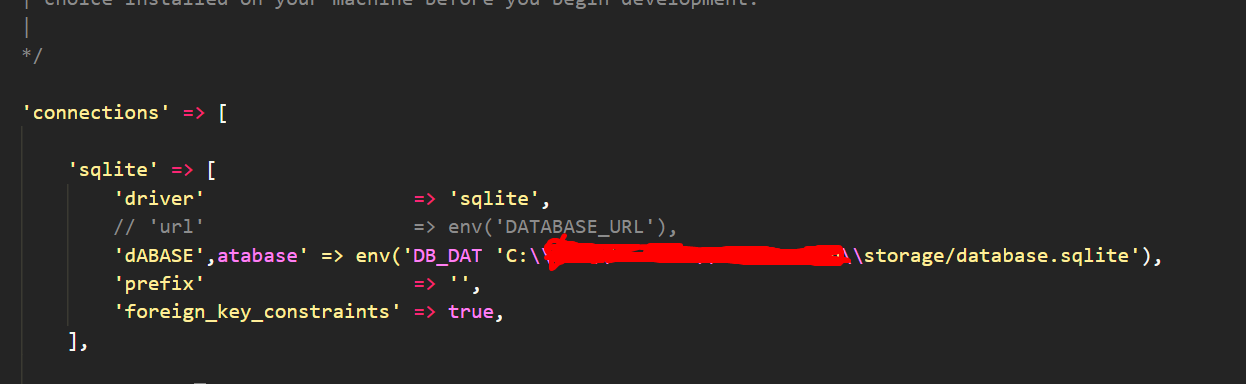
Screenshot_3

It is now: 'database' => env('DB_DATEBASE', base_path('storage/database.sqlite')),

Activity

  1. added
    needs review
    on Oct 14, 2021
  2. RomainMazB commented on Oct 14, 2021

    @RomainMazB
    Contributor

    Hi, are you able to provide the config/database.php file before the file was modified? at least the part which was broken after the winter:env command

  3. RomainMazB commented on Oct 14, 2021

    @RomainMazB
    Contributor

    And it should be 'database' => env('DB_DATABASE', base_path('storage/database.sqlite')), (with a A on DATABASE), is that a typo in your message?

  4. bennothommo commented on Oct 15, 2021

    @bennothommo
    Member

    @AIC-BV the ConfigWriter class used by the winter:env command does currently trip up when converting some config values that have already been populated in the config files to the .env file - most commonly, this is the result of passwords using quote characters or some other sequence-breaking characters.

    There is an active PR to fix this: wintercms/storm#40.

    As @RomainMazB, if you could provide us some examples where this has broken (you can forward through the details to us privately on Discord if you would prefer), we'll test it against that PR and make sure it will fix your particular case.

  5. added and removed
    needs review
    on Oct 15, 2021
  6. changed the title [-]php artisan winter:env breaks website[/-] [+]php artisan winter:env config conversion breaks in certain cases[/+] on Oct 15, 2021
  7. AIC-BV commented on Oct 15, 2021

    @AIC-BV
    ContributorAuthor

    And it should be 'database' => env('DB_DATABASE', base_path('storage/database.sqlite')), (with a A on DATABASE), is that a typo in your message?

    Was indeed a typo, thanks! But obviously didn't solve the problem..
    If it is still of any use; here's my config/database.php file, before running php artisan winter:env.

    <?php
    
    return [
    
        /*
        |--------------------------------------------------------------------------
        | PDO Fetch Style
        |--------------------------------------------------------------------------
        |
        | By default, database results will be returned as instances of the PHP
        | stdClass object; however, you may desire to retrieve records in an
        | array format for simplicity. Here you can tweak the fetch style.
        |
        */
    
        'fetch' => PDO::FETCH_CLASS,
    
        /*
        |--------------------------------------------------------------------------
        | Default Database Connection Name
        |--------------------------------------------------------------------------
        |
        | Here you may specify which of the database connections below you wish
        | to use as your default connection for all database work. Of course
        | you may use many connections at once using the Database library.
        |
        */
    
        'default' => 'mysql',
    
        /*
        |--------------------------------------------------------------------------
        | Database Connections
        |--------------------------------------------------------------------------
        |
        | Here are each of the database connections setup for your application.
        | Of course, examples of configuring each database platform that is
        | supported by Winter CMS is shown below to make development simple.
        |
        | All database work in Winter CMS is done through the PHP PDO facilities
        | so make sure you have the driver for your particular database of
        | choice installed on your machine before you begin development.
        |
        */
    
        'connections' => [
    
            'sqlite' => [
                'driver'                  => 'sqlite',
                // 'url'                  => env('DATABASE_URL'),
                'database'                => base_path('storage/database.sqlite'),
                'prefix'                  => '',
                'foreign_key_constraints' => true,
            ],
    
            'mysql' => [
                'driver'         => 'mysql',
                // 'url'         => env('DATABASE_URL'),
                'engine'         => 'InnoDB',
                'host'           => 'localhost',
                'port'           => 3306,
                'database'       => 'foo',
                'username'       => 'root',
                'password'       => "",
                'charset'        => 'utf8mb4',
                'collation'      => 'utf8mb4_unicode_ci',
                'prefix'         => '',
                'prefix_indexes' => true,
                'strict'         => true,
                'varcharmax'     => 191,
            ],
    
            'pgsql' => [
                'driver'         => 'pgsql',
                // 'url'         => env('DATABASE_URL'),
                'host'           => '127.0.0.1',
                'port'           => 5432,
                'database'       => 'foo',
                'username'       => 'root',
                'password'       => "''",
                'charset'        => 'utf8',
                'prefix'         => '',
                'prefix_indexes' => true,
                'schema'         => 'public',
                'sslmode'        => 'prefer',
            ],
    
            'sqlsrv' => [
                'driver'         => 'sqlsrv',
                // 'url'         => env('DATABASE_URL'),
                'host'           => '127.0.0.1',
                'port'           => 3306,
                'database'       => 'foo',
                'username'       => 'root',
                'password'       => '',
                'charset'        => 'utf8',
                'prefix'         => '',
                'prefix_indexes' => true,
            ],
    
        ],
    
        /*
        |--------------------------------------------------------------------------
        | Migration Repository Table
        |--------------------------------------------------------------------------
        |
        | This table keeps track of all the migrations that have already run for
        | your application. Using this information, we can determine which of
        | the migrations on disk have not actually be run in the databases.
        |
        */
    
        'migrations' => 'migrations',
    
        /*
        |--------------------------------------------------------------------------
        | Redis Databases
        |--------------------------------------------------------------------------
        |
        | Redis is an open source, fast, and advanced key-value store that also
        | provides a richer set of commands than a typical key-value systems
        | such as APC or Memcached. Winter CMS makes it easy to dig right in.
        |
        */
    
        'redis' => [
    
            'client' => 'predis',
    
            'options' => [
                'cluster' => 'redis',
                'prefix'  => '',
            ],
    
            'default' => [
                // 'url'   => env('REDIS_URL'),
                'host'     => '127.0.0.1',
                'password' => null,
                'port'     => 6379,
                'database' => 0,
            ],
    
        ],
    
        /*
        |--------------------------------------------------------------------------
        | Use DB configuration for testing
        |--------------------------------------------------------------------------
        |
        | When running plugin tests Winter CMS by default uses SQLite in memory.
        | You can override this behavior by setting `useConfigForTesting` to true.
        |
        | After that Winter CMS will take DB parameters from the config.
        | If file `/config/testing/database.php` exists, config will be read from it,
        | but remember that when not specified it will use parameters specified in
        | `/config/database.php`.
        |
        */
    
        'useConfigForTesting' => false,
    
    ];
    

    I think don't think the values are sequence-breaking characters, since its all pretty default.
    I tried running php artisan winter:env again and it didn't break that line. (but it adds the absolute path)
    Website is still broken returing the 500 internal server error with the "this page is not working" message. I think it doesn't have anything to do with the database file.

  8. LukeTowers commented on Oct 15, 2021

    @LukeTowers
    Member

    What does it look like after running?

  9. AIC-BV commented on Oct 18, 2021

    @AIC-BV
    ContributorAuthor
    <?php
    
    return [
    
        /*
        |--------------------------------------------------------------------------
        | PDO Fetch Style
        |--------------------------------------------------------------------------
        |
        | By default, database results will be returned as instances of the PHP
        | stdClass object; however, you may desire to retrieve records in an
        | array format for simplicity. Here you can tweak the fetch style.
        |
        */
    
        'fetch' => PDO::FETCH_CLASS,
    
        /*
        |--------------------------------------------------------------------------
        | Default Database Connection Name
        |--------------------------------------------------------------------------
        |
        | Here you may specify which of the database connections below you wish
        | to use as your default connection for all database work. Of course
        | you may use many connections at once using the Database library.
        |
        */
    
        'default' => env('DB_CONNECTION', 'mysql'),
    
        /*
        |--------------------------------------------------------------------------
        | Database Connections
        |--------------------------------------------------------------------------
        |
        | Here are each of the database connections setup for your application.
        | Of course, examples of configuring each database platform that is
        | supported by Winter CMS is shown below to make development simple.
        |
        | All database work in Winter CMS is done through the PHP PDO facilities
        | so make sure you have the driver for your particular database of
        | choice installed on your machine before you begin development.
        |
        */
    
        'connections' => [
    
            'sqlite' => [
                'driver'                  => 'sqlite',
                // 'url'                  => env('DATABASE_URL'),
                'database' => env('DB_DATABASE', 'C:\\...\\...\\...\\storage/database.sqlite'),
                'prefix'                  => '',
                'foreign_key_constraints' => true,
            ],
    
            'mysql' => [
                'driver'         => 'mysql',
                // 'url'         => env('DATABASE_URL'),
                'engine'         => 'InnoDB',
                'host' => env('DB_HOST', 'localhost'),
                'port' => env('DB_PORT', 3306),
                'database' => env('DB_DATABASE', 'foo'),
                'username' => env('DB_USERNAME', ''),
                'password' => env('DB_PASSWORD', ''),
                'charset'        => 'utf8mb4',
                'collation'      => 'utf8mb4_unicode_ci',
                'prefix'         => '',
                'prefix_indexes' => true,
                'strict'         => true,
                'varcharmax'     => 191,
            ],
    
            'pgsql' => [
                'driver'         => 'pgsql',
                // 'url'         => env('DATABASE_URL'),
                'host' => env('DB_HOST', '127.0.0.1'),
                'port' => env('DB_PORT', 5432),
                'database' => env('DB_DATABASE', 'database'),
                'username' => env('DB_USERNAME', ''),
                'password' => env('DB_PASSWORD', ''),
                'charset'        => 'utf8',
                'prefix'         => '',
                'prefix_indexes' => true,
                'schema'         => 'public',
                'sslmode'        => 'prefer',
            ],
    
            'sqlsrv' => [
                'driver'         => 'sqlsrv',
                // 'url'         => env('DATABASE_URL'),
                'host' => env('DB_HOST', '127.0.0.1'),
                'port' => env('DB_PORT', 5432),
                'database' => env('DB_DATABASE', 'database'),
                'username' => env('DB_USERNAME', ''),
                'password' => env('DB_PASSWORD', ''),
                'charset'        => 'utf8',
                'prefix'         => '',
                'prefix_indexes' => true,
            ],
    
        ],
    
        /*
        |--------------------------------------------------------------------------
        | Migration Repository Table
        |--------------------------------------------------------------------------
        |
        | This table keeps track of all the migrations that have already run for
        | your application. Using this information, we can determine which of
        | the migrations on disk have not actually be run in the databases.
        |
        */
    
        'migrations' => 'migrations',
    
        /*
        |--------------------------------------------------------------------------
        | Redis Databases
        |--------------------------------------------------------------------------
        |
        | Redis is an open source, fast, and advanced key-value store that also
        | provides a richer set of commands than a typical key-value systems
        | such as APC or Memcached. Winter CMS makes it easy to dig right in.
        |
        */
    
        'redis' => [
    
            'client' => 'predis',
    
            'options' => [
                'cluster' => 'redis',
                'prefix'  => '',
            ],
    
            'default' => [
                // 'url'   => env('REDIS_URL'),
                'host' => env('REDIS_HOST', '127.0.0.1'),
                'password' => env('REDIS_PASSWORD', null),
                'port' => env('REDIS_PORT', 6379),
                'database' => 0,
            ],
    
        ],
    
        /*
        |--------------------------------------------------------------------------
        | Use DB configuration for testing
        |--------------------------------------------------------------------------
        |
        | When running plugin tests Winter CMS by default uses SQLite in memory.
        | You can override this behavior by setting `useConfigForTesting` to true.
        |
        | After that Winter CMS will take DB parameters from the config.
        | If file `/config/testing/database.php` exists, config will be read from it,
        | but remember that when not specified it will use parameters specified in
        | `/config/database.php`.
        |
        */
    
        'useConfigForTesting' => env('DB_USE_CONFIG_FOR_TESTING', false),
    
    ];
    
    
  10. AIC-BV commented on Oct 18, 2021

    @AIC-BV
    ContributorAuthor

    Ok, I don't know why but after the 5th time, everything works fine as expected.
    Perhaps turning my computer off before the weekend mysteriously solved the problem..?

    I am sorry for the inconvenience.

  11. luciandex commented on Oct 22, 2021

    @luciandex
    Contributor

    What environment you use?
    If it is Docker containers, this may be cache config related problem.

  12. AIC-BV commented on Oct 25, 2021

    @AIC-BV
    ContributorAuthor

    No it's pretty default;
    XAMPP (apache)
    MySQL
    PHP 8.0
    and Visual Studio Code as IDE

  13. added
    low priority
    on Nov 3, 2021
  14. github-actions commented on Jan 3, 2022

    @github-actions

    This issue will be closed and archived in 3 days, as there has been no activity in the last 60 days.
    If this issue is still relevant or you would like to see it actioned, please respond and we will re-open this issue.
    If this issue is critical to your business, consider joining the Premium Support Program where a Service Level Agreement is offered.

  15. added
    stale
    on Jan 3, 2022
  16. removed
    stale
    on Jan 3, 2022
  17. github-actions commented on Mar 5, 2022

    @github-actions

    This issue will be closed and archived in 3 days, as there has been no activity in the last 60 days.
    If this issue is still relevant or you would like to see it actioned, please respond and we will re-open this issue.
    If this issue is critical to your business, consider joining the Premium Support Program where a Service Level Agreement is offered.

  18. added
    stale
    on Mar 5, 2022
  19. removed
    stale
    on Mar 5, 2022
  20. added this to the v1.2.0 milestone on Mar 5, 2022
  21. added and removed
    low priority
    on Mar 5, 2022
  22. LukeTowers commented on Mar 23, 2022

    @LukeTowers
    Member

    This should be fixed by #404

Sign up for free to join this conversation on GitHub. Already have an account? Sign in to comment

Metadata

Metadata

Assignees

No one assigned

    Labels

    No labels
    No labels

    Type

    Projects

    No projects

      Milestone

      Relationships

      None yet

      Development

      No branches or pull requests

      Issue actions