Repository navigation
NotImplementedError: Cannot copy out of meta tensor; no data! #87
Description

While trying to implement Pythia-Chat-Base-7B I am getting this error on running the very fist command (python inference/bot.py --model togethercomputer/Pythia-Chat-Base-7B) after creating and activating the conda env.
Can anyone help to identify what could possibly be the issue?
Reacted by Issac Trotts, Kamarul Adha and Luck
Activity
koonseng commentedon Apr 7, 2023
I have the same problem. I'm running this on AWS g3.4xlarge model with 128GB of memory.
python3 inference/bot.py --model togethercomputer/Pythia-Chat-Base-7B
Loading togethercomputer/Pythia-Chat-Base-7B to cuda:0...
Loading checkpoint shards: 100%|███████████████████████████████████████████████████████████| 2/2 [00:09<00:00, 4.55s/it]
Traceback (most recent call last):
File "inference/bot.py", line 285, in
main()
File "inference/bot.py", line 280, in main
not args.no_stream,
File "/usr/lib64/python3.7/cmd.py", line 105, in cmdloop
self.preloop()
File "inference/bot.py", line 127, in preloop
self._model = ChatModel(self._model_name_or_path, self._gpu_id, self._max_memory)
File "inference/bot.py", line 59, in init
self._model.to(device)
File "/home/ec2-user/.local/lib/python3.7/site-packages/transformers/modeling_utils.py", line 1811, in to
return super().to(*args, **kwargs)
File "/home/ec2-user/.local/lib/python3.7/site-packages/torch/nn/modules/module.py", line 989, in to
return self._apply(convert)
File "/home/ec2-user/.local/lib/python3.7/site-packages/torch/nn/modules/module.py", line 641, in _apply
module._apply(fn)
File "/home/ec2-user/.local/lib/python3.7/site-packages/torch/nn/modules/module.py", line 641, in _apply
module._apply(fn)
File "/home/ec2-user/.local/lib/python3.7/site-packages/torch/nn/modules/module.py", line 641, in _apply
module._apply(fn)
[Previous line repeated 1 more time]
File "/home/ec2-user/.local/lib/python3.7/site-packages/torch/nn/modules/module.py", line 664, in _apply
param_applied = fn(param)
File "/home/ec2-user/.local/lib/python3.7/site-packages/torch/nn/modules/module.py", line 987, in convert
return t.to(device, dtype if t.is_floating_point() or t.is_complex() else None, non_blocking)
NotImplementedError: Cannot copy out of meta tensor; no data!
nvidia-smi -L
GPU 0: Tesla M60 (UUID: GPU-db292a1c-442c-5142-97e5-384a4cf4dd07)
pip3 freeze
accelerate==0.18.0
brotlipy==0.7.0
certifi==2022.12.7
cffi @ file:///croot/cffi_1670423208954/work
charset-normalizer==3.1.0
conda==23.1.0
conda-content-trust @ file:///tmp/abs_5952f1c8-355c-4855-ad2e-538535021ba5h26t22e5/croots/recipe/conda-content-trust_1658126371814/work
conda-package-handling @ file:///croot/conda-package-handling_1672865015732/work
conda_package_streaming @ file:///croot/conda-package-streaming_1670508151586/work
cryptography @ file:///croot/cryptography_1673298753778/work
faiss-gpu==1.7.2
filelock==3.11.0
flit_core @ file:///opt/conda/conda-bld/flit-core_1644941570762/work/source/flit_core
huggingface-hub==0.13.4
idna==3.4
importlib-metadata==6.1.0
numpy==1.21.6
nvidia-cublas-cu11==11.10.3.66
nvidia-cuda-nvrtc-cu11==11.7.99
nvidia-cuda-runtime-cu11==11.7.99
nvidia-cudnn-cu11==8.5.0.96
packaging==23.0
pandas==1.3.5
Pillow==9.5.0
pluggy @ file:///tmp/build/80754af9/pluggy_1648042572264/work
psutil==5.9.4
pycosat @ file:///croot/pycosat_1666805502580/work
pycparser @ file:///tmp/build/80754af9/pycparser_1636541352034/work
pyOpenSSL @ file:///opt/conda/conda-bld/pyopenssl_1643788558760/work
PySocks @ file:///tmp/build/80754af9/pysocks_1594394576006/work
python-dateutil==2.8.2
pytz==2023.3
PyYAML==6.0
regex==2022.10.31
requests==2.28.2
ruamel.yaml @ file:///croot/ruamel.yaml_1666304550667/work
ruamel.yaml.clib @ file:///croot/ruamel.yaml.clib_1666302247304/work
six==1.16.0
tokenizers==0.13.3
koonseng commentedon Apr 7, 2023
OK, solved it. The problem was the g3.4xlarge instance has only 8GB per GPU, clearly not enough. I re-ran this on a g5.2xlarge and the problem disappears.
zas97 commentedon Apr 13, 2023
I have the same problem
orangetin commentedon Apr 13, 2023
@zas97 @akashmittal18 Could you please describe your setup? I see that a lot of people have this issue but I'm not able to reproduce it.
zas97 commentedon Apr 14, 2023
I used paperspace gradient with a P500
orangetin commentedon Apr 21, 2023
This error is caused by Accelerate auto-offloading weights to either the cpu or disk because of insufficient memory on the GPU.
@zas97 can you try manually offloading weights using the
-gand-rflags as suggested in these docs? You should be able to run it on a P5000 in 8bit.So on the g3.4xlarge (8GB VRAM, 122 GB memory) you'd run:
python inference/bot.py --model togethercomputer/Pythia-Chat-Base-7B -g 0:6 -r 120.This will load up to 6 GB of the model onto the gpu and the rest into memory.
This can work better with #84 as you'd be able to change the 6 to an 8.
@koonseng can you try this too?
wemoveon2 commentedon May 6, 2023
@orangetin can you give more details regarding the exact cause of this error?
orangetin commentedon May 6, 2023
Sure @wemoveon2 !
When loading the model using
device_map="auto"on a GPU with insufficient VRAM, Transformers tries to offload the rest of the model onto the CPU/disk. The problem is, the model is being loaded infloat16which is not supported by CPU/disk (neither is 8-bit). So, torch offloads the model as a meta-tensor (no data). In other words, parts of the model are missing.Solutions:
-gand-rarguments: gives Accelerate a manual config for where it should offload the model. Accelerate takes care of the dtype.wemoveon2 commentedon May 7, 2023
@orangetin Not sure if
float32will solve this particular issue since that's been the cause of my issue (unrelated to this project, more specific to just theacceleratepackage). I've been trying to load model pipelines infloat32with disk offload and have been getting this error insideaccelerate's helper functionmodeling.py::set_module_tensor_to_device()atmodule._parameters[tensor_name] = new_value.There is another thread documenting this same issue (occurs at the line, with a different torch version IIRC) in which the solution was resolved by using
float16, but I think this only worked as there was no longer offloading going on.@akashmittal18 did the proposed solution help resolve your issue? And if so, can you confirm whether you are still using CPU/disk offload along with the dtype assigned by
accelerate?anujsahani01 commentedon Jun 2, 2023
I am having the same problem i loaded the model checkpoint shards in both float32 and bfloat16 but it does not work for me i do not know for what reason.
This is my google colab file its a request to have a look in it.
https://drive.google.com/file/d/1-ccrx1Q5tkLUYtZBGi5lNZGjPMyr_X9U/view?usp=sharing
AN OVERVIEW OF MY CODE:
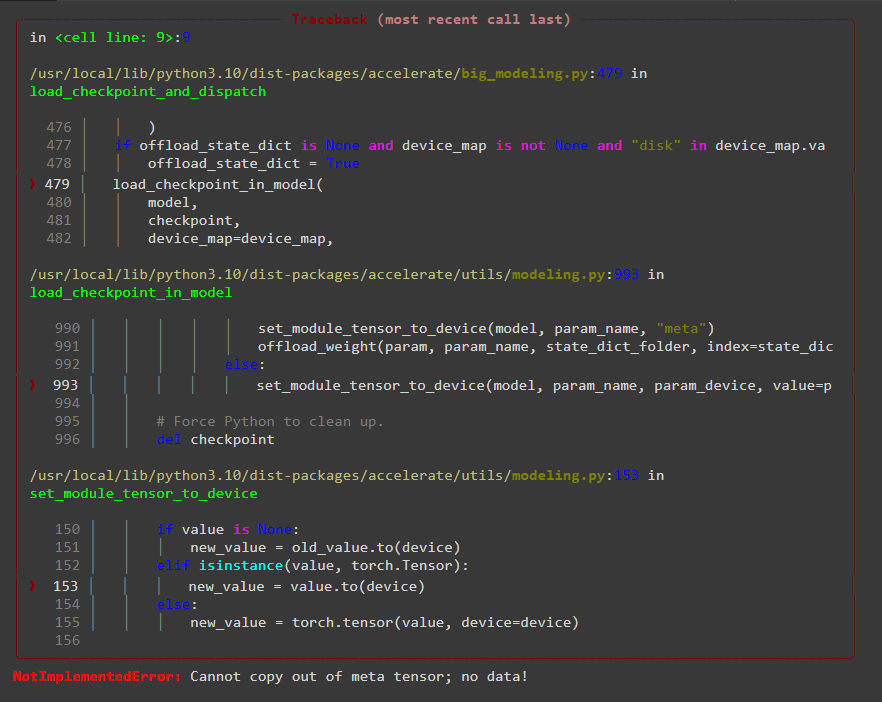
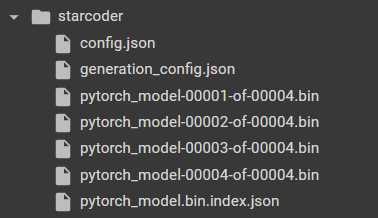
i am using https://huggingface.co/HuggingFaceH4/starchat-alpha model, finetuning it on my own dataset. Firstly i using the meta device i made a device_map to load the checkpoint shards to my device , then i initialized my model using the downloaded checkpoints on my session storage then i loaded the weights tied them and finally i used acceletator load_checkpoint_and_dispatch and passed the folder contaning checkpoints and .josn files which is giving me this error.
This is the code snip that is giving me error:

The error:
my checkpoint folder that i am passing.
Please correct if i am conceptually wrong or missing some imp step.
I am using colab pro for running this code.
Thank You!
please help me in solving this error. @orangetin
Your inputs will be highly appreciated.
orangetin commentedon Jun 2, 2023
@anujsahani01 I can't import your Colab file.
The error is caused by offloading model weights incorrectly. Refer to my previous comments on how to fix it:
Closing this thread as it is solved. Feel free to continue the conversation if you're still having issues.
anujsahani01 commentedon Jun 2, 2023
Thank You !
Can you please tell how to run these commands on my google colab?
zetyquickly commentedon Aug 29, 2023
Based on what was said, reordering the commands might provide a solution:
Ofc if the model itself (without inference data) can fit into VRAM