Repository navigation
[BUG] Distortion on the second pipeline connected to demux #2529


Description

Describe the bug
Distortion can be seen on the second amp output with #2526 applied
To Reproduce
- run aplay
- listen to the output from both amps
Reproduction Rate
100%
Expected behavior
Clear output from both amps
Impact
annoyance
Environment
- Branch name and commit hash of the 2 repositories: sof (firmware/topology) and linux (kernel driver).
- Kernel: topic/sof-dev branch thesofproject/linux@d05959d + ASoC: SOF: topology: fix: handle DAI widget connections properly with multiple CPU DAI's linux#1863
- SOF: master branch thesofproject/linux@d05959d + [RFC] Topology for synchronize playback #2526
- Name of the topology file
- Topology: sof-cml-rt711-rt1308-rt715.tplg
- Name of the platform(s) on which the bug is observed.
- Platform: CML laptop with 2 rt1308s
Screenshots or console output
sof-logger-distortion.txt
Activity
bardliao commentedon Mar 11, 2020
@slawblauciak I know the sof-log log is not sufficient for the audio quality issue. But can you check if you can find anything wrong with the sof-log log? In the meantime, I will try to do loopback to capture the audio data for you.
bardliao commentedon Mar 12, 2020
@slawblauciak I did a loopback test today, and I can get the same distortion as what I hear. An interesting thing is that the sound is very clear when I test it with a 1K tone.

Below are the recording file captured by loopback. The first picture is 1k tone and the second one is a voice says left channel and right channel repeatedly.
I also upload the captured wav here
1k.zip
lr.zip
Could you look into it?
slawblauciak commentedon Mar 12, 2020
I'm on it. Can you also reproduce the issue by generating some other tone? Like 1.5K? Or 2K?
bardliao commentedon Mar 12, 2020
@slawblauciak That is the result of testing with your testing file.
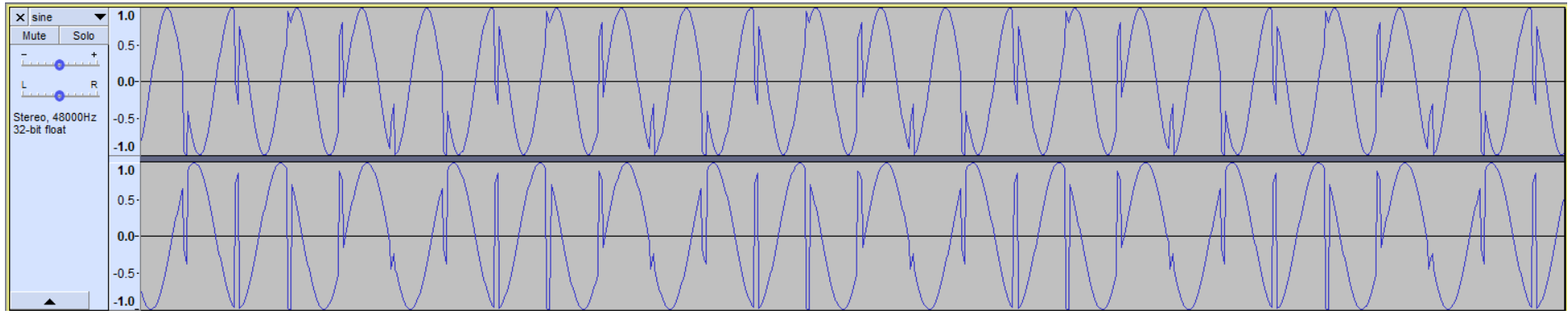
sine.zip
bardliao commentedon Mar 13, 2020
@slawblauciak The distortion is gone if I revert #2541. I also tried adding a PGA to the second DAI, and the distortion happens. So, what I observed is the distortion will happen if a PGA on the second pipeline. In other words, the second pipeline can only work with pass through pipeline.
bardliao commentedon Mar 13, 2020
I also don't observe distortion if I play a 32bits wav no matter if a PGA on the second pipeline or not. @RanderWang Do you have any comments?
slawblauciak commentedon Mar 13, 2020
@bardliao looking at the #2541: I don't really understand why it was like that to begin with. Why apply volume to only one of the demux outputs. It is an interesting finding tho, it's very strange.
bardliao commentedon Mar 13, 2020
@slawblauciak The reason of #2541 is that I want to keep the same volume level for two pipelines. @RanderWang said he think the issue probably due to bad format conversion. ie, convert 16/24 bits to 32 bits see https://github.com/thesofproject/sof/blob/master/src/audio/dai.c#L769.
slawblauciak commentedon Mar 13, 2020
I think there's a problem with stream param propagation, also why you had to do that hack with the 2 channels. So, I think it might all be related. I'm currently investigating that.
4 remaining items
jajanusz commentedon Mar 18, 2020
@bardliao Please add logs that show which method conversion was chosen in dai_params, so we'll know if demux is propagating correct formats.
After this:
sof/src/audio/dai.c
Line 279 in b20191b
bardliao commentedon Mar 18, 2020
@jajanusz Please below is the environment to repro it.
Platform: Dell CML-H laptop
kernel: https://github.com/bardliao/linux/commits/synchronize-playback
FW&Tplg: https://github.com/bardliao/sof/commits/demux-test
bardliao commentedon Mar 18, 2020
dd->frame_fmt is always 2, and local_fmt depends on the testing wav format. ie. It is 0 for S16_LE and 2 for S32_LE. But I don't know how to check if we use functions defined in pcm_converter_generic.c or pcm_converter_hifi3.c.
jajanusz commentedon Mar 18, 2020
Can you change 0x02 in demux blob (it takes format from there instead from pipeline)?
There should be 0x00 for 16 bits.
So it'll look more like:
Let me know if that helps.
bardliao commentedon Mar 19, 2020
@jajanusz With this change, S16_LE file can play but S32_LE is noisy.
jajanusz commentedon Mar 19, 2020
That's expected behaviour, you have to match format there with your format.
emilchudzik commentedon Mar 19, 2020
@bardliao I have CML-H as you:
Platform: Dell CML-H laptop
I use your kernel and FW and topology.
kernel: https://github.com/bardliao/linux/commits/synchronize-playback
FW&Tplg: https://github.com/bardliao/sof/commits/demux-test
But I have no repro with it.
Then I try with your patch: #2533 and still no repro.
I use alsamixer to volume up controls.
Then I use command to play:
sudo aplay -vv -Dhw:1,2 -f dat - c2 doremi-48k-s16le-stereo.wav
or
sudo aplay -vv -Dhw:1,2 doremi-48k-s16le-stereo.wav
I have always clear sound on both speakers, without noise.
Did you modify topology? I got this one: sof-cml-rt711-rt1308-rt715.tplg from your branch
emilchudzik commentedon Mar 19, 2020
Could you share how you made loopback? I see in comments that you record to file output, so you have to modify toplogy to made loopback, right?
bardliao commentedon Mar 19, 2020
But, the problem is we don't know what format will user play. Besides, there is no issue on the 1st pipeline connected to demux. The issue happens only on the 2nd pipeline.
bardliao commentedon Mar 19, 2020
Sorry, it should be #2541. I applied it to my repo, too
https://github.com/bardliao/sof/commits/demux-test
No, I didn't modify topology manually and yes, sof-cml-rt711-rt1308-rt715.tplg is the right one.
bardliao commentedon Mar 19, 2020
Ok, I will do it.
emilchudzik commentedon Mar 19, 2020
My mistake, I used #2541, not 2533 (error when pasting here)
bardliao commentedon Mar 19, 2020
@emilchudzik The loopback environment is:
kernel: https://github.com/bardliao/linux/commits/demux-loopback-test
sof: https://github.com/bardliao/sof/commits/demux-looback-test
Please run below script before testing.
rt711_mixer.txt
rt1308_mixer.txt
Open two terminal.
run arecord and aplay at the same time (start arecord before aplay)
arecord -Dhw:0,1 -fDAT loop.wav -vv
aplay -Dhw:0,2 test.wav -vv
Check loop.wav.
We do loopback from headset port. You can hear the noise from headset and only left speaker will output. And aplay -Dhw:0,0 will not work.
tlauda commentedon Mar 20, 2020
Fixed by #2589.