Skip to content

[WHL] HDMI/DP doesn't work #313

Closed
Closed

Description

linux: sof-dev/af44aa9
soft: master/ad3f3e4 tplg file: sof-whl-hda.m4 -> /lib/firmware/intel/sof-hda-generic.tplg
sof: whl-001-drop-stable/33e4b99

For above configuration HDA 48k, 16b, stereo works fine

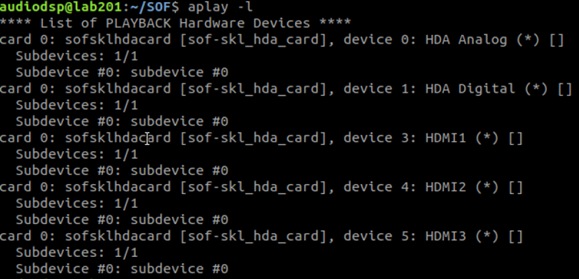
HDMI/DP doesn't work for all 3 iDisp configuration:
aplay -vv -Dhw:0,3 file_sound.wav
image

image

Activity

  1. added
    WHLApplies to WhiskeyLake platform
    enhancementNew feature or request
    bugSomething isn't working
    P1Blocker bugs or important features
    on Nov 26, 2018
  2. plbossart commented on Nov 26, 2018

    @plbossart
    Member

    @echudy Not an SOF issue, this is a configuration issue, you need to set the controls correctly. Typically this is done by checking which pin is connected, then setting the Pin5/6/7-Port0 Mux to 1 (for HDMI1 path), 2 (for HDMI2 path) and 3 (for HDMI3 path).
    The same requirement applies to the cAVS/SST driver, this is not SOF specific....

  3. xiulipan commented on Nov 27, 2018

    @xiulipan

    @echudy
    -19 means either you did not connect a HDMI monitor to the device or you have wrong set in alsamixer

    image

    A working hdmi setting is look like above.

    Notice here only port 6 is connection to a monitor so I can see below message in dmesg

    [    3.984807] HDMI HDA Codec ehdaudio0D2: hdac_hdmi_present_sense: disconnect for pin:port 5:0
    [    3.985075] HDMI HDA Codec ehdaudio0D2: hdac_hdmi_present_sense: disconnect for pin:port 7:0
    

    Which means I can only have port6 thus HDMI 2 working.
    So after you have a monitor connected, you need to check the dmesg to determine which card to use.

  4. emilchudzik commented on Nov 27, 2018

    @emilchudzik

    Ok, i did this steps:

    • connect monitor with HDMI and restart due to catch dmesg notification. I see the same as you:
    [    5.152543] sof-audio sof-audio: tplg: load pcm HDMI1 3
    [    5.152545] sof-audio sof-audio: tplg: load pcm HDMI2 4
    [    5.152547] sof-audio sof-audio: tplg: load pcm HDMI3 5
    [    5.162688] HDMI HDA Codec ehdaudio0D2: hdac_hdmi_present_sense: disconnect for pin:port 5:0
    [    5.163424] HDMI HDA Codec ehdaudio0D2: hdac_hdmi_present_sense: disconnect for pin:port 7:0
    [    5.234380] sof-audio sof-audio: creating new PCM HDMI1
    [    5.234385] skl_hda_dsp_generic skl_hda_dsp_generic: snd-soc-dummy-dai <-> HDMI1 3 mapping ok
    [    5.234392] sof-audio sof-audio: creating new PCM HDMI2
    [    5.234397] skl_hda_dsp_generic skl_hda_dsp_generic: snd-soc-dummy-dai <-> HDMI2 4 mapping ok
    [    5.234404] sof-audio sof-audio: creating new PCM HDMI3
    
    
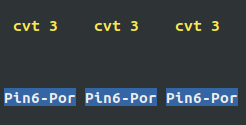
    • so i set alsamixer to pin 6: cvt3
      image

    • pin6 is HDMI2, so I use command to play:

      aplay -vv -Dhw:0,4 file_sound.wav
      image

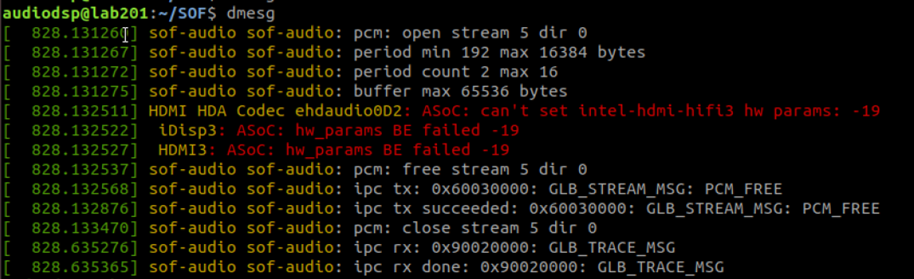
    in dmesg I still see code -19:

    [  361.469883] HDMI HDA Codec ehdaudio0D2: ASoC: can't set intel-hdmi-hifi2 hw params: -19
    [  361.469894]  iDisp2: ASoC: hw_params BE failed -19
    [  361.469899]  HDMI2: ASoC: hw_params BE failed -19
    
    
  5. xiulipan commented on Nov 27, 2018

    @xiulipan

    @bardliao
    I remember there is a hdac-hdmi codec driver patch to enable HDMI playback on WHL for sod-dev?
    If that patch is merged now?

  6. xiulipan commented on Nov 27, 2018

    @xiulipan

    @emilchudzik
    Confirmed with bard, please check if you have 441b4b0
    In you kernel repo.
    I can see from af44aa9 there is no this patch, please cherry-pick it.

  7. emilchudzik commented on Nov 27, 2018

    @emilchudzik

    Still the same, HDMI doesn't work.
    Error -19 disappeared.

    After play using HDMI2 (hw0,4) I have only this in dmesg:

    audiodsp@lab201:~$ dmesg
    [  414.479628] sof-audio sof-audio: pcm: open stream 4 dir 0
    [  414.479635] sof-audio sof-audio: period min 192 max 16384 bytes
    [  414.479639] sof-audio sof-audio: period count 2 max 16
    [  414.479643] sof-audio sof-audio: buffer max 65536 bytes
    [  414.479839] sof-audio sof-audio: pcm: close stream 4 dir 0
    
    
  8. plbossart commented on Nov 27, 2018

    @plbossart
    Member

    @emilchudzik please add ccflags-y += -DDEBUG to the Makefiles in sound/soc/sof/ sound/soc/sof/intel sound/soc/codecs sound/soc/intel/boards and submit the full dmesg log as attachment

  9. bardliao commented on Nov 28, 2018

    @bardliao
    Collaborator

    @emilchudzik Same branch/commit works on my WHL RVP. But there is only one DP port on my HWL RVP which is pin 5.

    [    3.440683] HDMI HDA Codec ehdaudio0D2: hdac_hdmi_present_sense: disconnect for pin:port 6:0
    [    3.440982] HDMI HDA Codec ehdaudio0D2: hdac_hdmi_present_sense: disconnect for pin:port 7:0
    

    So my command is aplay -Dhw:0,3 48k32bitCalifornia_Dreaming.wav -vv.

    Playing WAVE '48k32bitCalifornia_Dreaming.wav' : Signed 32 bit Little Endian, Rate 48000 Hz, Stereo
    Hardware PCM card 0 'sof-skl_hda_card' device 3 subdevice 0
    Its setup is:
      stream       : PLAYBACK
      access       : RW_INTERLEAVED
      format       : S32_LE
      subformat    : STD
      channels     : 2
      rate         : 48000
      exact rate   : 48000 (48000/1)
      msbits       : 32
      buffer_size  : 8064
      period_size  : 1920
      period_time  : 40000
      tstamp_mode  : NONE
      tstamp_type  : MONOTONIC
      period_step  : 1
      avail_min    : 1920
      period_event : 0
      start_threshold  : 8064
      stop_threshold   : 8064
      silence_threshold: 0
      silence_size : 0
      boundary     : 9079256848778919936
      appl_ptr     : 0
      hw_ptr       : 0
    
  10. emilchudzik commented on Nov 30, 2018

    @emilchudzik

    It seems like a monitor issue.

    • IIyama X2472HD:
      available only HDMI and JACK output - screen is visible, but unable to play using aplay

    • Dell U2414Hb:
      available DP and HDMI and JACK output - on both HDMI and DP can play and sound on stereo JACK works.

Sign up for free to join this conversation on GitHub. Already have an account? Sign in to comment

Metadata

Metadata

Assignees

Labels

P1Blocker bugs or important featuresWHLApplies to WhiskeyLake platformbugSomething isn't working

Type

No type

Projects

No projects

    Milestone

    No milestone

    Relationships

    None yet

    Development

    No branches or pull requests

    Issue actions