Repository navigation
[BUG] The volume of RT711 codec does not match the actual setting #2908
Description

100% reproducible on TGLU_SKU0A32_SDCA. Found in Internal daily test 3634, 3669, 3673, 3691. [worked well on 2021-04-26 Daily but began to fail since 2021-04-27 Daily (http://sof-ci.sh.intel.com/#/result/planresultdetail/3577)]
Test command to reproduce,
TPLG=sof-tgl-rt711-rt1316-rt714.tplg ~/sof-test/test-case/check-alsabat.sh -p hw:sofsoundwire,0 -c hw:Device,0
WARNING: Signal overflow!
 FAIL: Peak freq too high 2991.21 Hz
 FAIL: Peak freq too high 4985.60 Hz
 FAIL: Peak freq too high 6979.25 Hz
 FAIL: Peak freq too high 8973.63 Hz
 FAIL: Peak freq too high 10968.02 Hz
alsa-utils version 1.2.2

Entering capture thread (ALSA).
Get period size: 3000  buffer size: 24000
Recording ...
Capture completed.

BAT analysis: signal has 65536 frames at 48000 Hz, 1 channels, 2 bytes per sample.

Channel 1 - Checking for target frequency 997.00 Hz
Amplitude: 48324.8; Percentage: [147]
Detected peak at 996.83 Hz of 34.70 dB
 Total 40.1 dB from 985.84 to 1008.54 Hz
 PASS: Peak detected at target frequency
Detected peak at 2991.21 Hz of 30.61 dB
 Total 40.7 dB from 2990.48 to 2992.68 Hz
Detected peak at 4985.60 Hz of 27.59 dB
 Total 41.0 dB from 4984.86 to 4986.33 Hz
Detected peak at 6979.25 Hz of 24.11 dB
 Total 41.2 dB from 6979.25 to 6980.71 Hz
Detected peak at 8973.63 Hz of 23.49 dB
 Total 41.3 dB from 8973.63 to 8973.63 Hz
Detected peak at 10968.02 Hz of 21.42 dB
 Total 41.3 dB from 10968.02 to 10968.02 Hz
Detected at least 6 signal(s) in total

Return value is -1003
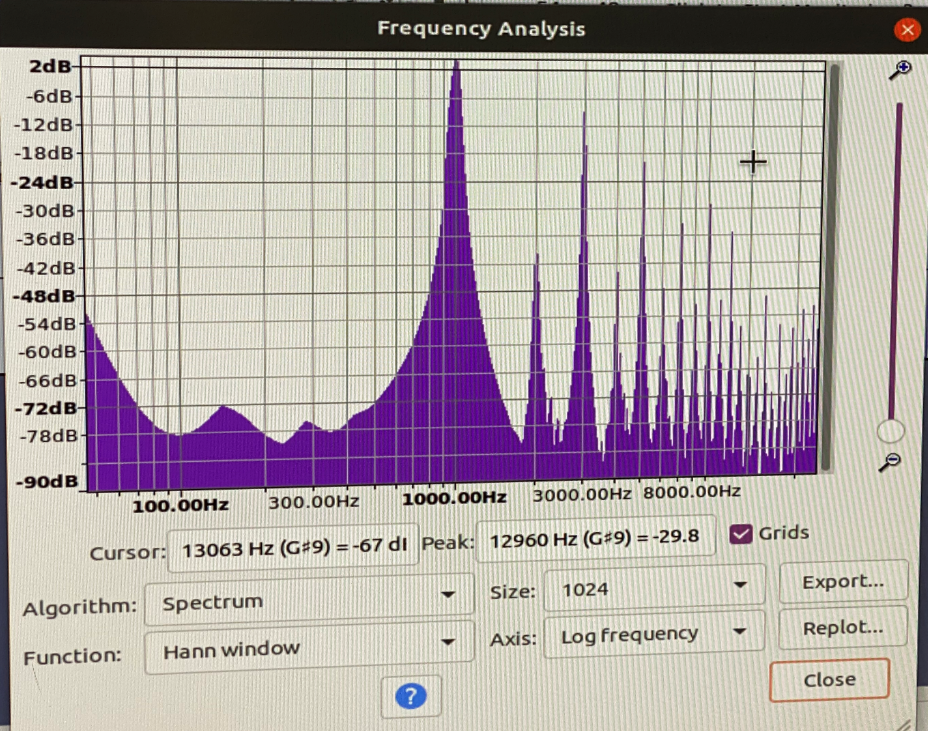
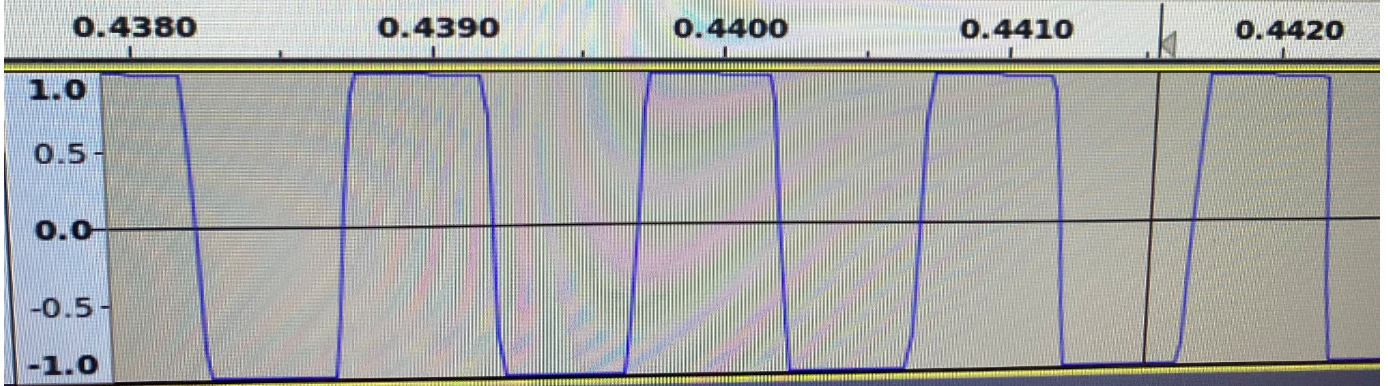
Using audacity to analyze the recorded file , we can get --
Activity
plbossart commentedon May 4, 2021
This might be linked to #2877 which doesn't do the mute management correctly.
plbossart commentedon May 4, 2021
could also be that the controls changed with a previous commit so the capture may not be enabled.
ca5118c
we'd need to make sure the mixer settings are updated, @libinyang should be able to help here.
XiaoyunWu6666 commentedon May 7, 2021
More detailed reproduction steps here
Reproduction steps
Step 1、
run TGLU_SKU0A32_SDCA.sh(attached in the end) ,or run 'cget ...' manually , and then run
TPLG=sof-tgl-rt711-rt1316-rt714.tplg ~/sof-test/test-case/check-alsabat.sh -p hw:sofsoundwire,0 -c hw:Device,0[Failed]
Step 2、
run 'alsamixer',find item ' rt711 FU05', press up button once and press down button once [do not change any value ,just make some action]
or try
amixer -c sofsoundwire cset name='rt711 FU05 Playback Volume' 50Step 3、
TPLG=/lib/firmware/intel/sof-tplg/sof-tgl-rt711-rt1316-rt714.tplg sof-test/testcases/check-alsabat.sh -p hw:sofsoundwire,0 -c hw:Device,0[ PASS]
Attachment
=============TGLU_SKU0A32_SDCA.sh ==========
=========================================
XiaoyunWu6666 commentedon May 7, 2021
plbossart commentedon May 7, 2021
sorry @XiaoyunWu6666, I don't see how a cget could lead to a fail?
The mixer values have not been modified by a cget. There's got to be a different side effect or something, this doesn't seem right to me.
XiaoyunWu6666 commentedon May 8, 2021
Situations before April 26 are not confirmed yet so I hide my comment yesterday.
However ,the fact that cget causes a fail is true.
In my understanding , the mixer values should have not been modified by a cget. But after I execute merely cget , alsabat test did change from pass to fail . This may look non-sense , just my random test behavior , but it did leads to different test results.
To reproduce it ,please log in ubuntu@sh-tglu-sku0a32-sdca-02 and execute the following:
1.TPLG=./sof-tgl-rt711-rt1316-rt714.tplg ~/sof-test/test-case/check-alsabat.sh -p hw:sofsoundwire,0 -c hw:Device,0
2.amixer -c sofsoundwire cget name='rt711 FU05 Playback Volume'
3.TPLG=./sof-tgl-rt711-rt1316-rt714.tplg ~/sof-test/test-case/check-alsabat.sh -p hw:sofsoundwire,0 -c hw:Device,0
For me , usually step 1 gets pass , step3 gets failed [very high rate] . If not , loop these three steps then that occurs.
Members in shanghai have already tried to play songs in step 3, it sounds really loud .
Please let me know if you try that and get some different results :) Thanks
btw, sh-tglu-sku0a32-sdca-03 has some hardware issue so it was removed from CI . Please use 01 or 02 to try
[-][BUG] alsabat test fails due to signal overflow[/-][+][BUG] The volume of RT711 codec does not match the actual setting[/+]libinyang commentedon May 10, 2021
This bug is caused by FU05 volume set wrongly. After cget the FU05 volume, there is possibility the FU05 volume will be changed in next playback. It should be the codec issue. PR ca5118c is related with FU0E and FU0F. Not sure whether there is relationship between them. I will debug on it.
libinyang commentedon May 11, 2021
At first, I thought this is a bug related regmap cache issue. After disable cache, the bug still can be reproduced. Another finding is the bug can NOT be reproduced on my rt711-rt1316-rt714 platform.
plbossart commentedon May 12, 2021
@libinyang could there be an ALSA mixer setting issue and different configurations here? I would think your platform uses UCM for ALSA mixers, but it's not clear what the CI device does.
bardliao commentedon May 13, 2021
I can reproduce it on my
TGLU_SKU0A32_SDCAdevice. I will take a look, too.112 remaining items
ASoC: rt715-sdw: use first_hw_init flag on resume
ASoC: rt1308-sdw: use first_hw_init flag on resume
ASoC: rt5682-sdw: use first_hw_init flag on resume
ASoC: rt700-sdw: use first_hw_init flag on resume
ASoC: rt711-sdw: use first_hw_init flag on resume
ASoC: rt715-sdw: use first_hw_init flag on resume
ASoC: rt711-sdca-sdw: use first_hw_init flag on resume
UPSTREAM: ASoC: rt5682-sdw: use first_hw_init flag on resume
UPSTREAM: ASoC: rt711-sdw: use first_hw_init flag on resume
UPSTREAM: ASoC: rt1308-sdw: use first_hw_init flag on resume
ASoC: rt1308-sdw: use first_hw_init flag on resume
ASoC: rt5682-sdw: use first_hw_init flag on resume
ASoC: rt700-sdw: use first_hw_init flag on resume
ASoC: rt711-sdw: use first_hw_init flag on resume
ASoC: rt715-sdw: use first_hw_init flag on resume