Repository navigation
[BUG][CML][SDW UCM2]Output source/input Device selection won't auto highlight on headphone/headset when plug in headset. #1999

Description

Describe the bug
Output source/input Device selection won't auto highlight on headphone/headset when plug in headset.
To Reproduce
- Boot up without headset.
- Open sound setting. Then plug in headset.
- Check the input and output Device selection.
Reproduced rate
100%
Expected result
Input Device will auto switch to "Headset Mic - sof-soundwire"
Output Device will auto switch to "Headphone - sof-soundwire"
Actual result
Input Device still highlight on "Soundwire microphones-sof-soundwire"
Output Device still highlight on "Speaker-sof-soundwire"
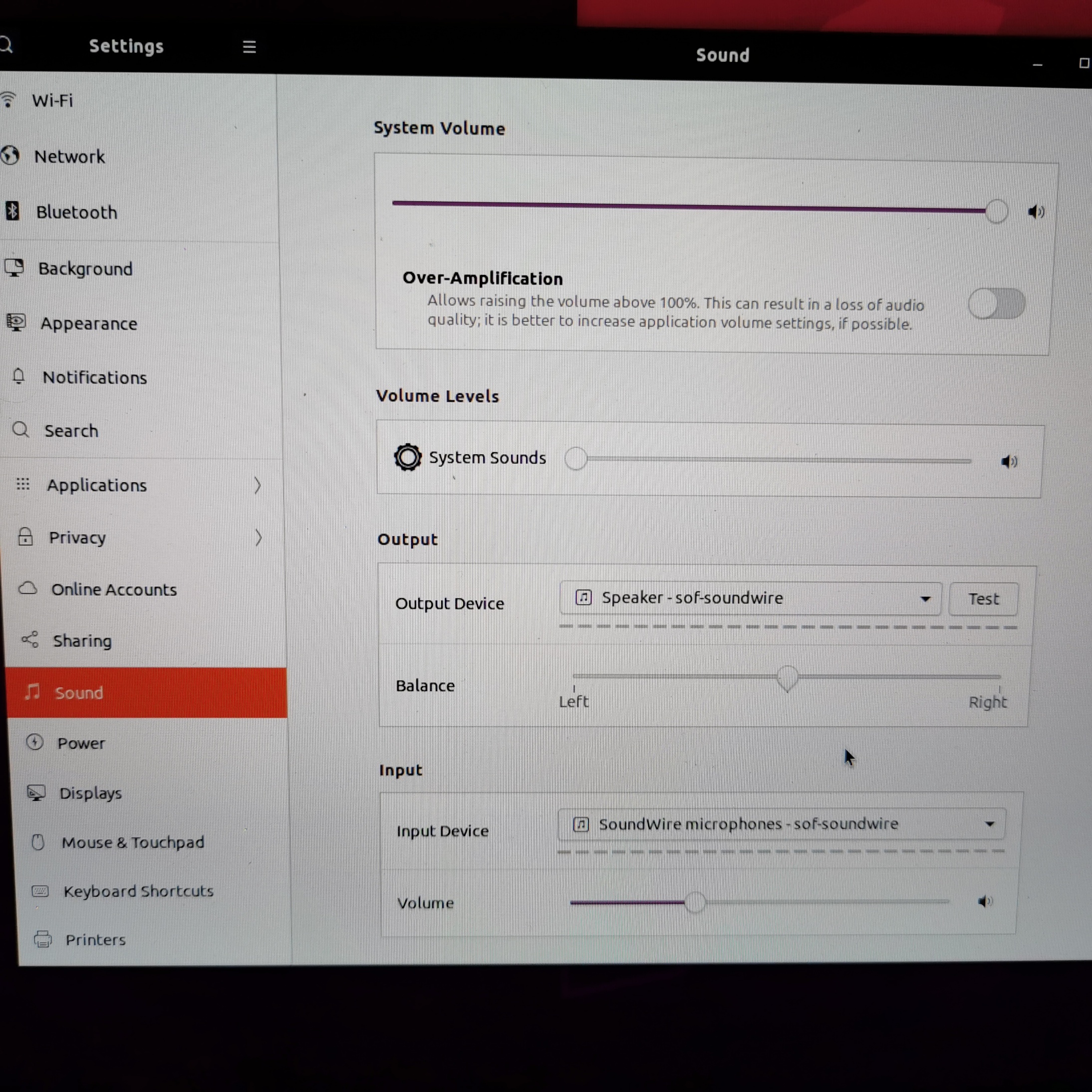
Test recipe
Kernel: https://github.com/thesofproject/linux/commits/topic/sof-dev commit:052e45d7
FW: https://github.com/thesofproject/sof/commits/master commit:b4e8b1e
UCM: https://github.com/thesofproject/alsa-ucm-conf commit: 4722f5b +thesofproject/alsa-ucm-conf#29
TPLG: Same with FW branch, sof-cml-rt711-rt1308-mono-rt715.tplg
platform: CML-U Laptop with ALC711+ ALC1308+ ALC715 in SDW mode
Activity
plbossart commentedon Apr 8, 2020
@YvonneYang2 I just tried and indeed there is no automatic switch but
a) there is no exclusion between Speaker and Headphone
b) on Dell platforms isn't this supposed to be handled with a user choice?
@juimonen can you help here, I am not sure what would trigger a switch in a UCM file.
[-][BUG][CML][UCM2]Output source/input Device selection won't auto highlight on headphone/headset when plug in headset.[/-][+][BUG][CML][SDW UCM2]Output source/input Device selection won't auto highlight on headphone/headset when plug in headset.[/+]ClarexZhou commentedon Apr 9, 2020
Latest provided Dell platform UCM1 is thesofproject/alsa-ucm-conf#28, which is crated by @libinyang
Will do automatic switch when plug in/ unplug headset.
And no pop up query for headset/headphone/Microphone type selection when plugging in headset.
@juimonen could you comment more details?
juimonen commentedon Apr 9, 2020
hmm I haven't too much tested this platform with ucm1 or ucm2. Need to think a little bit...
libinyang commentedon Apr 17, 2020
I did some test and debug on this issue. It seems there are 2 issues.
libinyang commentedon Apr 21, 2020
some update: pulseaudio can recognize the UCM2 priority setting. But it doesn't work when Headset hotplug. I will do more test on that.
libinyang commentedon Apr 21, 2020
This bug is caused that we are using the single profile (or may be more accurate: switch between ports in the same profile). If we switch to multi profiles mode, this bug is fixed. I'm not sure this is a bug in pulseaudio of single support or it is designed so. I'm confirming with Jaroslav. Please see more details in https://gitlab.freedesktop.org/pulseaudio/pulseaudio/-/issues/854
perexg commentedon Apr 21, 2020
The headset automatic switch issue is probably a gnome issue: https://gitlab.gnome.org/GNOME/libgnome-volume-control/-/merge_requests/10
libinyang commentedon Apr 21, 2020
@perexg Got it. Thanks a lot.
libinyang commentedon Apr 24, 2020
@perexg I checked with Hui. He told me that gnome patch is rejected. I checked pulseaudio and found if headphone and speaker use different pcms in a single profile, when headphone is plugged in, the headphone will be considered as active, which causes pulseaudio will not switch to headphone automatically. So it seems we have to use multiple profiles to support automatic Headphone switch. Or do you have any other suggestions?
@plbossart @mengdonglin @kv2019i @juimonen Is this a mandatory feature that system will automatically switch to headphone if it is plugged in?
perexg commentedon Apr 24, 2020
Read the whole gnome story... We have different (and correct) mechanism in pulseaudio so the clients can do the proper manual port selection. The gnome patch should be recoded.
It's resolvable. Create a new pulseaudio issue. You may also propose the fix.
It's a bit step back.
libinyang commentedon Apr 24, 2020
@perexg
Yes. the manual port selection works well.
OK. I will create an issue in gitlab.freedesktop.org and try to fix it. Thanks for the suggestion.
ClarexZhou commentedon May 29, 2020
Error not seen with https://gitlab.freedesktop.org/pulseaudio/pulseaudio/-/merge_requests/295#note_512131, wait Pulseaudio update.
libinyang commentedon Aug 6, 2020
with the latest recipe:
sudo add-apt-repository ppa:hui.wang/switch-audio
sudo apt-get update
sudo apt install gnome-control-center
This bug is fixed.