Repository navigation
'NoneType' object has no attribute 'total_available' for users.populate_groups #837

Description

Describe the bug
I am attempting to get the number of groups a user is in using the code here: https://tableau.github.io/server-client-python/docs/api-ref#users for users.populate_groups
Versions
Details of your environment, including:
- Tableau Server version: 3.9 (result from using
server.versionin Python script) - Tableau Server version: 2020.3.7 (listed under About Tableau Server)
- Python version: 3.7.1
- TSC library version: 0.15.0
To Reproduce
Code to reproduce:
with server.auth.sign_in(tableau_auth):
    all_users, pagination_item = server.users.get()
    print("\nThere are {} user on site: ".format(pagination_item.total_available))
    print([user.name for user in all_users])
    page_n = server.users.populate_groups(all_users[0])
    print("\nUser {0} is a member of {1} groups".format(all_users[0].name, page_n.total_available))
    print("\nThe groups are:")
    for group in all_users[0].groups :
        print(group.name)
Results
AttributeError: 'NoneType' object has no attribute 'total_available'
My initial thought is that our Tableau Server is not on a sufficient version to handle the request.
Activity
bcantoni commentedon Apr 23, 2021
@patawan so far I'm puzzled by this one. At first I thought your user might not have enough permission to fetch the list of users (only site admins and server admins can do so), but if that was the case you'd get a 403
'user' isn't authorized to query users on site 'X'type of error.Can you confirm: using the same user as in your script, if you login to Tableau server web UI can you see a list of users?
Your example is showing that
server.users.get()is returning None forpagination_item. I guess one more thing you can try: isall_usersalso empty or are there entries there?patawan commentedon Apr 23, 2021
@bcantoni haha me too!
I'm the user trying to access the list of users. I am an admin for this Tableau Site (not the whole server) and can see the full list of users on the Tableau server web UI.
I altered the code a tiny bit: (also not sure why github doesn't like my code formatting)
`with server.auth.sign_in(tableau_auth):
all_users, pagination_item = server.users.get()
I get the same error but this time it does show that
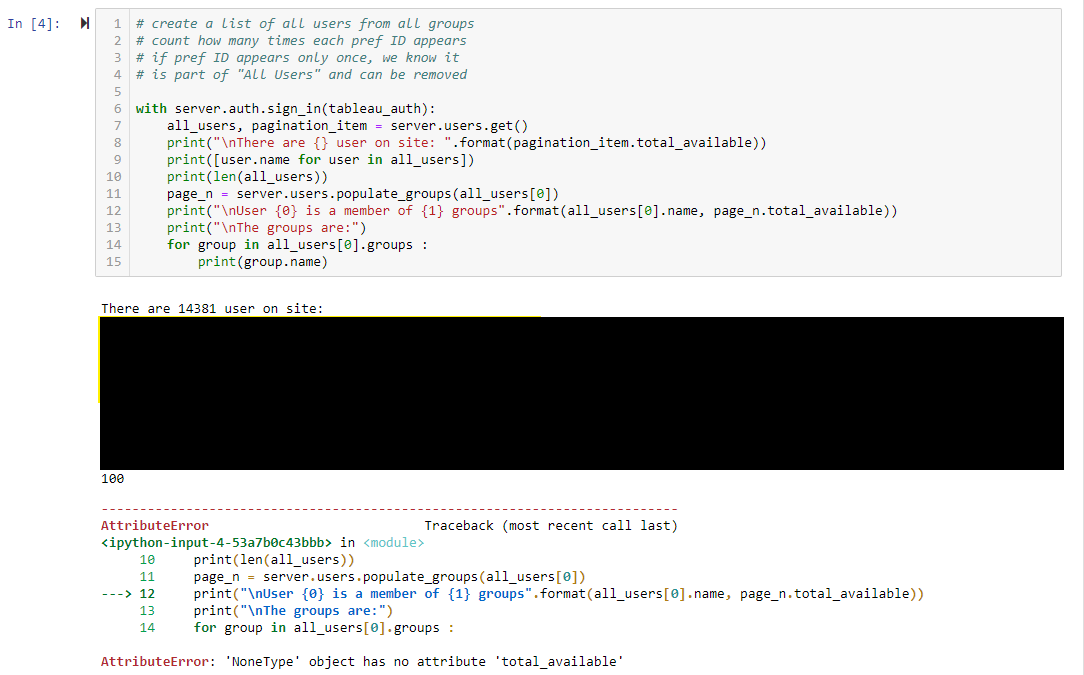
all_usersis not empty:Screenshot
You can see my use case there in comments - I was able to find a workaround using Groups rather than users and generate a list of users with their Group Count. I'd be happy to share that if you think others will find it of use.
SaravShah commentedon Oct 12, 2021
I'm running into the same exact issue. Was wondering if this was still being worked on?
SaravShah commentedon Oct 12, 2021
I figured the issue out, @patawan if you do this
You should be able to get the user's groups. So grab the user, populate the user with groups, then access that original user object to get the group.s
patawan commentedon Oct 12, 2021
Good find @SaravShah - thanks for following up!
jacalata commentedon Nov 8, 2021
Thanks for figuring this out @SaravShah - sounds like we need to update our docs or throw a clearer error message for this. Did you look at any specific documentation to work this out, or have a suggestion for us?
kramantab commentedon Jan 27, 2023
Docs have been updated using the example provided in this issue