Skip to content
This repository was archived by the owner on Oct 16, 2020. It is now read-only.

Sublime Text 3 LSP package will not start this language server. #625

Open

Description

@ctrl-alt-adrian

Per the LSP Docs, I've ran npm install -g javascript-typescript-langserver to install this language server.

For a while, things were working great. I then closed Sublime Text 3 as I was done with work, and later reopened editor to continue working on a side project. I now get the following error:
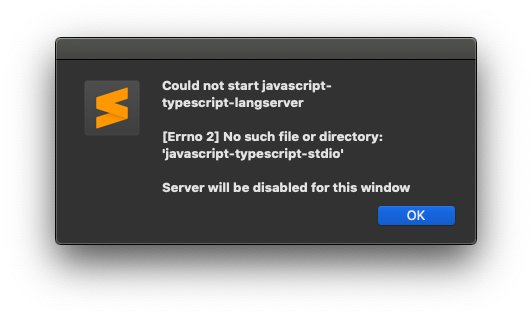
Picture

In my node_modules (where the language server was installed locally) there exists a language-server-stdio file.

I've uninstalled and reinstalled the language server but the error still persists. Even with the typescript files I was working with earlier.

I've made no changes to any packages or npm installs. Sublime Text 3's LSP package still won't start this.

Any ideas?

I'm using Version 3.2.1 Build 3207 of Sublime Text 3 and version 0.8.5 of LSP from Package Control.

Activity

  1. felixfbecker commented on Aug 9, 2019

    @felixfbecker
    Contributor

    Hey @AdrianDeveloper, does Sublime log the stack trace of the error anywhere?

  2. mtangoo commented on Aug 10, 2019

    @mtangoo

    I have also experienced problems with the TCP version with our in-house editor. I will find time and gather information to see if this might be a cause the same. You have to restart editor several times for it to work. Disabling this LS things works fine

  3. nvmnghia commented on Dec 4, 2019

    @nvmnghia

    I don't face the same error, but I cannot use LSP in sublime. The options (Find Occurences,... basically all LSP options in right mouse menu) are just grayed out.

  4. digitized commented on Jan 16, 2020

    @digitized

    @nvmnghia Ran into this same issue where I would enable it, but it would refuse to start the server. It seems like there might be another package that causes some issue with LSP (Haven't pinpointed which package was causing the problem). I decided to remove some packages and it started working.

  5. dalisoft commented on Jan 24, 2020

    @dalisoft

    Same thing, from Console i see this

    reloading plugin TypeScript.main
    2020-01-25 00:41:24,414: 4533923264: WARNING: TypeScript plugin initialized.
    plugins loaded
    LSP: global configs ['gopls=False', 'golsp=False', 'ra-lsp=False', 'dart=False', 'flow=False', 'clangd=False', 'lsp-tsserver=False', 'eslint=False', 'pyls=True', 'metals=False', 'reason=False', 'cquery=False', 'jdtls=False', 'intelephense-ls=False', 'typescript-language-server=False', 'ruby=False', 'vscode-css=False', 'rlang=False', 'elixir-ls=False', 'polymer-ide=False', 'ocaml=False', 'javascript-typescript-langserver=True', 'rls=False', 'phpls=False', 'haskell-ide-engine=False', 'bashls=False']
    LSP: window 3 starting 1 initial views
    lang_service_enabled: True
    Path of tsserver.js: /Users/dalisoft/Library/Application Support/Sublime Text 3/Packages/TypeScript/tsserver/tsserver.js
    Path of tsc.js: /Users/dalisoft/Library/Application Support/Sublime Text 3/Packages/TypeScript/tsserver/tsc.js
    Trying to spawn node executable from: /usr/local/bin/node
    ref view not found
    Emmet: No need to update PyV8
    Package Control: Skipping automatic upgrade, last run at 2020-01-25 00:05:43, next run at 2020-01-25 01:05:43 or after
    Unable to open /Users/dalisoft/Library/Application Support/Sublime Text 3/Packages/Default/Preferences.sublime-settings
    reloading settings Packages/User/Preferences.sublime-settings
    reloading settings Packages/User/Preferences.sublime-settings
    Unable to open /Users/dalisoft/Library/Application Support/Sublime Text 3/Packages/LSP/LSP.sublime-settings
    reloading settings Packages/User/LSP.sublime-settings
    LSP: global configs ['gopls=False', 'golsp=False', 'ra-lsp=False', 'dart=False', 'flow=False', 'clangd=False', 'lsp-tsserver=False', 'eslint=False', 'pyls=True', 'metals=False', 'reason=False', 'cquery=False', 'jdtls=False', 'intelephense-ls=False', 'typescript-language-server=False', 'ruby=False', 'vscode-css=False', 'rlang=False', 'elixir-ls=False', 'polymer-ide=False', 'ocaml=False', 'javascript-typescript-langserver=True', 'rls=False', 'phpls=False', 'haskell-ide-engine=False', 'bashls=False']
Sign up for free to join this conversation on GitHub. Already have an account? Sign in to comment

Metadata

Metadata

Assignees

No one assigned

    Labels

    No labels
    No labels

    Type

    No type

    Projects

    No projects

      Milestone

      No milestone

      Relationships

      None yet

      Development

      No branches or pull requests

      Issue actions