You signed in with another tab or window. Reload to refresh your session.You signed out in another tab or window. Reload to refresh your session.You switched accounts on another tab or window. Reload to refresh your session.Dismiss alert
{{ message }}
Repository navigation
asr failed: connect ECONNREFUSED 127.0.0.1:8200 #4
上面账户下面系统,加了conda install m2w64-toolchain后的这一行之后整个文件系统里应该只有这一个路径里有g++……
path不加这一行的话就是上面的g++ not available
parse config succeed, use it
parse config succeed, use it
try to init vosk asr engine
asrDir exists, start asr server E:\Workspace\Echo\echo-v1.0.0\asr-server
try to init nlp engine
nlpDir exists, start nlp server E:\Workspace\Echo\echo-v1.0.0\nlp-server
stdout: 2023-03-28 13:14:17.247 INFO : NLP API is starting, please wait...
stdout: 2023-03-28 13:14:17.247 INFO : NLP-API model dir: E:\Workspace\Echo\echo-v1.0.0\nlp-server\model
stdout: 2023-03-28 13:14:17.410 INFO : ASR API is starting, please wait...
stdout:
You can find the C code in this temporary file: C:\Users\ADMINI~1\AppData\Local\Temp\theano_compilation_error_ilc_djwt
stdout: 2023-03-28 13:14:17.897 ERROR : Compilation failed (return status=1):
Traceback (most recent call last):
File "theano\gof\lazylinker_c.py", line 76, in
raise ImportError(
ImportError: Version check of the existing lazylinker compiled file. Looking for version 0.211, but found None. Extra debug information: force_compile=False, _need_reload=True
stdout: During handling of the above exception, another exception occurred:
Traceback (most recent call last):
  File "theano\gof\lazylinker_c.py", line 99, in <module>
    raise ImportError(
ImportError: Version check of the existing lazylinker compiled file. Looking for version 0.211, but found None. Extra debug information: force_compile=False, _need_reload=True

During handling of the above exception, another exception occurred:

Traceback (most recent call last):
  File "main.py", line 38, in <module>
  File "<frozen importlib._bootstrap>", line 991, in _find_and_load
  File "<frozen importlib._bootstrap>", line 975, in _find_and_load_unlocked
  File "<frozen importlib._bootstrap>", line 671, in _load_unlocked
  File "PyInstaller\loader\pyimod02_importers.py", line 499, in exec_module
  File "punctuator\__init__.py", line 4, in <module>
    from .punc import Punctuator
  File "<frozen importlib._bootstrap>", line 991, in _find_and_load
  File "<frozen importlib._bootstrap>", line 975, in _find_and_load_unlocked
  File "<frozen importlib._bootstrap>", line 671, in _load_unlocked
  File "PyInstaller\loader\pyimod02_importers.py", line 499, in exec_module
  File "punctuator\punc.py", line 12, in <module>
    import theano
  File "<frozen importlib._bootstrap>", line 991, in _find_and_load
  File "<frozen importlib._bootstrap>", line 975, in _find_and_load_unlocked
  File "<frozen importlib._bootstrap>", line 671, in _load_unlocked
  File "PyInstaller\loader\pyimod02_importers.py", line 499, in exec_module
  File "theano\__init__.py", line 110, in <module>
    from theano.compile import (
  File "<frozen importlib._bootstrap>", line 991, in _find_and_load
  File "<frozen importlib._bootstrap>", line 975, in _find_and_load_unlocked
  File "<frozen importlib._bootstrap>", line 671, in _load_unlocked
  File "PyInstaller\loader\pyimod02_importers.py", line 499, in exec_module
  File "theano\compile\__init__.py", line 12, in <module>
    from theano.compile.mode import *
  File "<frozen importlib._bootstrap>", line 991, in _find_and_load
  File "<frozen importlib._bootstrap>", line 975, in _find_and_load_unlocked
  File "<frozen importlib._bootstrap>", line 671, in _load_unlocked
  File "PyInstaller\loader\pyimod02_importers.py", line 499, in exec_module
  File "theano\compile\mode.py", line 11, in <module>
    import theano.gof.vm
  File "<frozen importlib._bootstrap>", line 991, in _find_and_load
  File "<frozen importlib._bootstrap>", line 975, in _find_and_load_unlocked
  File "<frozen importlib._bootstrap>", line 671, in _load_unlocked
  File "PyInstaller\loader\pyimod02_importers.py", line 499, in exec_module
  File "theano\gof\vm.py", line 674, in <module>
    from . import lazylinker_c
  File "<frozen importlib._bootstrap>", line 991, in _find_and_load
  File "<frozen importlib._bootstrap>", line 975, in _find_and_load_unlocked
  File "<frozen importlib._bootstrap>", line 671, in _load_unlocked
  File "PyInstaller\loader\pyimod02_importers.py", line 499, in exec_module
  File "theano\gof\lazylinker_c.py", line 139, in <module>
    cmodule.GCC_compiler.compile_str(dirname, code, location=loc,
  File "theano\gof\cmodule.py", line 2410, in compile_str
    raise Exception('Compilation failed (return status=%s): %s' %
Exception: Compilation failed (return status=1):
asr server exit: 1
(node:2368) UnhandledPromiseRejectionWarning: false
(Use echo-debug --trace-warnings ... to show where the warning was created)
(node:2368) UnhandledPromiseRejectionWarning: Unhandled promise rejection. This error originated either by throwing inside of an async function without a catch block, or by rejecting a promise which was not handled with .catch(). To terminate the node process on unhandled promise rejection, use the CLI flag --unhandled-rejections=strict (see https://nodejs.org/api/cli.html#cli_unhandled_rejections_mode). (rejection id: 1)
(node:2368) [DEP0018] DeprecationWarning: Unhandled promise rejections are deprecated. In the future, promise rejections that are not handled will terminate the Node.js process with a non-zero exit code.
stdout: 2023-03-28 13:14:20.718 INFO : NLP API has been started
Endpoint: POST http://127.0.0.1:8100/translate
Language: en to zh

Activity
rerender2021 commentedon Mar 14, 2023
“asr failed: connect ECONNREFUSED 127.0.0.1:8200” 已经是结果了,报错的原因应该在前面,可以完整复制相关输出,或者完整截图贴一下来排查。
"ASR-API.exe启动报错闪退",它这个不能直接点exe,要在同级目录下控制台输入.\ASR-API.exe,这样打开的话才不会闪退。
不过不需要单独打开它来排查,用调试包就可以,调试包会自动调起它。
ChialeChiu commentedon Mar 14, 2023
rerender2021 commentedon Mar 14, 2023
导致报错的在这里:

看上去好像在编译什么。你电脑上是有装c++相关编译的环境/工具吗
ChialeChiu commentedon Mar 14, 2023
对的,c++的编译器mingw是有装的
rerender2021 commentedon Mar 14, 2023
我电脑上正常启动的话,输出应该是这样的,它好像会尝试去找g++,你的估计就是找到了,然后它会尝试去编译,用c++高性能的,但是编译出问题了
ChialeChiu commentedon Mar 14, 2023
哦!所以你是没有装,我的装了,看报错,是没有Python.h这个头文件,只要解决这个就行了吧
rerender2021 commentedon Mar 14, 2023
是的,我猜是这个原因,不过我没试过怎么让它找到。。有2种方式可以使得正常使用:
ChialeChiu commentedon Mar 14, 2023
好的,非常感谢,我去试试
rerender2021 commentedon Mar 14, 2023
不客气~
rerender2021 commentedon Mar 28, 2023
补充:移除g++环境变量的方式:
如果这里没有,就点进path里面看有没有
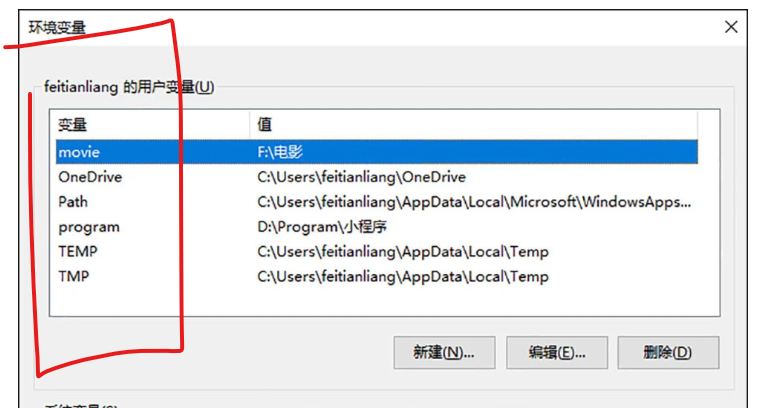
点进path看会是这样:
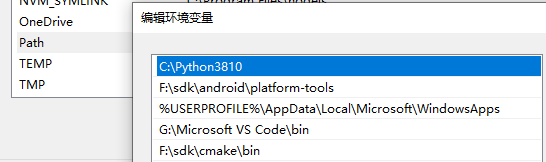
yy35959199 commentedon Mar 28, 2023
吐了……翻遍了也没找到环境变量里另一个编译器OTZ
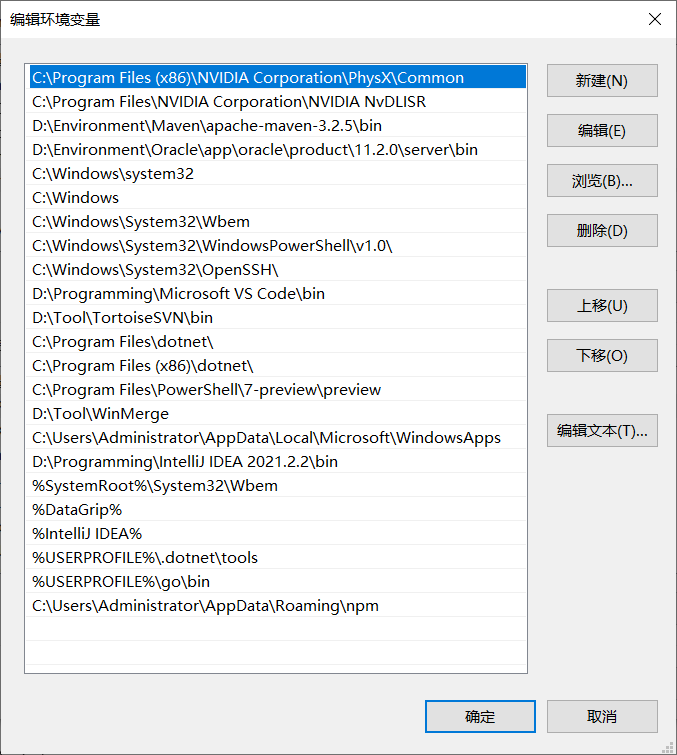
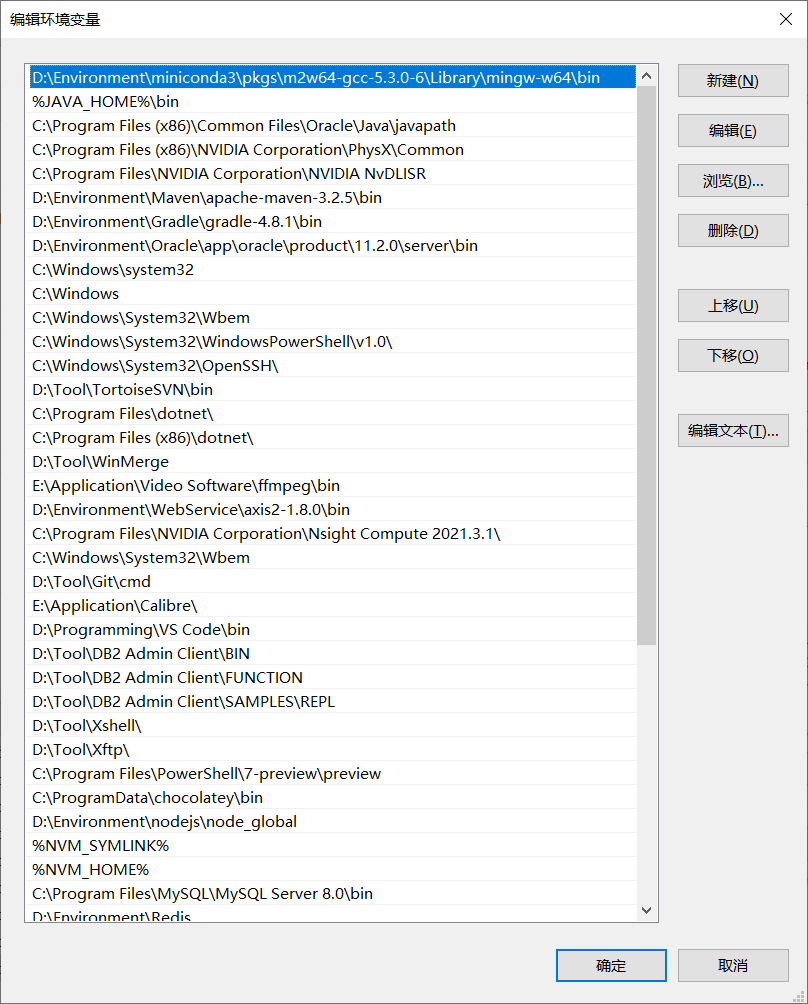

上面账户下面系统,加了conda install m2w64-toolchain后的这一行之后整个文件系统里应该只有这一个路径里有g++……
path不加这一行的话就是上面的g++ not available
parse config succeed, use it
parse config succeed, use it
try to init vosk asr engine
asrDir exists, start asr server E:\Workspace\Echo\echo-v1.0.0\asr-server
try to init nlp engine
nlpDir exists, start nlp server E:\Workspace\Echo\echo-v1.0.0\nlp-server
stdout: 2023-03-28 13:14:17.247 INFO : NLP API is starting, please wait...
stdout: 2023-03-28 13:14:17.247 INFO : NLP-API model dir: E:\Workspace\Echo\echo-v1.0.0\nlp-server\model
stdout: 2023-03-28 13:14:17.410 INFO : ASR API is starting, please wait...
stdout:
You can find the C code in this temporary file: C:\Users\ADMINI~1\AppData\Local\Temp\theano_compilation_error_ilc_djwt
stdout: 2023-03-28 13:14:17.897 ERROR : Compilation failed (return status=1):
Traceback (most recent call last):
File "theano\gof\lazylinker_c.py", line 76, in
raise ImportError(
ImportError: Version check of the existing lazylinker compiled file. Looking for version 0.211, but found None. Extra debug information: force_compile=False, _need_reload=True
stdout: During handling of the above exception, another exception occurred:
asr server exit: 1
(node:2368) UnhandledPromiseRejectionWarning: false
(Use
echo-debug --trace-warnings ...to show where the warning was created)(node:2368) UnhandledPromiseRejectionWarning: Unhandled promise rejection. This error originated either by throwing inside of an async function without a catch block, or by rejecting a promise which was not handled with .catch(). To terminate the node process on unhandled promise rejection, use the CLI flag
--unhandled-rejections=strict(see https://nodejs.org/api/cli.html#cli_unhandled_rejections_mode). (rejection id: 1)(node:2368) [DEP0018] DeprecationWarning: Unhandled promise rejections are deprecated. In the future, promise rejections that are not handled will terminate the Node.js process with a non-zero exit code.
stdout: 2023-03-28 13:14:20.718 INFO : NLP API has been started
Endpoint: POST http://127.0.0.1:8100/translate
Language: en to zh
vs都卸了……感觉应该不会有漏网之鱼
rerender2021 commentedon Mar 28, 2023
就是要确保g++ not available的情况去运行,上面贴的报错,是在g++ not available的情况下运行的吗
rerender2021 commentedon Mar 28, 2023
打开控制台输入g++ ,如果出现
'g++' is not recognized as an internal or external command,
operable program or batch file.
这样就对了,说明g++已经移除了,可以这样检查一下。
yy35959199 commentedon Mar 28, 2023
啊……不是,我还以为g++ not avaiable的状态是不正常的……就按照上面的提示执行了conda install m2w64-toolchain,现在python的包里有一个g++……那这样的话我去把那个卸掉试试OTZ
rerender2021 commentedon Mar 28, 2023
会出现编译报错的原因是,它找到了g++;所以解决的方式是移除g++的环境变量,这样它就找不到了,就会用默认的python代码去运行。
yy35959199 commentedon Mar 29, 2023
好的,非常感谢,现在GPU和非GPU的版本都正常运行了,唯一的问题是输入设备改为立体声混音后一直显示输入最大音量为0%……还在搜索原因和解决方案OTZ
NIDIE2 commentedon Apr 17, 2023
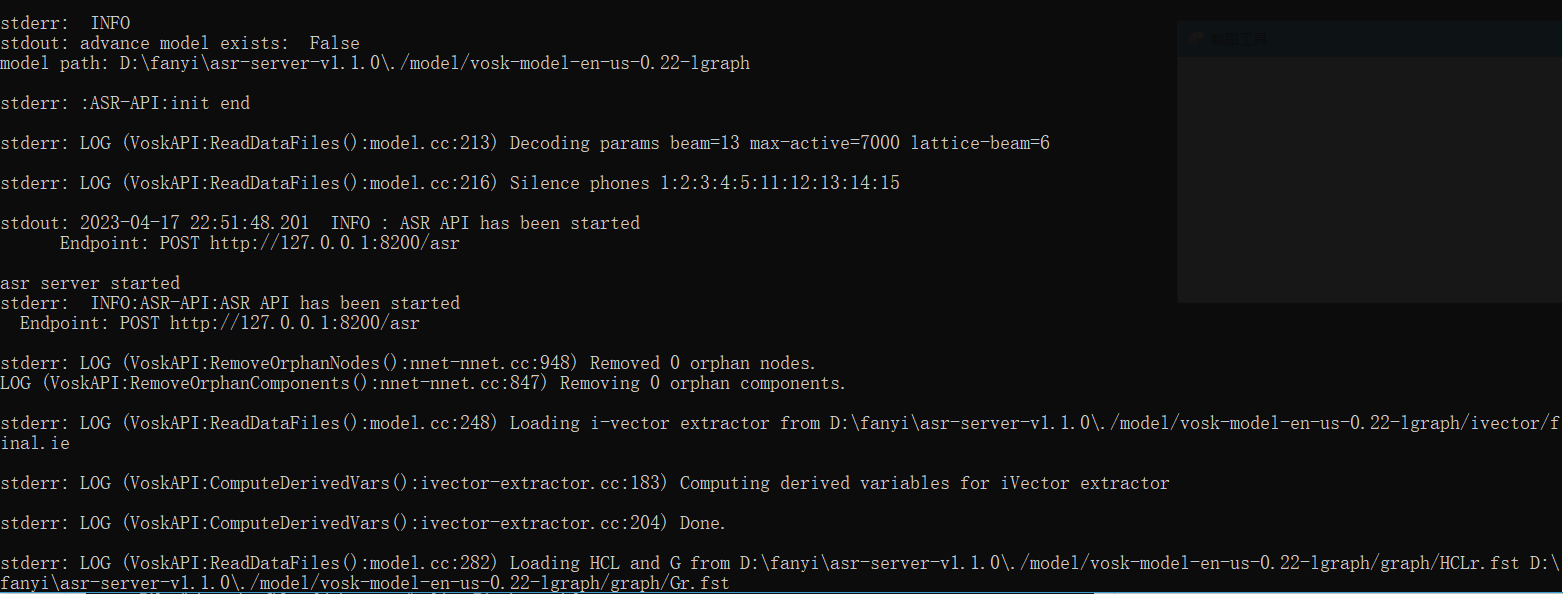
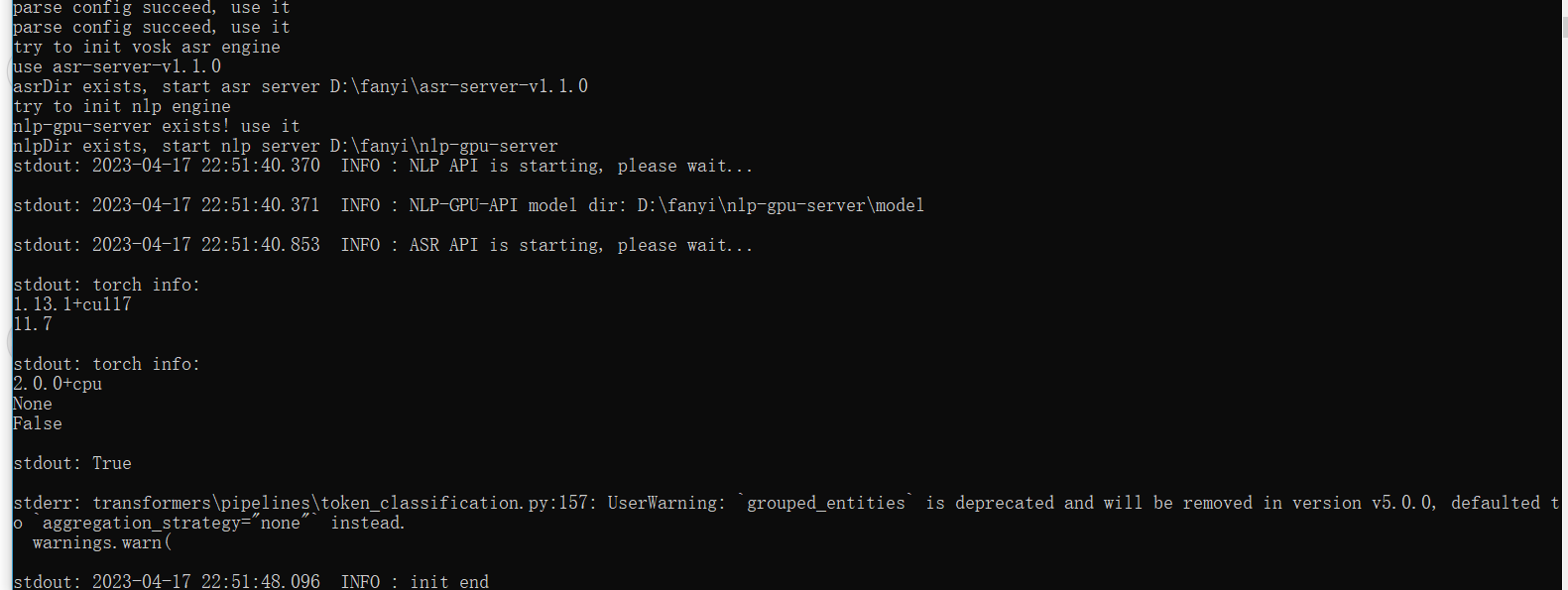
你好,我这是什么问题?


rerender2021 commentedon Apr 18, 2023
从截图来看,问题是没有进行语音识别。
现象是正常播放视频,但是没有翻译的字幕吗?
另外,在电脑设置中有确认是立体声混音吗,如果正常的话,它下面的测试麦克风会有反应:
NIDIE2 commentedon Apr 19, 2023
感谢,解决了。但似乎是扬声器可以,有线耳机却没有声音跳动?
rerender2021 commentedon Apr 20, 2023
我试过有线耳机倒是可以,就是那种最普通的有线耳机(小耳塞,入耳的),不过我只有笔记本电脑,没试过台式机。
AABBDAAAQIUYAOHUI commentedon Oct 17, 2023
这个是什么问题
rerender2021 commentedon Nov 4, 2023
看上去是加载dll失败了,查看一下路径上有没有这个dll呢
