Repository navigation
Two differently styled Text components inside a TextInput display the same style sometimes #37502
Description

Description
The general idea is to create a <TextInput> with a bolded text for a user's name, like you might see on Slack or Instagram etc: **@someone** hello world.
This is done in my React Native app using a <TextInput> with two <Text> components inside it. The first <Text> component has a bold style, while the second <Text> has no special style.
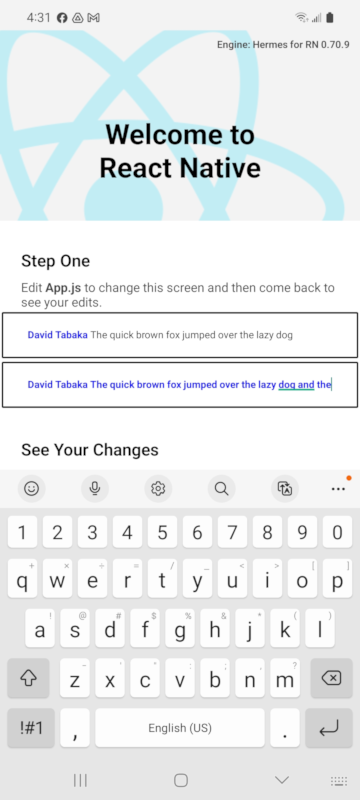
If I change the text string inside the second text, the behavior differs. Sometimes, I tap on the end of the TextInput, and the style of the second text changes to match the style of the first one. That's wrong. The style should not change. With other strings, the style does not change, and that is the expected behavior.
So, the behavior is inconsistent and unexpected, which indicates a bug in <TextInput>.
Sample code:
    <View style={{paddingHorizontal: 24, borderColor: 'black', borderWidth: 2, margin: 2, borderRadius: 2}}>
    <TextInput multiline>
        <Text style={{"fontWeight":"bold","color":"blue","backgroundColor":"white"}}>David Tabaka</Text>
        <Text> The quick brown fox jumped over the lazy dog and the</Text>
    </TextInput>
    </View>
The bug is causing problems in another public project as well as in my own project - https://github.com/dabakovich/react-native-controlled-mentions
React Native Version
0.70.9
Output of npx react-native info
info Fetching system and libraries information...
System:
OS: Linux 5.19 Ubuntu 22.04.2 LTS 22.04.2 LTS (Jammy Jellyfish)
CPU: (12) x64 Intel(R) Core(TM) i7-10710U CPU @ 1.10GHz
Memory: 5.27 GB / 46.77 GB
Shell: 5.1.16 - /bin/bash
Binaries:
Node: 14.20.0 - ~/.nvm/versions/node/v14.20.0/bin/node
Yarn: 1.22.19 - /usr/bin/yarn
npm: 6.14.17 - ~/.nvm/versions/node/v14.20.0/bin/npm
Watchman: Not Found
SDKs:
Android SDK:
API Levels: 23, 26, 27, 28, 29, 30, 31, 32, 33
Build Tools: 28.0.3, 29.0.2, 29.0.3, 30.0.2, 30.0.3, 31.0.0, 33.0.0
System Images: android-23 | Intel x86 Atom, android-23 | Intel x86 Atom_64, android-23 | Google APIs Intel x86 Atom, android-23 | Google APIs Intel x86 Atom_64, android-29 | Android TV Intel x86 Atom, android-29 | ARM 64 v8a, android-29 | Intel x86 Atom, android-29 | Intel x86 Atom_64, android-29 | Google APIs ARM 64 v8a, android-29 | Google APIs Intel x86 Atom, android-29 | Google APIs Intel x86 Atom_64, android-29 | Google Play ARM 64 v8a, android-29 | Google Play Intel x86 Atom, android-29 | Google Play Intel x86 Atom_64, android-30 | Google APIs Intel x86 Atom, android-30 | Google Play Intel x86 Atom_64, android-32 | Google APIs Intel x86 Atom_64
Android NDK: Not Found
IDEs:
Android Studio: Not Found
Languages:
Java: 11.0.18 - /usr/bin/javac
npmPackages:
@react-native-community/cli: Not Found
react: 18.1.0 => 18.1.0
react-native: 0.70.9 => 0.70.9
npmGlobalPackages:
react-native: Not Found
Steps to reproduce
Create the example default project for React Native.
Add the following code snippet. Make sure not to add it inside a <Section> component, which will confuse the issue.
          <View style={{paddingHorizontal: 24, borderColor: 'black', borderWidth: 2, margin: 2, borderRadius: 2}}>
            <TextInput multiline>
              <Text style={{"fontWeight":"bold","color":"blue","backgroundColor":"white"}}>David Tabaka</Text>
              <Text> The quick brown fox jumped over the lazy dog</Text>
            </TextInput>
          </View>
          <View style={{paddingHorizontal: 24, borderColor: 'black', borderWidth: 2, margin: 2, borderRadius: 2}}>
            <TextInput multiline>
              <Text style={{"fontWeight":"bold","color":"blue","backgroundColor":"white"}}>David Tabaka</Text>
              <Text> The quick brown fox jumped over the lazy dog and the</Text>
            </TextInput>
          </View>
Now run the app on an Android device (I'm using a Samsung A71).
Tap the first TextInput at the end. You will see nothing strange happen - the styles do not change, which is correct.
Next, tap the second TextInput at the end. You will see the style of the first Text get applied to the second Text (see video recording attached). That's the bug.
Snack, code example, screenshot, or link to a repository
Here's a repo that demos the issue.
https://github.com/fullStackOasis/react-native-styled-text-in-textinput
That repo can be used to demo the issue. It also contains a screenrecording in the README. The screenshot below shows how the second Text has had its style changed after tapping at the end of the TextInput as described.
Activity
fullStackOasis commentedon May 20, 2023
My only test devices are Samsung mobile phones. The bug happens on a Samsung Galaxy A71 5G and a Samsung Galaxy A32 5G.
I tried this with the
emulator -avd Pixel_5_API_32and the bug doesn't happen there.fullStackOasis commentedon May 26, 2023
Anyone?
fullStackOasis commentedon May 31, 2023
Is there something I can do to help get this triaged?
cortinico commentedon May 31, 2023
Could you try this on the latest stable version of React Native?
github-actions commentedon May 31, 2023
fullStackOasis commentedon Jun 10, 2023
@cortinico Thank you for taking a look!
The issue also occurs on React Native 0.71.
I tried to upgrade my sample project, but it wasn't a clean upgrade. Instead, I built a new project and applied the few small changes need to demo the issue. So I did this:
Then I applied the few minor changes to App.tsx.
Project uses React Native 0.71.10. There's video in my new demo project that shows the exact same bug occurring. Here's a new link to my demo project:
https://github.com/fullStackOasis/react-native-styled-text-in-textinput-71
The new output of
npx react-native infois here:fullStackOasis commentedon Jul 3, 2023
Anything I can do to help?
cortinico commentedon Jul 4, 2023
I'd say the best at this point would be to try to fix this issue and send us a PR as that would highly increase the chances of getting this fixed
hanarotg commentedon Aug 4, 2023
That's very strange, I don't get that bug on my S21.