Validate custom fonts for compatibilty on iOS + Android #14611
Description

Android + iOS interpret fonts slightly differently in 2 cases at the moment:
The style property for fontFamily on iOS refers to the internal post script name of the font. This is what the iOS UIFont object reports as fontName. The style property for fontFamily on Android refers to the filename of the font.
Additionally, iOS + Android pay attention to different metadata when defining the line height of a font. There is a metadata property called lineGap which is often used to specify how to layout a font. This is ignored on android but used on iOS. For a font to have the same layout on both platforms, the linegap should be 0. There are other variations on the metadata that can lead to layout differences between the plaforms, but linegap is a property that leads to significant discrepencies.
https://stackoverflow.com/questions/5414730/custom-installed-font-not-displayed-correctly-in-uilabel
There is some difference in character widths or letter spacing that needs some investigation.
Reproduction Steps
This affects some custom fonts, added using the nominal flow of react-native link
Sample Code
https://github.com/dmueller39/react-native-font-discrepency-demo
Here is a side by side:
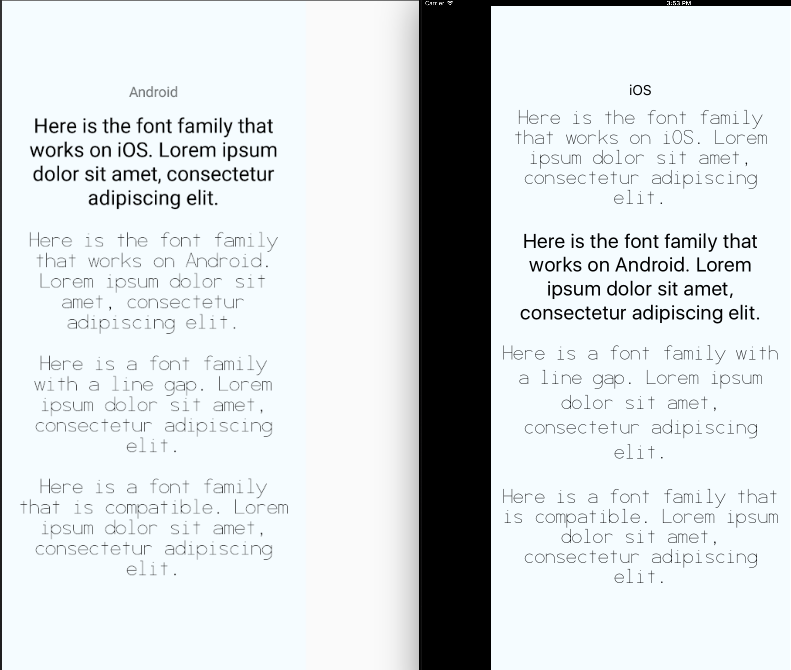
Note the missing fonts for the first two examples and and the exacerbated line spacing in the third. The spacing between the letters is still different in the last example, but the two issues presented are things that led to big discrepancies for us.
Solution
It would be great if there was some validation that ran on custom fonts somewhere between linking them + building the project. I would be excited to contribute to this (we already have a portion of this solved) but I would need some guidance on best practices of where to add this.
Additional Information
- React Native version: 0.45.0
- Platform: Android + iOS
- Development Operating System: macOS 10.12.5
- Build tools: Xcode 8.3.2 + AndroidStudio 2.3
Activity
dmueller39 commentedon Jun 19, 2017
Also note that the text examples wrap at different locations. If anyone has thoughts that would be great, but if not, well look into it.
lelandrichardson commentedon Jun 19, 2017
@dmueller39 i think the wrapping in different places is just due to different viewport sizes, no? I don't think i would call that a bug. Agree some extra validations would be great, or making the font loading process more similar for the two platforms.
dmueller39 commentedon Jun 21, 2017
@lelandrichardson
Whats the best way to surface a warning? At the time of
react-native link(this might be really complicated actually) or at runtime?react-native linkwould require some npm dependencies for font parsing (which might be a no-go tbh).Any thoughts on the best direction?
peterp commentedon Aug 2, 2017
Perhaps we could write a shell script that's capable of adjusting the fonts to behave the same, and additionally writing some documentation on how to add custom fonts to each platform (there isn't any documentation on this process yet.)
pull-bot commentedon Oct 9, 2017
Hi there! This issue is being closed because it has been inactive for a while. Maybe the issue has been fixed in a recent release, or perhaps it is not affecting a lot of people. Either way, we're automatically closing issues after a period of inactivity. Please do not take it personally!
If you think this issue should definitely remain open, please let us know. The following information is helpful when it comes to determining if the issue should be re-opened:
If you would like to work on a patch to fix the issue, contributions are very welcome! Read through the contribution guide, and feel free to hop into #react-native if you need help planning your contribution.
zen0wu commentedon Jan 5, 2018
+1 for this!
I think the most ideal way to solve this is for
react-native linkto create some kind of metadata stored in project's files for both iOS and Android with some custom API to locate the font by a single source of truth (file name seems easier)Just an idea with require and the bundler would figure this out for both platform.
At least, the fact that iOS uses PostScriptName and Android uses file name should be properly documented somewhere in the official docs, given how much time people have spent on this issue, accoss multiple teams