Repository navigation
Module not found: Can't resolve '../components/Overlay' on starting server #3041
Description

Is this a bug report?
Yes
Can you also reproduce the problem with npm 4.x?
I'm using yarn 0.27.5
Which terms did you search for in User Guide?
N/A
Environment
node -v: v8.2.1npm -v: 5.3.0yarn --version(if you use Yarn): 0.27.5npm ls react-scripts(if you haven’t ejected): 1.0.12
Then, specify:
- Operating system: Mac OS X 10.12.6
- Browser and version (if relevant):
Steps to Reproduce
- run
dotenv npm run start
Expected Behavior
Server starts running.
Actual Behavior
Receive the following error:
Failed to compile.

./node_modules/react-error-overlay/lib/containers/CompileErrorContainer.js
Module not found: Can't resolve '../components/Overlay' in '/Users/jason/nob/messages-frontend-prototype/node_modules/react-error-overlay/lib/containers'
Reproducible Demo
None at the moment.
Note: Downgrading to react-scripts 1.0.11 works great.
Activity
gaearon commentedon Sep 1, 2017
Can you run
and try again?
axelson commentedon Sep 1, 2017
@gaearon That does fix the issue. But
yarn upgrade react-scriptsshould have worked fine right?emveeoh commentedon Sep 1, 2017
Also ran into this issue. Yarn install, then Yarn Start to launch Development Server. I have the same environment as the author and same error message.
Resolution:
Deleted the node_modules and the yarn.lock file. Yarn install, yarn start. Works perfectly now.
gaearon commentedon Sep 1, 2017
It's not working because the filename casing is different but OS probably didn't recognize that.
I think we can fix it.
tharakawj commentedon Sep 1, 2017
@gaearon you mean by renaming the file to old name?
gaearon commentedon Sep 1, 2017
The issue is because we replaced
overlay.jswithOverlay.js, and FS gets confused.Let's just completely rename this file to something else. e.g.
ErrorOverlay.js.himanshupathakpwd commentedon Sep 2, 2017
Do,
npm installor
yarn installif you are using yarnIt solved problem on my system
Changelog for 1.0.13
gaearon commentedon Sep 2, 2017
This should be fixed in 1.0.13. Please verify.
https://github.com/facebookincubator/create-react-app/releases/tag/v1.0.13
brandonmikeska commentedon Sep 3, 2017
I just upgraded to 1.0.13 and got this error when I copied and pasted
yarn add --exact react-scripts@1.0.13from the release notes.I went back and ran yarn upgrade react-scripts and it fixed the issue.
betoharres commentedon Sep 6, 2017
I was on 1.0.10 and then I ran
yarn add --exact react-scripts@1.0.12andyarn add --exact react-scripts@1.0.13both of them gave me this error. I'm trying to reinstall all modules now
update: it works!
gaearon commentedon Sep 6, 2017
Yes, you'll still have the issue if you even try to upgrade to 12. That's why we recommend skipping it and going directly to 13.
But in any case removing node_modules and reinstalling will fix it.
balazsorban44 commentedon Sep 6, 2017
I just tried everything posted here, and nothing works! My project was ejected with react eject. Can it be a problem? I get this error at running yarn start:
nicksarafa commentedon Sep 8, 2017
@balazsorban44 if you've already ejected perhaps try rolling back
react-error-overlayto an older version.."react-error-overlay": "^1.0.10"works for megaearon commentedon Sep 8, 2017
@balazsorban44 If you look closely at your error message, it is not the error message discussed in this thread. Please search issues for it—somebody already filed another issue about it. If you see this message it means you updated
react-error-overlayto incompatible major version. Did you do this intentionally? It is expected that if you update packages to major versions, they will have breaking changes. Please don't update them if you haven't checked what changed.ankibalyan commentedon Oct 1, 2017
After upgrading to react@16.0 this issue arises to me as well.
ankibalyan commentedon Oct 1, 2017
pfftdammitchris commentedon Oct 8, 2017
I had errors with react-error-overlay/middleware, I had upgraded them which caused errors.
My fix was to downgrade.
react-error-overlay to 1.0.9
react-hot-loader to 3.0.0-beta.7
Steps:
yarn remove react-error-overlay -D (remove from devDependencies)
yarn add react-error-overlay@1.0.9 -D
yarn remove react-hot-loader -D (remove from devDependencies)
yarn add react-hot-loader@3.0.0-beta.7
deathmood commentedon Oct 10, 2017
Having same problems on
(on macOS High Sierra works ok -- problems appears on Windows)
also
pls hlp!!!!
----- UPD
to everyone having same problem: when I thought I tried everything (reinstalling node, npm, packages) someone told me to restart windows and that worked ;)
zslabs commentedon Oct 18, 2017
I've had something similar happening with a project attempting a react 16 upgrade - getting the following error:
I've tried deleting
node_modulesand clearing npm cache without any luck.Doing some research around that error (like this one) it looks like there might still be a 16 incompatibility with that module, but the package itself should support it just fine.
huangsav commentedon Dec 6, 2017
I have the same error in "react-error-overlay": "^3.0.0" with React 16.2.0
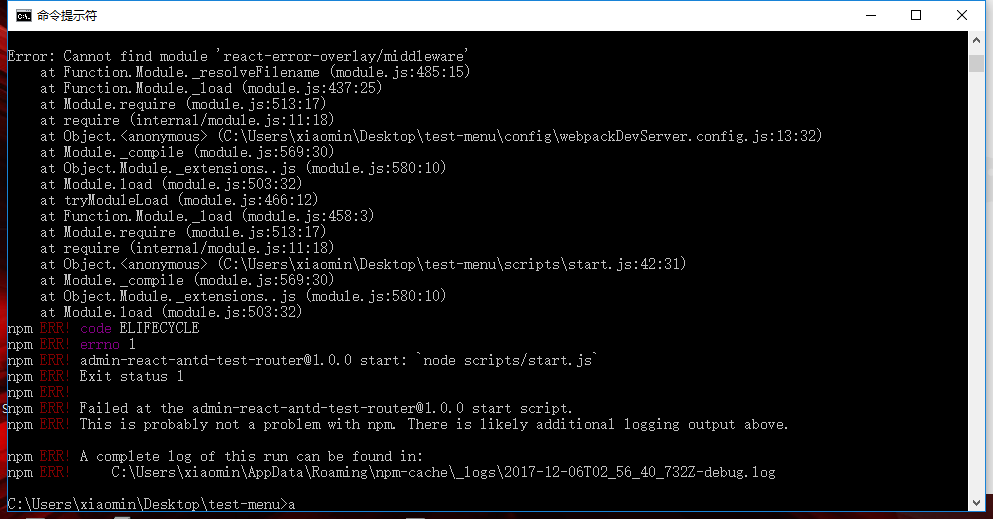
huangsav commentedon Dec 6, 2017
After I re-create the whole scripts is OK.