Repository navigation
IDLE: path browser unusable on some displays #81222

Description

| BPO | 37041 |
|---|---|
| Nosy | @terryjreedy, @aroberge |
| Superseder | |
| Files |
Note: these values reflect the state of the issue at the time it was migrated and might not reflect the current state.
Show more details
GitHub fields:
assignee = 'https://github.com/terryjreedy'
closed_at = <Date 2021-06-03.16:23:21.025>
created_at = <Date 2019-05-25.10:26:20.340>
labels = ['3.8', 'expert-IDLE', 'type-bug', '3.7']
title = 'IDLE: path browser unusable on some displays'
updated_at = <Date 2021-06-03.16:23:21.025>
user = 'https://github.com/aroberge'
bugs.python.org fields:
activity = <Date 2021-06-03.16:23:21.025>
actor = 'aroberge'
assignee = 'terry.reedy'
closed = True
closed_date = <Date 2021-06-03.16:23:21.025>
closer = 'aroberge'
components = ['IDLE']
creation = <Date 2019-05-25.10:26:20.340>
creator = 'aroberge'
dependencies = []
files = ['48355']
hgrepos = []
issue_num = 37041
keywords = []
message_count = 3.0
messages = ['343466', '343532', '343543']
nosy_count = 2.0
nosy_names = ['terry.reedy', 'aroberge']
pr_nums = []
priority = 'normal'
resolution = 'duplicate'
stage = 'resolved'
status = 'closed'
superseder = '31552'
type = 'behavior'
url = 'https://bugs.python.org/issue37041'
versions = ['Python 3.7', 'Python 3.8']
Activity
aroberge commentedon May 25, 2019
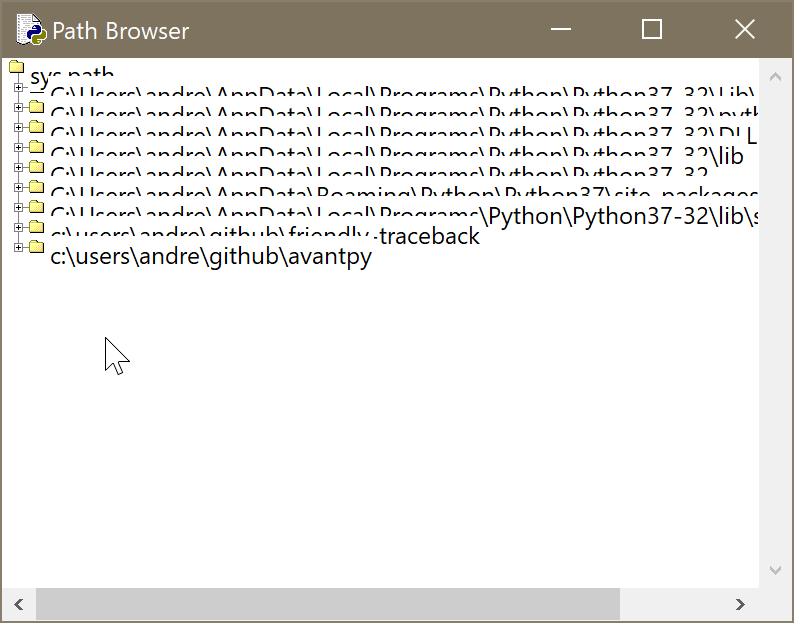
On my computer (Windows 10, screen resolution 3000 x 2000, scaling of text and other elements set at 200% as the recommended value), the path browser is essentially unusable as the items overlap each other. See the attached image.
I found that changing the following:
in tree.py solved the problem.
terryjreedy commentedon May 26, 2019
Another reason to replace IDLE's custom tree widget with hard-coded constants with ttk.Treeview.
I am closing this because I believe that bpo-31552 will solve this problem. For an initial check, run the following test code, extracted from
https://tkdocs.com/tutorial/tree.html
Click the [+] buttons. I am curious whether commenting out the fix_scaling call makes any difference.
---------
aroberge commentedon May 26, 2019
I ran the example you gave and it worked perfectly.