Repository navigation
IDLE: Remove noisy icons from module browser #69277

Description

| BPO | 25090 |
|---|---|
| Nosy | @rhettinger, @terryjreedy, @kbkaiser, @serwy, @roseman |
| Files |
Note: these values reflect the state of the issue at the time it was migrated and might not reflect the current state.
Show more details
GitHub fields:
assignee = 'https://github.com/terryjreedy'
closed_at = None
created_at = <Date 2015-09-13.23:44:39.591>
labels = ['expert-IDLE', 'type-feature', '3.7']
title = 'IDLE: remove noisy icons from class (module) browser'
updated_at = <Date 2017-09-23.23:11:37.191>
user = 'https://github.com/roseman'
bugs.python.org fields:
activity = <Date 2017-09-23.23:11:37.191>
actor = 'terry.reedy'
assignee = 'terry.reedy'
closed = False
closed_date = None
closer = None
components = ['IDLE']
creation = <Date 2015-09-13.23:44:39.591>
creator = 'markroseman'
dependencies = []
files = ['40452']
hgrepos = []
issue_num = 25090
keywords = []
message_count = 5.0
messages = ['250589', '250590', '250599', '250669', '302818']
nosy_count = 5.0
nosy_names = ['rhettinger', 'terry.reedy', 'kbk', 'roger.serwy', 'markroseman']
pr_nums = []
priority = 'normal'
resolution = None
stage = 'test needed'
status = 'open'
superseder = None
type = 'enhancement'
url = 'https://bugs.python.org/issue25090'
versions = ['Python 3.6', 'Python 3.7']Metadata
Metadata
Assignees
Projects
- Status
Activity
roseman commentedon Sep 13, 2015
Proposal for an alternative or perhaps replacement of both the code context extension, as well as the class browser (rooted at a particular file, not the path browser).
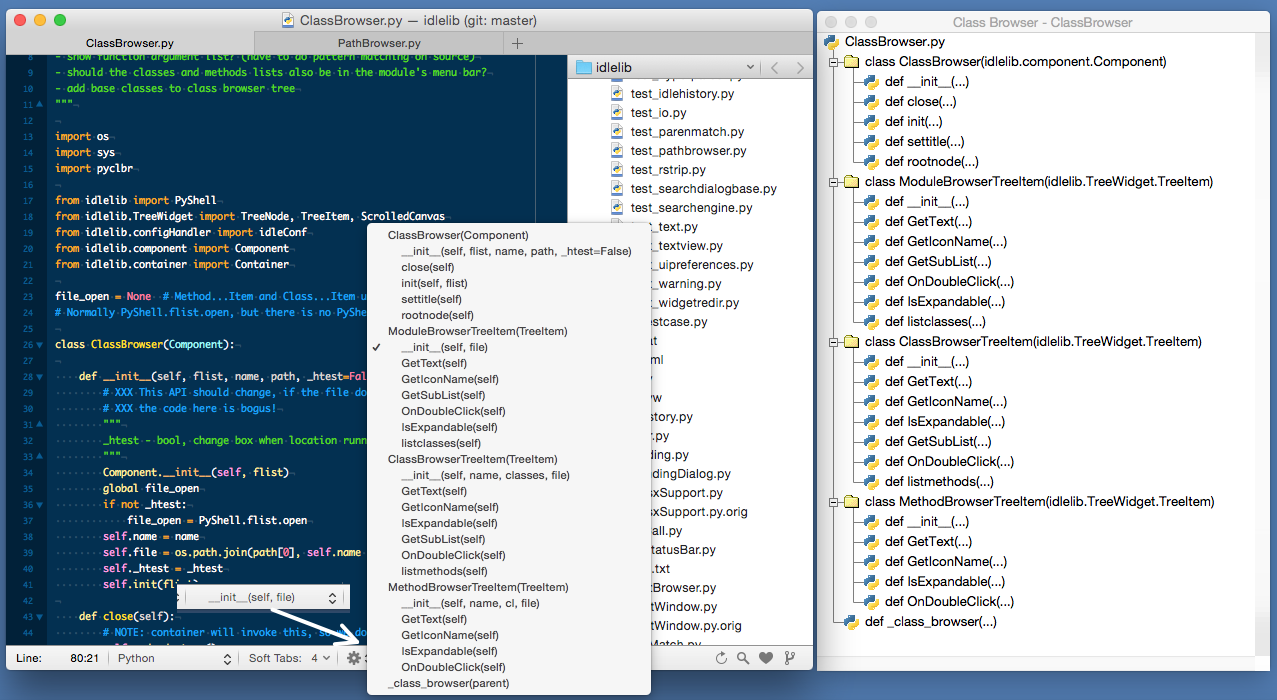
I'll direct your attention to the attached browser.png. On the right is IDLE's class browser window of ClassBrowser.py. On the left, I've got the same file loaded into TextMate.
In the TextMate status bar, it shows you where you're currently located (here, in the __init__ function). When you click on that part of the status bar, it brings up a scrollable menu showing the structure of the file. I think it's easier to read than IDLE's, despite having more information (description of the parameters), thanks to reduction in 'chart junk'.
Downside of this approach is that you can't have a window along the side so you can navigate the code while seeing the class display. Though that might best be achieved if IDLE added a sidebar, rather than a true separate window.
rhettinger commentedon Sep 14, 2015
I don't see anything that replaces Code Context. That extension is priceless for people editing classes and methods that extend more than one screen.
ISTM, there are too many sweeping change proposals that seem to base on general look and feel but disregard how people actually use these tools.
terryjreedy commentedon Sep 14, 2015
Adding function arguments to the module browser, misnamed Class Browser, is bpo-20827. That leaves removing the noisy icons from class and def entries (where they do not fit anyway), as the concrete appearance change proposal here. Better to use the space for arguments.
Adding nested classes is bpo-1612262 (9 years ago). I just noticed that there is a 6 year old patch that needs to be reviewed.
The TextMate box has a checkmark at the current location. Having an editor know about an attached module browser and inform it of the cursor's location would be a separate issue. It would be relatively easy when code context is active. But nested classes and functions cannot be marked until they are displayed.
A module browser, even enhanced to display nested classes and functions, could not replace code context since the latter includes nested compound statements within functions. I think code context would be even more useful if it were to display the complete context, using as many lines as needed, instead of some fixed number. But I have not written a patch yet or opened an issue.
[-]IDLE: alternative to class browser / code context[/-][+]IDLE: remove noisy icons from class (module) browser[/+]roseman commentedon Sep 14, 2015
Thanks Raymond. As an 'outsider' I rely on people like you to provide feedback based on your experience to some of the proposals I'm floating here.
On a more specific note...
This one came about mainly as I was looking at the class (module) browser. I thought it a bit limited/clunky, which as Terry noted has been brought up before. I noticed many editors/IDEs do a status bar thing showing current class and/or function, often as a gateway to navigating through the structure. I've found it a convenient and compact navigational cue/tool. I've also seen this used in addition to or in conjunction with a sidebar showing the file structure, highlighting current location.
I've admittedly only briefly tried Code Context (and personally based on that limited experience didn't find it particularly helpful, and somewhat visually disruptive), and the mention here was almost an afterthought (since the status bar thing does provide a coarse level of context). I'd actually be curious to see how other editors/IDEs implement the same sort of feature as there may be some nice tweaks to steal - do you have any pointers?
Again, I greatly appreciate the feedback. In regards to your comment on "too many sweeping change proposals" I'd certainly like to hear any suggestions you may have around process, general concerns, etc. Thanks again.
terryjreedy commentedon Sep 23, 2017
I merged the nested functions and classes patch yesterday, so I really want to stop using file and folder icons for functions and classes.
However, this is not as easy as I was hoping. By default, tree.TreeItem.GetIconName returns None. tree.TreeNode then uses the default closed and open folder icons for contracted and expanded nodes. There is no provision for 'no icon'. The text print function hardcodes space for the icon. The one thing I tried worked with module browser for at least a few node, but sent pathbrowser into a do-nothing state, probably a loop.
I decided to let this sit longer. I hope to soon replace at least the low level part of tree (TreeNode) with ttk.Treeview, which does not require icons.
[-]IDLE: remove noisy icons from class (module) browser[/-][+]IDLE: Remove noisy icons from module browser[/+]serhiy-storchaka commentedon Sep 6, 2026
#157029 removes them: a
ttk.Treeviewputs no image on a row unless asked, and the Module Browser asks for none, its text already saying class or function. The Path Browser keeps icons where they do work — directory, package, module — so a package row drops its": package".