Repository navigation
scatter colorbar ignores boundaries when outside of plot #144
Description

Description
When using the plt.scatter wrapper, if some dimension of the data is mapped to color and the color bar placed externally, it is forced into a discrete colorbar and the boundaries cannot be modified. The colorbar features are different if placed inside the plot.
- It would be great for this to generally be fixed.
- Would it be feasible to add
levelsto the scatter wrapper?
Steps to reproduce
import numpy as np
import proplot as plot

state = np.random.RandomState(51423)
data = state.rand(2, 100)

f, ax = plot.subplots()
ax.scatter(*data, marker='o', color=data.sum(axis=0), cmap='Marine',
           colorbar='l', vmin=0, vmax=2,
           colorbar_kw={'boundaries': plot.arange(0, 2, 0.01),
                                  'locator': 0.5})

f, ax = plot.subplots()
ax.scatter(*data, marker='o', color=data.sum(axis=0), cmap='Marine',
           colorbar='lr', vmin=0, vmax=2,
           colorbar_kw={'boundaries': plot.arange(0, 2, 0.01),
                                  'locator': 0.5})
In the first bit, I am using boundaries as a hack to get at levels. I want to force this to much smaller colorbar steps, just to prove that it's working. It seems like locator works, but not boundaries for instance.
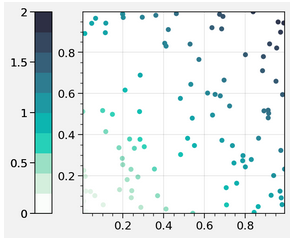
In the second bit, when colorbar='lr', it works fine. I.e., when colorbars are inside the plot, the boundaries keyword works. When placed outside (e.g. l, r, b), the colorbar is funky.

Equivalent steps in matplotlib
The default exterior colorbar in matplotlib looks a lot better (it's continuous without mislabeling of the discrete boundaries), and the boundaries keyword works here.
import matplotlib.pyplot as plt
state = np.random.RandomState(51423)
data = state.rand(2, 100)


f, ax = plt.subplots()
p = ax.scatter(*data, marker='o', c=data.sum(axis=0))

f.colorbar(p, boundaries=plot.arange(0, 2, 0.1))
Proplot version
0.5.0.post46
Activity
lukelbd commentedon Apr 22, 2020
Thanks for the examples. Unfortunately it looks like this bug was introduced to the dev branch, possibly in commit f83570c. Here is your first example with the last stable release (v0.5.0):
And here is the dev branch:
For now you can revert back to the last stable release.
lukelbd commentedon Apr 22, 2020
Also I know the Issue page is getting pretty backed up here... I've been really focusing on research these past 2 months. Will try to catch up on these issues by the end of the month at least, then release a new version by early May.
lukelbd commentedon Apr 22, 2020
Re: adding
levelsto scatter, I 100% support that. Right now it's a little complicated becausescatteris wrapped bycycle_changer, and generally plotting functions are wrapped by eithercmap_changer(which provides level support) orcycle_changer, not both.This may be easier to do after #111 is merged, because then features can be added piecemeal to individual plotting methods like
Axes.contourfandAxes.scatterby dispatching to several small, self-contained functions, instead of using these big honking wrapper functions likecmap_changer. The whole "wrapper function" idea is a relic of some of the very first plotting code I wrote for this library.