Repository navigation
inspector: breakpoints and letter case in script path argument #19273
Description

- Version: master (10)
- Platform: Windows 7 x64
- Subsystem: inspector
Trying to debug the #19250, I've found a confusing behavior in debugging with Google Chrome: breakpoints depend on the case of script path argument (in particular. drive letter case).
- Create
test.jsfile:
'use strict';

console.log(1);

console.log(2);- Run it the first time with the full path and lowercase drive letter:
j:\temp>node --inspect-brk j:/temp/test.js- Run to completion in the inspector, open the file and add a breakpoint to the file, then close the file:

- Disconnect the inspector. Run it the second time with the full path and lowercase drive letter again:
j:\temp>node --inspect-brk j:/temp/test.js- You can see a tab with the wrapped file. The breakpoint is listed in Breakpoints list, but not marked in the file:
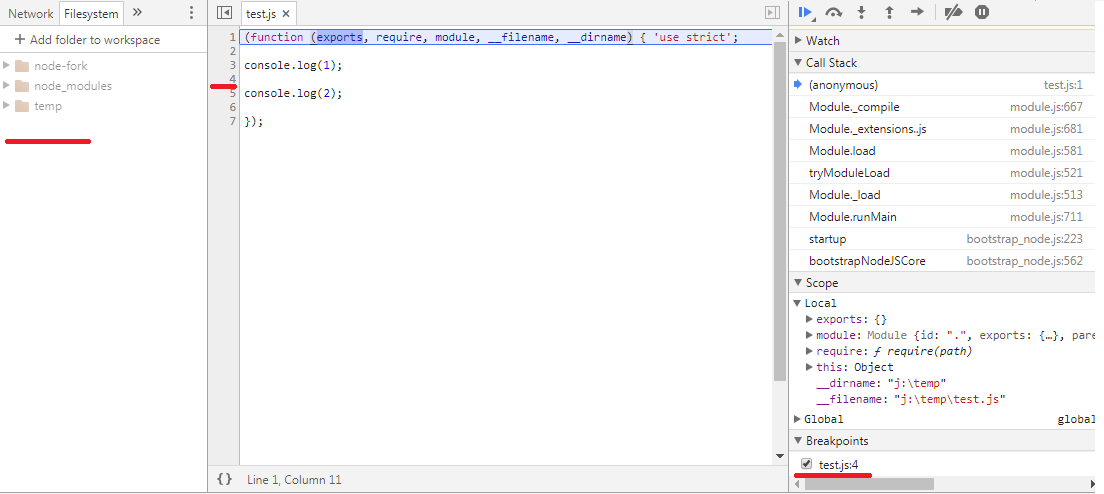
-
Run to completion in the inspector. No breakpoint is activated.
-
Disconnect the inspector. Run it the third time with the full path and uppercase drive letter:
j:\temp>node --inspect-brk J:/temp/test.js- First, you can see only the wrapped file with breakpoint mark, then after a second, it is automatically replaced by not-wrapped one with recalculated breakpoint:
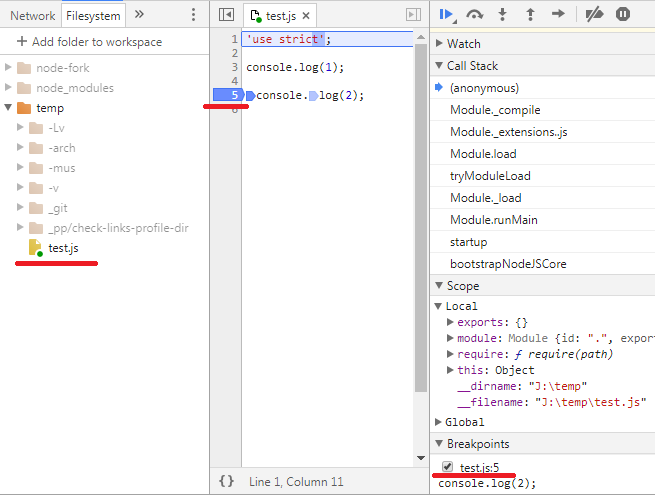
- Run to completion in the inspector. Breakpoint is activated.
Also, compare info on the chrome://inspect/#devices page:
- with lowercased drive letter:
j:/temp/test.js file:///J:/_temp_test.js - with uppercased drive letter:
J:/temp/test.js file:///J:/_temp_test.js
It seems Google Chrome inspector should compare paths case insensitively on OS like Windows. Otherwise, the behavior is confusing: only uppercased drive letter in the path can guarantee consistent behavior between debug calls. Or a user should resort to debugger; code to debug several script calls with a different case in the path.
cc @nodejs/v8-inspector ?
Activity
vsemozhetbyt commentedon Mar 10, 2018
There is a more severe use case: the same issue makes breakpoints inactive in dependent files inside one debug session.
test-script.jstest-lib.jstest-script.jswith lowercase drive letter:node --inspect-brk j:/temp/test-script.jsAdd a breakpoint in the dependent
test-lib.js, run to completion. The breakpoint is not activated. Remove the breakpoint.Run the
test-script.jswith uppercase drive letter:node --inspect-brk J:/temp/test-script.jstest-lib.js, run to completion. The breakpoint is activated.vsemozhetbyt commentedon Mar 10, 2018
Upstream issue: https://bugs.chromium.org/p/chromium/issues/detail?id=820728
[-]inspector: breakponts and case of script path argument[/-][+]inspector: breakpoints and case of script path argument[/+][-]inspector: breakpoints and case of script path argument[/-][+]inspector: breakpoints and letter case in script path argument[/+]hashseed commentedon Mar 15, 2018
One way to fix this is to convert file names passed as script name to all lowercase for case insensitive file systems.
jasnell commentedon Jun 19, 2020
@nodejs/inspector ... is there anything actionable here?
jasnell commentedon Jun 25, 2020
Closing due to lack of activity. Can reopen if there's new information or someone wants to pick it up.