Repository navigation
Project-local venv used by default in unrelated folder. #5968
Description

The extension knows how to find a variety of interpreter environments. This includes venvs in the ".venv" folder directly under the workspace folder, which are project-local. Such an env should not be visible to other workspace folders. I found a case where it gets used by default for a new workspace.
Repro:
- create folder: "testing"
- run
python3 -m venv testing/.venv - run
code testing - open a .py file
- set the interpreter env to "testing/.venv"
- close the folder
- create another folder: "eggs"
- run
code eggs - open a .py file
At that point the extension uses "testing/.venv" as the env. However, the workspace for the "eggs" folder should not know about that interpreter, since it is local to another workspace.
Activity
DonJayamanne commentedon Jun 11, 2019
eggsfolder with respect tospamuser settings.jsonand yourworkspace .vscode/settings.json(interested in seeing the values forpython.pythonPathspam/.venvdirectory?I cannot replicate this at my end (using Mac).
ericsnowcurrently commentedon Jun 11, 2019
"testing" and "eggs" ended up next to each other in a common parent directory. I have multiple versions of Python installed. "python" is 2.7 and "python3" is 3.6. The venv is 3.7. This is on linux.
user settings.json:
{
    "python.jediEnabled": false,
    "explorer.confirmDelete": false
}
The "eggs" settings.json does not exist after step 9, but gets created as soon as I manually set the environment.
"testing" settings.json:
{
    "python.testing.unittestArgs": [
        "-v",
        "-s",
        ".",
        "-p",
        "*test*.py"
    ],
    "python.testing.pytestEnabled": true,
    "python.testing.nosetestsEnabled": false,
    "python.testing.unittestEnabled": false,
    "python.testing.pytestArgs": [
        "."
    ],
    "python.pythonPath": ".venv/bin/python"
Here's how VSCode looks right after step 9 (there's no settings.json yet):
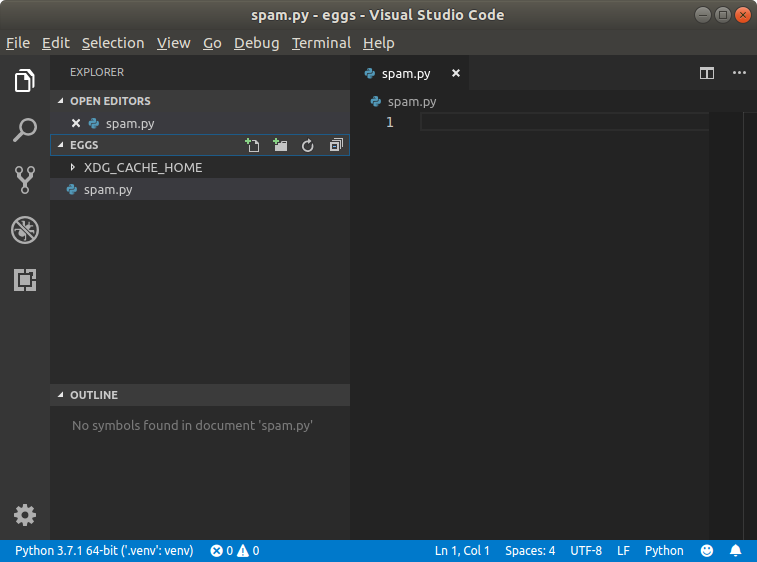
Here's how it looks when I click on the env in the status bar:
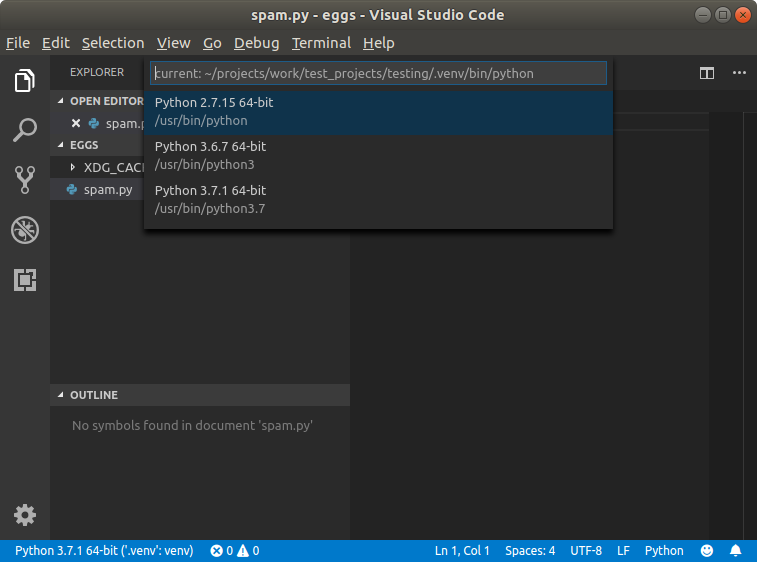
After selecting one of the available interpreters it creates the appropriate settings.json.
DonJayamanne commentedon Jun 11, 2019
Looking at the above screenshots, you don't have
.venvfolder underspaminstead it's under a folder namedtesting.Sorry, but please can we try to use same set of data, gets confusing when screenshots refer to one and your notes another.
ericsnowcurrently commentedon Jun 12, 2019
Sorry, I've corrected it for you.
karrtikr commentedon Oct 21, 2021
Fixed in latest extension