Repository navigation
Own code not recognised when virtualenv interpreter selected. #19871

Description

Type: Bug
Behaviour
Expected vs. Actual
Expected:
Enabled breakpoints remain enabled, and are hit.
vs.
Breakpoints are disabled
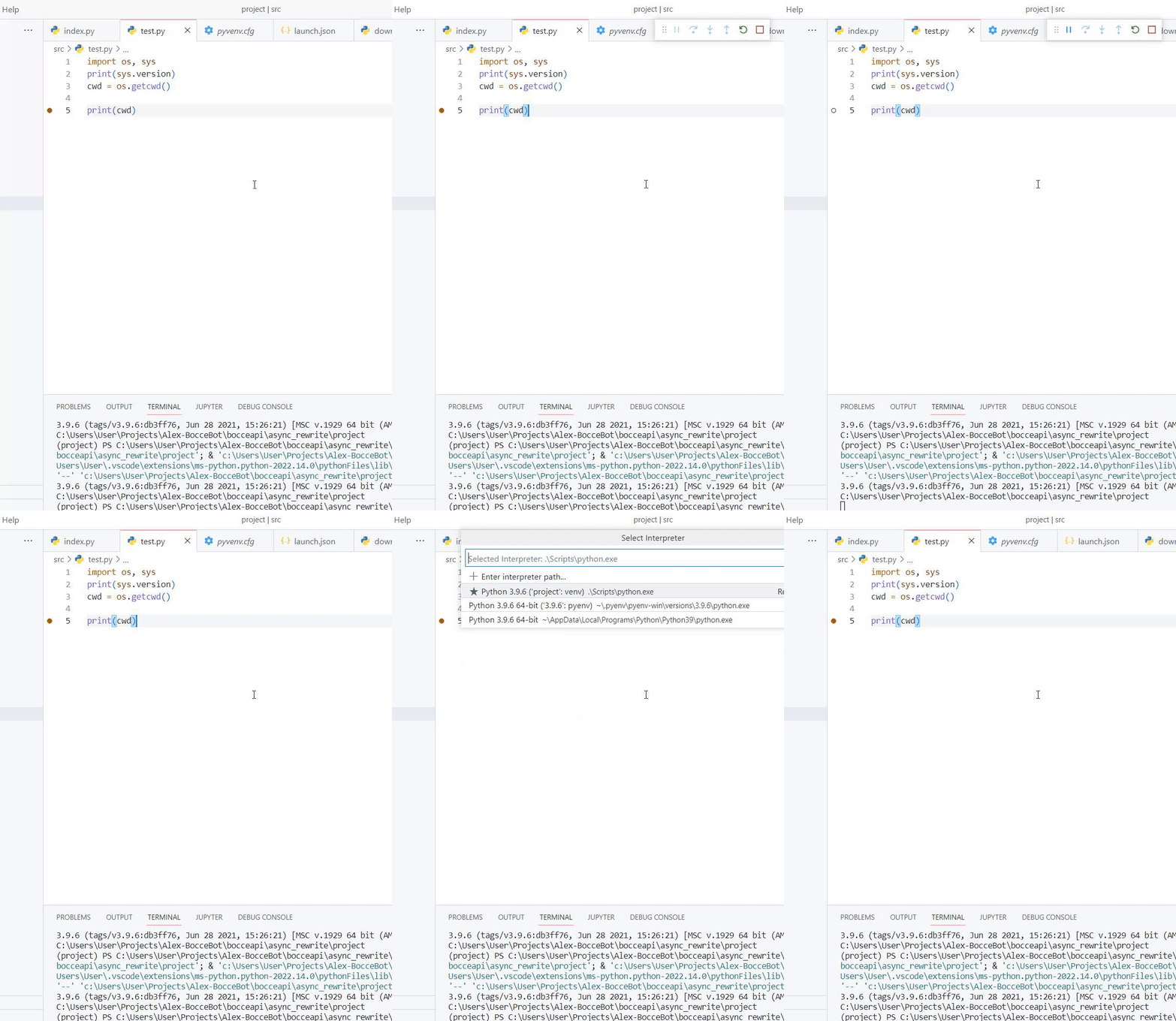
Steps to reproduce:
- Make a
virtualenvandactivateit. - Select the
venvPython interpreter. - Write some python with debuggable code (not automatically skipped)
- Create a breakpoint
- Press F5 and Debug Current File.
- See that your breakpoints are skipped.
Problem is independent of Python version (so it's not a duplicate of #15890, #15861 or this specific issue with debugpy.) I have changed versions multiple times within the venv and out and noticed that only within the venv does this problem manifest. Also tested with known good version Python 3.9.4, same result within both venv and out.
Also not whatever this is. The commenter appears to have misunderstood the issue, but if it's any help, the status bar does change state.
This issue may indeed be a duplicate of #12593, but after testing python3.9.4, I noticed the issue occur even outside of the venv.
The strangest thing is that this seems to crop up at random, I had previously been working with the same exact environment and venv with no issue.
EDIT: The issue occurs because the debugger doesn't recognise your code as your code when you're using the virtualenv interpreter and turns off your breakpoints because "Hey, you said you didn't want to see anything else other than your own code, right? Here's absolutely nothing because none of this code is yours." Enable 'justOwnCode': false in your launch.json for a workaround if you don't want to use other intepreter executables.
Diagnostic data
- Python version (& distribution if applicable, e.g. Anaconda): 3.9.6
- Type of virtual environment used (e.g. conda, venv, virtualenv, etc.): Venv
- Value of the
python.languageServersetting: Default
Output for Python in the Output panel (View→Output, change the drop-down the upper-right of the Output panel to Python)
XXX
User Settings
languageServer: "Pylance"
Extension version: 2022.14.0
VS Code version: Code 1.71.2 (74b1f979648cc44d385a2286793c226e611f59e7, 2022-09-14T21:03:37.738Z)
OS version: Windows_NT x64 10.0.19044
Modes:
Sandboxed: No
System Info
| Item | Value |
|---|---|
| CPUs | AMD Ryzen 9 4900HS with Radeon Graphics (16 x 2994) |
| GPU Status | 2d_canvas: enabled canvas_oop_rasterization: disabled_off direct_rendering_display_compositor: disabled_off_ok gpu_compositing: enabled multiple_raster_threads: enabled_on opengl: enabled_on rasterization: enabled raw_draw: disabled_off_ok skia_renderer: enabled_on video_decode: enabled video_encode: enabled vulkan: disabled_off webgl: enabled webgl2: enabled webgpu: disabled_off |
| Load (avg) | undefined |
| Memory (System) | 31.42GB (9.00GB free) |
| Process Argv | --crash-reporter-id 714f54fb-43d4-4f20-ba7d-a00b5e70ac48 |
| Screen Reader | no |
| VM | 0% |
A/B Experiments
vsliv368:30146709
vsreu685:30147344
python383cf:30185419
vspor879:30202332
vspor708:30202333
vspor363:30204092
vslsvsres303:30308271
pythonvspyl392:30443607
vserr242cf:30382550
pythontb:30283811
vsjup518:30340749
pythonptprofiler:30281270
vshan820:30294714
vstes263cf:30335440
vscorecescf:30445987
pythondataviewer:30285071
vscod805:30301674
binariesv615:30325510
bridge0708:30335490
bridge0723:30353136
cmake_vspar411:30557514
vsaa593:30376534
pythonvs932:30410667
cppdebug:30492333
vsclangdf:30486550
c4g48928:30535728
hb751961:30553087
dsvsc012:30540252
azure-dev_surveyone:30548225
i497e931:30553904
vscccc:30566498
fc301958:30573243
Activity
ezra-en commentedon Sep 22, 2022
I had a suspicion it might be Pylance after finding out that it assigns the python PATH on start and doesn't reassign it, but after restarting Pylance and ensuring a known good version of Python was being run, the issue persisted.
The issue persisted even after a restart of VSCode itself.
ezra-en commentedon Sep 22, 2022
After a full restart, the issue still persists. I am distraught at the loss of my breakpoints. The sheer refusal to break, not out of resilience, but of sloth.
ezra-en commentedon Sep 22, 2022
Deleted my
launch.jsonto see if it was one of the options there. No change.ezra-en commentedon Sep 22, 2022
I return to you very confused. I figured that if the issue was persisting after a full restart, the culprit must persist too. Took one look at
pyenv.cfgand found config data relating to python3.9.2 despite being on 3.10.7 both globally and in the virtualenv. Decided to change the filename and restart VSCode, lo and behold, my breakpoints work again! I've tried to reproduce my issue to no avail, changing versions, environments, forcibly desyncingpyenv.cfgs, everything's working again. It doesn't make much sense to me as another directory I've been working in reproduces the issue no problemo. At very least, we have a known bad environment to get this fixed once and for all.ezra-en commentedon Sep 22, 2022
I've gotten just a little bit further down the debugging track. After deleting the
pyenv.cfgand restarting the extension host, the breakpoints work, even after replacing thepyenv.cfgand restarting the exthost again. From what I've gathered, it seems to be an issue with the Python extension potentially running the right interpreter but attaching to the wrong one? I'll return in the morning to figure this out once someone actually triages this issue.karthiknadig commentedon Sep 23, 2022
@EzraEn1 The Output > Python logs capture the selected interpreter and the command that is used to launch the debugger. If you can share that it would likely help digging into the issue.
luis-guilherme commentedon Sep 24, 2022
set
"justMyCode": false
in launch.json and breakpoints will stop. setting to true will make them skip again
reason for behavior, no idea...
ezra-en commentedon Sep 25, 2022
I can confirm that GUi (@luis-guilherme)'s indicated behaviour is true, setting
"justMyCode": falsewill cause breakpoints to break, and undoing so will cause breakpoint to disable on run.ezra-en commentedon Sep 25, 2022
Karthik Nadig (@karthiknadig) , here's your requested
Output > Pythonlogs for my known-bad environment:ezra-en commentedon Sep 25, 2022
And the equivalent from my known-good:
ezra-en commentedon Sep 25, 2022
It appears that there are issues with breaking breakpoints when debugging using a virtualenv version of pyenv. Even when outside of the venv on the CLI, if the Python interpreter selected is the venv version, breakpoints will not break.
This may be related to the fact that the Python extension seems to discover available Python versions only on runtime, and does not recognise other versions available to pyenv, or recognise when there are new versions available to the extension. As a result, the extension doesn't recognise when there is a context change (the venv in this case) and doesn't change interpreters to accommodate.
ezra-en commentedon Sep 25, 2022
I can force the issue by manually changing the Interpreter to the one inside the
virtualenv. Even if I execute debugging outside of thevenv, as long as the interpreter selected is within thevirtualenv, breakpoint are disabled during debugging. Is this intended behaviour? Surely any instance ofpython.exewould support debugging attachment?ezra-en commentedon Sep 25, 2022
Found an interesting thing, the hashes for both interpreter executables are different, and have different sizes! They both purport to be of the same release tag:
Global intepreter
3.10.7 (tags/v3.10.7:6cc6b13, Sep 5 2022, 14:08:36) [MSC v.1933 64 bit (AMD64)] (project) PS C:\Users\User\Projects\Alex-BocceBot\bocceapi\async_rewrite\project> c:; cd 'c:\Users\User\Projects\Alex-BocceBot\bocceapi\async_rewrite\project'; & 'C:\Users\User\.pyenv\pyenv-win\versions\3.10.7\python.exe' 'c:\Users\User\.vscode\extensions\ms-python.python-2022.14.0\pythonFiles\lib\python\debugpy\adapter/../..\debugpy\launcher' '59220' '--' 'c:\Users\User\Projects\Alex-BocceBot\bocceapi\async_rewrite\project\src\test.py' 3.10.7 (tags/v3.10.7:6cc6b13, Sep 5 2022, 14:08:36) [MSC v.1933 64 bit (AMD64)]virtualenv interpreter
(project) PS C:\Users\User\Projects\Alex-BocceBot\bocceapi\async_rewrite\project> c:; cd 'c:\Users\User\Projects\Alex-BocceBot\bocceapi\async_rewrite\project'; & 'c:\Users\User\Projects\Alex-BocceBot\bocceapi\async_rewrite\project\Scripts\python.exe' 'c:\Users\User\.vscode\extensions\ms-python.python-2022.14.0\pythonFiles\lib\python\debugpy\adapter/../..\debugpy\launcher' '59228' '--' 'c:\Users\User\Projects\Alex-BocceBot\bocceapi\async_rewrite\project\src\test.py' 3.10.7 (tags/v3.10.7:6cc6b13, Sep 5 2022, 14:08:36) [MSC v.1933 64 bit (AMD64)]But the hashes and sizes of each are different:
Global intepreter
SHA-1:
1A6D5A0FF7525EF60A2AF8C1487EB5733121098CSize on Disk: 100KB
virtualenv interpreter
SHA-1:
FF1EA7D66999BEA0B2D4B8341225181FB2F45DA1Size on disk: 264 KB
ezra-en commentedon Sep 25, 2022
Perhaps this is relevant to what GUi (@luis-guilherme) mentioned? Perhaps our own code is mistakenly marked as "notOurCode" exclusively when running with a
virtualenvinterpreter?[-]Breakpoints are disabled when running in venv[/-][+]Breakpoints are disabled, own code not recognised when `virtualenv` interpreter not selected.[/+][-]Breakpoints are disabled, own code not recognised when `virtualenv` interpreter not selected.[/-][+]Own code not recognised when `virtualenv` interpreter selected.[/+]karthiknadig commentedon Sep 25, 2022
I will also need details on how your project is organized. in relation to the virtual env.
Here is how 'user code' and
library codeare separated:cwdas user code. If a site package exists under cwd, the contents of the site package are excluded.Depending on how you have laid out the code for your project, and how it appears in relation to the where the virutalenv sits, it could treat it as library code.
First run the following, two commands:
As far as I can tell from the above description, your 'src' is under one of the site packages paths.
ezra-en commentedon Sep 29, 2022
Karthik Nadig (@karthiknadig)
Output of
import site;print(site.getsitepackages()):['C:\\Users\\User\\Projects\\Alex-BocceBot\\bocceapi\\async_rewrite\\project', 'C:\\Users\\User\\Projects\\Alex-BocceBot\\bocceapi\\async_rewrite\\project\\lib\\site-packages']Output of
import site;print(site.getusersitepackages()):C:\Users\User\AppData\Roaming\Python\Python310\site-packagesSeems to be considering the project root (
c:\Users\User\Projects\Alex-BocceBot\bocceapi\async_rewrite\project\) as a site package if I'm reading this correctly? My 'src/' is in...\async_rewrite\project\src\for context.karthiknadig commentedon Sep 29, 2022
Thats is correct, the src should be outside of it. Typically this is the project structure that is expected:
ezra-en commentedon Sep 29, 2022
Well that clears a lot up! I've gone ahead and recreated my venv in a separate project directory, and everything's testing properly now, even with
justOwnCodefalse! This has simplified my setup massively, thank you so much! Perhaps we could consider this issue resolved? I'm not sure whether to close it as a number of issues (referenced in the original post) seem to have relevancy.karthiknadig commentedon Sep 29, 2022
We can consider this closed! Thank you for providing the details that made it easier to diagnose.