Repository navigation
Unexpected syntax errors about random tokens #1449
Description

Environment data
- VS Code version: Code 1.37.1 (f06011ac164ae4dc8e753a3fe7f9549844d15e35, 2019-08-15T16:17:55.855Z)
- Extension version (available under the Extensions sidebar): 2019.8.30787
- OS and version: Windows_NT x64 10.0.18362
- Python version (& distribution if applicable, e.g. Anaconda): Python 3.6.4 64-bit
- Type of virtual environment used (N/A | venv | virtualenv | conda | ...): N/A
- Relevant/affected Python packages and their versions: XXX
- Jedi or Language Server? (i.e. what is
"python.jediEnabled"set to; more info How to update the language server to the latest stable version vscode-python#3977): Language Server
Expected behaviour
I have been using the language server and pylint and everything was fine until recently. However, now from time to time I experience random parsing errors on tokens that are not even in the file.
Actual behaviour
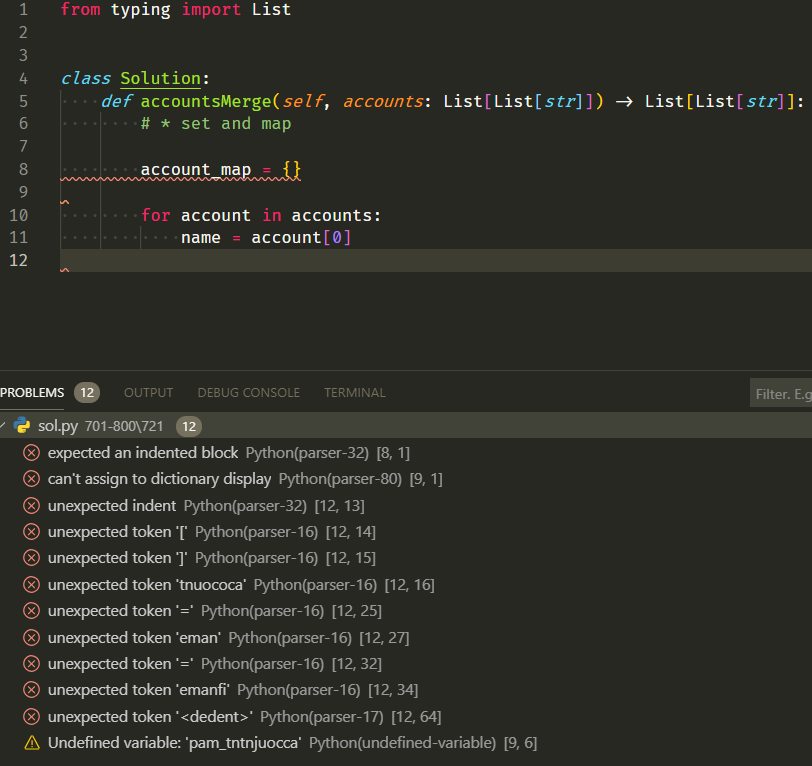
As shown in the figure below, the parser shouts these errors regarding "eman", "tnuococa", which are not in the file. There are other errors also. The actual file can be executed normally by an interpreter.
After inspecting the logs below, my guess is that it has something to do with this sol.py.4f805ae93a314088ee8dc430f8bf5945.py file. The actual file name is sol.py so the other file is probably some temp file generated during the execution of the extension.
from typing import List


class Solution:
    def accountsMerge(self, accounts: List[List[str]]) -> List[List[str]]:
        # * set and map

        account_map = {}

        for account in accounts:
            name = account[0]
Steps to reproduce:
- I can't really find an exact way to reproduce this. Usually when I first open a file the parser works fine. Some time later during editing it breaks. Reloading the window solves the problem temporarily.
Logs
The real project path has been replaced by <project_path> for privacy concerns. It only contains English letters (a-zA-Z) and backslashes.
Output for Python in the Output panel (View→Output, change the drop-down the upper-right of the Output panel to Python)
User belongs to experiment group 'ShowPlayIcon - runFile'
> conda --version
> pyenv root
> python3.7 -c "import sys;print(sys.executable)"
> python3.6 -c "import sys;print(sys.executable)"
> python3 -c "import sys;print(sys.executable)"
> python2 -c "import sys;print(sys.executable)"
> python -c "import sys;print(sys.executable)"
> py -3.7 -c "import sys;print(sys.executable)"
> py -3.6 -c "import sys;print(sys.executable)"
> py -3 -c "import sys;print(sys.executable)"
> py -2 -c "import sys;print(sys.executable)"
> C:\Programs\Python3.6\python.exe -c "import sys;print(sys.executable)"
> conda info --json
Starting Microsoft Python language server.
[Info  - 9:04:53 PM] Analysis cache path: C:\Users\luhao\AppData\Local\Microsoft\Python Language Server
[Info  - 9:04:53 PM] GetCurrentSearchPaths C:\Programs\Python3.6\python.exe
[Info  - 9:04:53 PM] Interpreter search paths:
[Info  - 9:04:53 PM]     c:\programs\python3.6\dlls
[Info  - 9:04:53 PM]     c:\programs\python3.6\lib
[Info  - 9:04:53 PM]     c:\programs\python3.6
[Info  - 9:04:53 PM]     c:\programs\python3.6\lib\site-packages
[Info  - 9:04:53 PM] User search paths:
[Info  - 9:04:56 PM] Microsoft Python Language Server version 0.3.47.0
[Info  - 9:04:56 PM] Initializing for C:\Programs\Python3.6\python.exe
> conda info --json
> conda --version
> C:\Programs\Python3.6\python.exe -m black -S --diff --quiet <project_path>\701-800\721\sol.py.4f805ae93a314088ee8dc430f8bf5945.py
cwd: <project_path>
> C:\Programs\Python3.6\python.exe -m black -S --diff --quiet <project_path>\701-800\721\sol.py.4f805ae93a314088ee8dc430f8bf5945.py
cwd: <project_path>
Output from Console under the Developer Tools panel (toggle Developer Tools on under Help; turn on source maps to make any tracebacks be useful by running Enable source map support for extension debugging)
(...)
console.ts:137 [Extension Host] No editors associated with document: <project_path>\701-800\721\sol.py
t.log @ console.ts:137
console.ts:137 [Extension Host] Info Python Extension: 2019-08-15 21:05:01: Cached data exists getEnvironmentVariables, <project_path>
notificationsAlerts.ts:40 Black does not support the "Format Selection" command
onDidNotificationChange @ notificationsAlerts.ts:40
console.ts:137 [Extension Host] swdc-vscode: storing kpm metrics
console.ts:137 [Extension Host] Info Python Extension: 2019-08-15 21:06:07: Cached data exists getEnvironmentVariables, <project_path>\701-800\721\sol.py
console.ts:137 [Extension Host] Info Python Extension: 2019-08-15 21:06:07: > C:\Programs\Python3.6\python.exe -m black -S --diff --quiet <project_path>\701-800\721\sol.py.4f805ae93a314088ee8dc430f8bf5945.py
console.ts:137 [Extension Host] Info Python Extension: 2019-08-15 21:06:07: cwd: <project_path>
console.ts:137 [Extension Host] Info Python Extension: 2019-08-15 21:06:07: > C:\Programs\Python3.6\python.exe -m black -S --diff --quiet <project_path>\701-800\721\sol.py.4f805ae93a314088ee8dc430f8bf5945.py
console.ts:137 [Extension Host] Info Python Extension: 2019-08-15 21:06:07: cwd: <project_path>
console.ts:137 [Extension Host] swdc-vscode: error posting data for /commits, message: Request failed with status code 500
console.ts:137 [Extension Host] swdc-vscode: storing kpm metrics
Activity
haollhao commentedon Aug 16, 2019
On second thought the strange file name could also be because of git. And reversing the Python extension version to 2019.6.24221 doesn't solve the problem. So the cause might have something to do with git integration for either vscode or the Python/git extensions because I recently initiated the project as a git repo.