Repository navigation
TSServer High CPU usage #31248

Description

- VSCode Version: 1.32.3
- OS Version: Fedora 29
Steps to Reproduce:
- Install clean stable VSCode with neo extensions or setting
- Open large project with sub projects
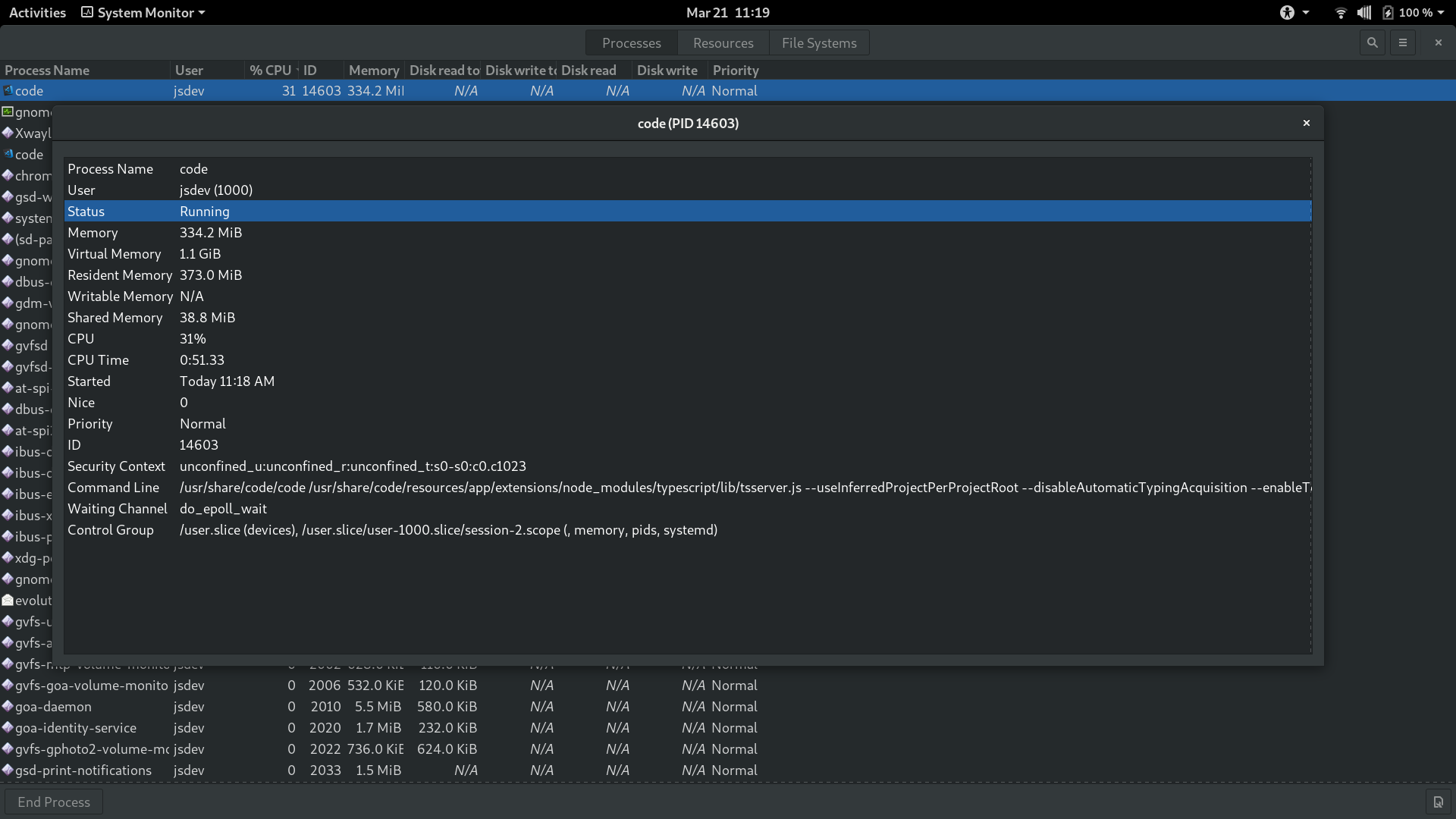
- Check System Monitor -> HIGH CPU Usage, almost non usable OS
I tried to turn off some settings, but nothing help.
It caused by TSServer.js build-in "TypeScript and JavaScript Language Features" extension.
Solution: Disable "TypeScript and JavaScript Language Features" build-in extensions.


Does this issue occur when all extensions are disabled?: Yes
Activity
mjbvz commentedon Mar 21, 2019
Does this reproduce in the latest VS Code insiders build with all extensions disabled?
kasik96 commentedon Mar 21, 2019
Matt Bierner (@mjbvz) Yes :/

kasik96 commentedon Mar 21, 2019
Also i have the same problem with Ubuntu (Unity, XFCE), Mate and Fedora.
kasik96 commentedon Mar 26, 2019
Matt Bierner (@mjbvz) Any update on this bug? Also tested on Manjaro, i have same problem. It does not look it happens on Windows, it has little more CPU use, but not that much as in Linux.
ZachGoldberg commentedon Apr 16, 2019
Same here. Ubuntu 18.04. Identical symptoms. Disabling JS & TS features built-in also fixes it.
abhishek-rs commentedon Apr 18, 2019
Have the same issue on MacOS Mojave. Using this as a workaround -
"javascript.validate.enable": falsemjbvz commentedon Apr 18, 2019
Martin Kase (@kasik96) Please try collecting the TS Server log:
"typescript.tsserver.log": "verbose",TypeScript: Open TS Server logcommandtsserver.logfile in itIf you can share the log, I can also take a look to see if anything stands out that could be causing this
kasik96 commentedon Apr 18, 2019
Matt Bierner (@mjbvz) Yeah, no problem, here it is: https://gist.github.com/kasik96/0af966b0b28f7a118025e50f943429d8
stefems commentedon Apr 24, 2019
+1
I'm having the same cpu issue with
eletron_node tsserver.jsas shown in the vs code process explorer. Pls fix soon. My laptop has been melting my fingers. Suggestion by abhishek-rs has been working thus far.npesa92 commentedon May 1, 2019
+1 Having the same issue here. One line change will spike CPU and show electron_node tsserver.js as the problem
SeedyROM commentedon May 3, 2019
+1 Can confirm on Ubuntu 16.04, problem seems to be stemming from tsserver. I have nearly identical logs to kasik96. Use an older version of VSCode in the mean time instead of trying to hack this into working!
mjbvz commentedon May 4, 2019
Moving this upstream as I don't see anything that stands out in those logs.
Can you please try upgrading your workspace to use
typescript@nextby following these instructions just to make sure this hasn't already been fixed34 remaining items
mordka commentedon Dec 17, 2019
Same problem in WebStorm https://intellij-support.jetbrains.com/hc/en-us/community/posts/360003579280-IntelliJ-node-processes-using-a-lot-of-CPU-on-TypeScript-project-IntelliJ-performance-suffers-?flash_digest=13598a0eb3a2ffbcf8004d50e974872587e71957
Disabling tsserver in WebStorm fixes the excessive CPU usage
arielsalminen commentedon Dec 21, 2019
Have been facing this exact issue as well on the latest macOS for the past few weeks and haven’t been able to solve it.
sheetalkamat commentedon Jan 30, 2020
@cushmatt can you please try typescript@next to see if the issue still repros.. We made some changes to directory watching for Linux and it might have fixed the issue with the files being watched..
If the issue still repros, please share new tsserver log with the latest build when the issue repros to be able to investigate this further
m0xj commentedon Apr 22, 2021
I am still experiencing this issue with VSCode Insider and typescript@next.
mjbvz commentedon Apr 23, 2021
@puppeteer701 Please open a new issue with information about your project
Closing this since we cannot investigate this without more info from the original poster