Repository navigation
Importing types in JS files stopped working. #27302
Description

Issue Type: Bug
There
VS Code version: Code - Insiders 1.28.0-insider (2558a72, 2018-09-21T05:12:46.853Z)
OS version: Darwin x64 15.6.0
System Info
| Item | Value |
|---|---|
| CPUs | Intel(R) Core(TM)2 Duo CPU P7350 @ 2.00GHz (2 x 2000) |
| GPU Status | 2d_canvas: unavailable_software checker_imaging: disabled_off flash_3d: unavailable_software flash_stage3d: unavailable_software flash_stage3d_baseline: unavailable_software gpu_compositing: unavailable_software multiple_raster_threads: disabled_off native_gpu_memory_buffers: unavailable_software rasterization: unavailable_software video_decode: unavailable_software video_encode: unavailable_software webgl: unavailable_off webgl2: unavailable_off |
| Load (avg) | 4, 11, 10 |
| Memory (System) | 8.00GB (0.12GB free) |
| Process Argv | /Applications/Visual Studio Code - Insiders.app/Contents/MacOS/Electron -psn_0_2023918 |
| Screen Reader | no |
| VM | 0% |
Extensions (5)
| Extension | Author (truncated) | Version |
|---|---|---|
| vscode-eslint | dba | 1.6.0 |
| svg | joc | 0.1.4 |
| autoimport | ste | 1.5.3 |
| code-spell-checker | str | 1.6.10 |
| vscode-wakatime | Wak | 1.2.3 |
Since last week, importing of external types has stopped working.
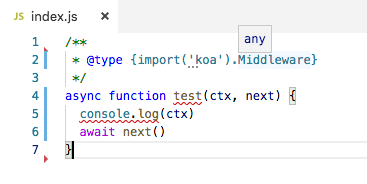
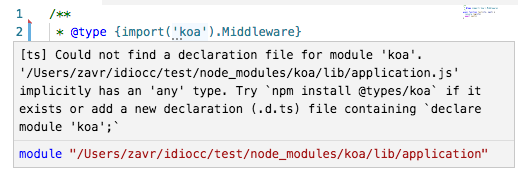
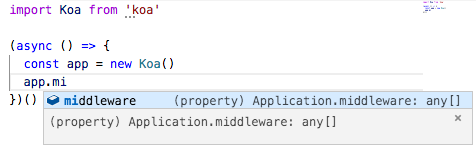
It works in non-insiders. This has definitely worked in insiders fine last week.

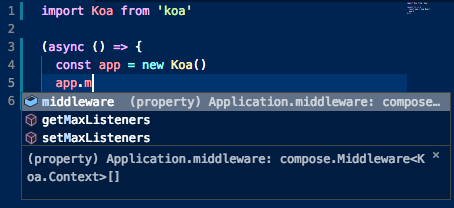
And no I don't want to convert to TypeScript.
Activity
sandersn commentedon Sep 24, 2018
My initial attempt at a repro failed -- everything succeeded. I'm going to try a clean
npm initetc since I was testing in a directory with an explicit tsconfig.json and that already had@types/koainstalled. This might be a failure in automatic type acquisition, since@types/koahasapp.middleware: compose.Middleware<koa.Context>[]notany[].Do you have a tsconfig.json or jsconfig.json? Or have you explicitly done
npm install @types/koa?sandersn commentedon Sep 24, 2018
From a fresh start, I can't repro your errors either; I think VS Code was either automatically installing
@types/koaor perhaps it was in your package.json, because the types you have from your Working screenshot references types that are only in the d.ts, not in the actual package.Specifically,
koa.Middlewareis a type defined only in the .d.ts.Andy (Andrewkraft) (@Andy-MS) Does this look like a failure in Automatic Type Acquisition?
zavr-1 Since this appears to be a problem with either the language service or VS Code, can you set the language service to dump its logs somewhere and send them to me or Andy (Andrewkraft) (@Andy-MS)? You have to set this environment variable:
SET TSS_LOG=-level verbose -file C:\temp\logs\tsserver.log. We'd like to see the log from setting up a new project that uses koa, then pasting in the simple repro you gave above.My Microsoft mail is nathansa.
zavr-1 commentedon Sep 24, 2018
Hi no I don't have
tsconfigorjsconfigI was just using running project as I always do and writingtype {import('koa').Middleware}worked on Friday and then I came back after the weekend it stopped after a restart, so I reckoned it must be some commit that got merged... also it's not just middleware it's everything.Here's the log tsserver.log
And this is the repo https://github.com/idiocc/test
zavr-1 commentedon Sep 24, 2018
Andy (Andrewkraft) (@Andy-MS) This is with
@nexttsserver.log
zavr-1 commentedon Sep 25, 2018
And so it works today... Sorry don't know what's happened. The only thing different from last night was that there was a pending update (restart to update) to
2018-09-24T11:57:32.166Zbut it started working before I restarted. I guess it can be closed now...zavr-1 commentedon Sep 25, 2018
I Think it's the same issue. To reproduce:
git clone git@github.com:idiocc/test.gitcd test; git checkout insidercode-insiders .idio-- thekoa-routerwill have an error. (I have an error because it's not discovered). Although there seems to be a type, it's not from definitions and is incomplete. If I don't specify the return type explicitly, I won't have neither router nor middleware as shown in the referenced issue. I really don't think I should have to write types for my packages when I just return objects created with constructors.If I add it as package dependency, it works fine.
JacksonKearl commentedon Sep 26, 2018
Getting this as well, simple repro:
VSCode 1.27.2
TypeScript 3.0.3
package.json:
npm installmain.ts:
tsconfig.json:
peteroid commentedon Oct 10, 2018
I was experiencing this issue while using the vscode with default Typescript version 3.1.0. Finally got the intellisense back after downgrading the ts to 3.0.3