You signed in with another tab or window. Reload to refresh your session.You signed out in another tab or window. Reload to refresh your session.You switched accounts on another tab or window. Reload to refresh your session.Dismiss alert
{{ message }}
Repository navigation
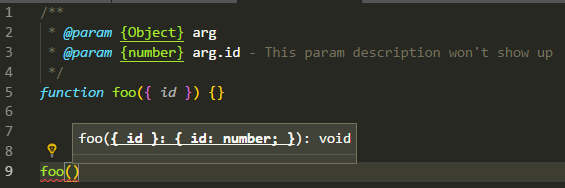
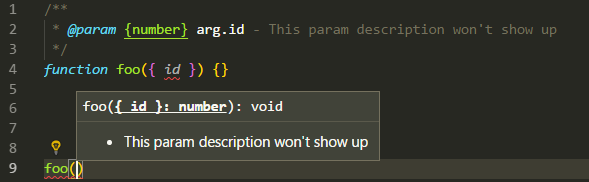
JSDoc comment for destructuring param: description text not displayed #24746
That's because TypeScript treats JSDoc types object and Object as any. You can designate a generic object using Object.<string, any>. So, redoing the above will give you the proper intellisense for id:
/** * @param {Object.<string, any>} arg * @param {number} arg.id - This param description will show up */functionfoo({ id }){}// Intellisense for id will workfoo({id: 1})
Reacted by Albert Mañosa, Adarsh Hatwar, Zoé de Moffarts, Esteban Echeverry and Kartikeya Pande
@THoisington, for that to work, you need to first define a custom object for the options, and then define its properties. Then you assign that custom type as your parameter:
This appears to have popped up in several issues, perhaps there could be some consolidation: #11597 and #11859, for example.
Robert Biggs (@rbiggs) , I attempted your solution and found the vscode intellisense didn't display the subkeys or comments at all when using the @typedef and @property combination.
At the risk of making a huge comment, I will document my findings here.
Outcome 1: ❌ Top level details, ❌ subkey descriptions, ❌ current subkey highlighting.
JSDOC that caused this:
/** * @typedef {Object} requiredArguments * @property {string} timeSince Beginning date for the range... * @property {string} timeUntil End date for the range... *//** * @param {requiredArguments} * @param {*} options - { filterUserId, filterCustomerId ... } * @see https://www.clockodo.com/en/api/entries/ */
/** * @param {Object} requiredArguments * @param {string} requiredArguments.timeSince - Beginning date for the range... * @param {string} requiredArguments.timeUntil - End date for the range... * @param {Object} options { filterUserId, filterCustomerId ... } * @see https://www.clockodo.com/en/api/entries/ */
/** * @typedef {Object.<string, any>} RequiredArguments * @property {string} RequiredArguments.timeSince - Beginning date for the range... * @property {string} RequiredArguments.timeUntil - End date for the range... *//** * @param {RequiredArguments} params * @param {Object} options { filterUserId, filterCustomerId ... } */
Outcome 2: ✅ Top level details, ✅ subkey descriptions, ❌ current subkey highlighting.
JSDOC that caused this:
/** * @typedef {Object.<string, any>} RequiredArguments * @param {string} timeSince - Beginning date for the range... * @param {string} timeUntil - End date for the range... *//** * @param {RequiredArguments} params * @param {Object} options { filterUserId, filterCustomerId ... } */
/** * @typedef {Object} RequiredArguments * @param {string} RequiredArguments.timeSince - Beginning date for the range... * @param {string} RequiredArguments.timeUntil - End date for the range... *//** * @param {RequiredArguments} paramsss * @param {Object} options { filterUserId, filterCustomerId ... } */
I could move this comment to a different issue if it helps.
Interestingly, both the typedef and the integrated properties syntax work if you declare the argument you're destructuring to be a @property instead of the @param that it is.
Apologies if this is not intended to be supported, the JSDoc docs only show examples where the types are in JSDoc (for object destructuring), but I know that VSCode does display the tooltip for regular parameters even when I don't put types in JSDoc.
Is JSDoc dead? This is not solved after more than 4 years.
Reacted by Radim Baštan, Marek Krajčovič, Sophia, Sam Grönblom, Joseph Sawa, Cody-Jian, Darius Jankauskas, a928230991, Kartikeya Pande and Jeancarlo Fontalvo (Pirani)
I have found the simplest cleanest solution for this mess.
/**
* Main entrypoint and recommended function to use for route navigation.
* @param {string} location - The path or url to navigate to, serves as a fallback url when goBack is true
* @param {object} [config] - Additional configuration to alter the navigation
* @property {object} [config]
* @param {boolean} [config.replace] - If true, will use replace instead of push. This bypasses the browser history mechanism.
* @param {boolean} [config.newTab] - If true, will open the url in a new tab, using window.open bypassing router
* navigation.
* @param {function} [config.callback] - If a function, will be called after navigation has ended
* @param {boolean} [config.goBack] - If true, will use the browser history mechanism to go back. If going back leaves
* the page, e.g. triggers beforeunload event, we warn the user, if he wants to stay in the page we redirect to the
* provided url, which serves as a fallback.
*/
Reacted by Vladimir Kolchurin and Alessandro Rubino
David (@dagadbm) At least there's some work-around. It still doesn't seem to cut it for me, though. take a look:
exportclassExtendedPromiseErrorextendsError{/** * `val: "default"` assigns `this.val = val(){return {}}`\ * you can also assign any value to this prop * * @param {String} message - required by the parent `Error` class * @param {object} options - optional * @param {string} [options.cause] - specific reason * @param {string|any} [options.val] - for cases when handler needs to return a value * @param {string} [options.once] - if attaching a listener is undesirable */constructor(message,options){super(message)this.message=messagethis.name="Extended Promise Error"this.cause=options?.causeif(options?.val){if(options.val==="default"){this.val=()=>{return{}}}else{this.val=options.val}}}}
is there a jsconfig.js / tsconfig.ts setting i'm missing/misusing?
I have found the simplest cleanest solution for this mess.
/**
* Main entrypoint and recommended function to use for route navigation.
* @param {string} location - The path or url to navigate to, serves as a fallback url when goBack is true
* @param {object} [config] - Additional configuration to alter the navigation
* @property {object} [config]
* @param {boolean} [config.replace] - If true, will use replace instead of push. This bypasses the browser history mechanism.
* @param {boolean} [config.newTab] - If true, will open the url in a new tab, using window.open bypassing router
* navigation.
* @param {function} [config.callback] - If a function, will be called after navigation has ended
* @param {boolean} [config.goBack] - If true, will use the browser history mechanism to go back. If going back leaves
* the page, e.g. triggers beforeunload event, we warn the user, if he wants to stay in the page we redirect to the
* provided url, which serves as a fallback.
*/
On Thu, Feb 2, 2023, 16:21 Joseph Sawa ***@***.***> wrote:
I have found the simplest cleanest solution for this mess.
/**
* Main entrypoint and recommended function to use for route navigation.
* @PARAM {string} location - The path or url to navigate to, serves as a fallback url when goBack is true
* @PARAM {object} [config] - Additional configuration to alter the navigation
* @Property {object} [config]
* @PARAM {boolean} [config.replace] - If true, will use replace instead of push. This bypasses the browser history mechanism.
* @PARAM {boolean} [config.newTab] - If true, will open the url in a new tab, using window.open bypassing router
* navigation.
* @PARAM {function} [config.callback] - If a function, will be called after navigation has ended
* @PARAM {boolean} [config.goBack] - If true, will use the browser history mechanism to go back. If going back leaves
* the page, e.g. triggers beforeunload event, we warn the user, if he wants to stay in the page we redirect to the
* provided url, which serves as a fallback.
*/
[image: image]
<https://user-images.githubusercontent.com/16737095/215473857-4a260050-6bf6-4168-a7c6-88bf31a0bbf1.png>
Sadly this leaves out type information.
—
Reply to this email directly, view it on GitHub
<#24746 (comment)>,
or unsubscribe
<https://github.com/notifications/unsubscribe-auth/AD7WGR47F3SSIKFUTWTCRS3WVPNKJANCNFSM4FDYEENQ>
.
You are receiving this because you were mentioned.Message ID:
***@***.***>
This is still an issue. The official jsdoc gives this example
/** * Assign the project to an employee. * @param {Object} employee - The employee who is responsible for the project. * @param {string} employee.name - The name of the employee. * @param {string} employee.department - The employee's department. */Project.prototype.assign=function({ name, department }){// ...};
I'm unsure if this could be related to the issue, but I noticed that semicolons are being added instead of commas to object parameters. This happens regardless of using the dot-notation or object definition syntax.
That is, both of the following result in the above tooltip:
/** * Space object stores snippet groupings in buckets. * @param {{name: string, synced: boolean, data: DataBucket}} params */
Bumping up this. It's a major issue. Destructured parameters have been around since ES6, and JSDoc has an official documentation on how to document them properly. They're used everywhere, why was it never properly supported in VSCode's JSDoc tooltips?
Reacted by Daniel Steigerwald, Zoé de Moffarts and Landon Alder
Activity
mhegazy commentedon Jun 7, 2018
PRs welcomed.
rbiggs commentedon Jul 6, 2018
That's because TypeScript treats JSDoc types
objectandObjectasany. You can designate a generic object usingObject.<string, any>. So, redoing the above will give you the proper intellisense forid:tannerbaum commentedon Sep 14, 2018
Robert Biggs (@rbiggs) That does indeed work. However, VSCode only displays the description of the first parameter in the destructured object.
I feel like we are so close here!
rbiggs commentedon Sep 14, 2018
@THoisington, for that to work, you need to first define a custom object for the options, and then define its properties. Then you assign that custom type as your parameter:
That'll give you IntelliSense for each property on the options parameter.
tannerbaum commentedon Sep 17, 2018
This appears to have popped up in several issues, perhaps there could be some consolidation: #11597 and #11859, for example.
Robert Biggs (@rbiggs) , I attempted your solution and found the vscode intellisense didn't display the subkeys or comments at all when using the
@typedefand@propertycombination.At the risk of making a huge comment, I will document my findings here.
Outcome 1: ❌ Top level details, ❌ subkey descriptions, ❌ current subkey highlighting.
JSDOC that caused this:
Outcome 2: ✅ Top level details, ✅ subkey descriptions, ❌ current subkey highlighting.
JSDOC that caused this:
I could move this comment to a different issue if it helps.
fix(todo): JSDocのdestructuringの記法を修正
feat(todo): Todoアプリの課題を追加 (#620)
sandersn commentedon Jan 31, 2019
#11859 is just for Typescript, but is otherwise the same. Let's use this issue to track bugs in the Javascript side.
lookuh commentedon Apr 7, 2020
Interestingly, both the typedef and the integrated properties syntax work if you declare the argument you're destructuring to be a
@propertyinstead of the@paramthat it is.3 remaining items
Juanpam commentedon Sep 20, 2021
Jems (@J3m5) I agree! Just my workaround for this issue. Still hoping this gets reviewed soon.
kolchurinvv commentedon May 9, 2022
having the same issue with in vscode in javascript using a named parameter

ShadowLNC commentedon Jul 22, 2022
I seem to have the same issue but I am not specifying my types in JSDoc because I'm explicitly specifying them on the function, e.g.:
Apologies if this is not intended to be supported, the JSDoc docs only show examples where the types are in JSDoc (for object destructuring), but I know that VSCode does display the tooltip for regular parameters even when I don't put types in JSDoc.
PoulBak commentedon Aug 8, 2022
Is JSDoc dead? This is not solved after more than 4 years.
joesawa commentedon Jan 26, 2023
Problem still persists into 2023.
dagadbm commentedon Jan 30, 2023
I have found the simplest cleanest solution for this mess.
kolchurinvv commentedon Jan 30, 2023
David (@dagadbm) At least there's some work-around. It still doesn't seem to cut it for me, though. take a look:
is there a
jsconfig.js/tsconfig.tssetting i'm missing/misusing?dagadbm commentedon Jan 30, 2023
You are missing the empty line I added with the Property part.
kolchurinvv commentedon Jan 30, 2023
that was dumb of me 🤣 - worked like a charm! 💯
joesawa commentedon Feb 2, 2023
Sadly this leaves out type information.
dagadbm commentedon Feb 2, 2023
woodjs commentedon May 1, 2023
My decision
dmrickey commentedon Jun 22, 2023
This is still an issue. The official jsdoc gives this example
Found here https://jsdoc.app/tags-param.html#parameters-with-properties
subheader - Documenting a destructuring parameter
I'd expect the tooltip to work if the jsdoc is correct per its own documentation
jpc-ae commentedon Sep 26, 2023
I'm unsure if this could be related to the issue, but I noticed that semicolons are being added instead of commas to object parameters. This happens regardless of using the dot-notation or object definition syntax.
That is, both of the following result in the above tooltip:
I wasn't able to find where this semicolon is being added in the jsdoc parser, but could someone please fix that at least?
Genroa commentedon Oct 13, 2023
Bumping up this. It's a major issue. Destructured parameters have been around since ES6, and JSDoc has an official documentation on how to document them properly. They're used everywhere, why was it never properly supported in VSCode's JSDoc tooltips?