You signed in with another tab or window. Reload to refresh your session.You signed out in another tab or window. Reload to refresh your session.You switched accounts on another tab or window. Reload to refresh your session.Dismiss alert
PrecompiledAssemblyException: Multiple precompiled assemblies with the same name Library.dll included for the current platform. Only one assembly with the same name is allowed per platform. Assembly paths: Assets/Scripts/Library/bin/Debug/netstandard2.0/Library.dll, Assets/Scripts/Library/obj/Debug/netstandard2.0/Library.dll
In fact I'm looking for a tool that would allow me to use weaving code on unity, like Fody
I'd love to kill that project if MSBuildForUnity offers something that would allow using Fody directly instead :) (Of course without specifically adding support for it - more like "makes the regular build pipelines one uses outside of Unity just work" 😄)
You should definitely be able to use Fody with MSBuildForUnity. In the case described above by Loïc Lopez (@loic-lopez), the problem is that by default, the build for csproj puts the compiled dll in both the obj directory and the bin directory, and so Unity sees it twice and doesn't know how to handle it. There are a couple ways to deal with this, but the simplest is to put the project in a directory that Unity won't process. To do this, you can either:
Move the csproj outside of the Unity project's Assets directory, and set the in the csproj to be a directory under Assets. This way, the final outputs (normally in the bin directory) will be pushed into the Unity project.
Andrei Borodin (@andreiborodin) is doing a bunch of work on the project generation side that will make this easier. The generated projects ultimately will be used for both consuming dependencies - ProjectReference (MSBuild project) or PackageReference (NuGet package). We'll have more samples demonstrating this soonish.
Also I think the best solution is the second choice:
Move the csproj outside of the Unity project's Assets directory, and set the in the csproj to be a directory under Assets. This way, the final outputs (normally in the bin directory) will be pushed into the Unity project.
Also in theory I should be able to use the Fody library through this example: https://github.com/microsoft/MSBuildForUnity/tree/master/Samples/SimpleNuGetDependency.Unity
I would like to do something like that with Fody in a MonoBehaviour:
public class MyBehaviour : MonoBehaviour
{
[Time]
public void MyMethod()
{
//Some code u are curious how long it takes
Console.WriteLine("Hello");
}
}
Ref: Fody/MethodTimer
Thanks for your help.
Ok, so I am not very familiar with Fody, however, as I understand it's two NuGet packages and then a special compilation step that replaces default source compilation?
I think you can craft a special C# project based on the AsmDef generated projects. It references generated .g.props and g.targets that will be geneerated when you open the Editor. Those generated props/targets reference Unity libraries and can allow you to build Unity scripts outside of Unity.
This special crafted project with it's script should be invisible to Unity, so either outside of Assets or in a folder that is prefixed with a dot '.' in the assets folder.
You can then reference that project from Dependencies.msb4u.csproj.
You will need to have Auto Generation Enabled for this, so start with IntegratedDependencies.msb4u sample.
But I would like to log the exec time of a MonoBehaviour private member like my example above, and with and external project, I think I will not able to extends from `MonoBehaviour no?
So that what I was trying to say in my longer post above. The IntegratedDependencies.Unity generates the C# Projects and Solution that can be used to build compiled Unity binaries outside of Unity editor.
So, you can do the same for your code, and have it live outside of Unity, and as long as it references the same imports as the generated props, it should build.
I will see if I can find sometime and hack up a C# project for you.
There are two very similar C# projects that are of interest to you:
CustomUnityBuild
CustomUnityBuild.Player
You can find notes in them that I added, they are prefixed "anborod NOTE::"
They both reference the same source file under .src folder (invisible to Unity) which is in fact a Unity MonoBehaviour.
These projects get build by Unity, and then they rely on current Editor's very own DLLs to build against and place the output into Unity.
Caveat! I had to check-in the meta files, as I couldn't properly hook into our metafilegenerator (there is a task on us to reconcile this). There are two being produced.
Additionally, I have to have two projects to build current platform editor version and player version, we will support a better way in the future.
Finally, any NuGet referenced by these projects will be brought in regardless if any other project file in Unity references the same NuGet package already.
Andrei Borodin (@andreiborodin) I have encountered multiple issue when building the IntegratedDependencies.Unity on Unity 2018.4.12
example:
C:\Users\Dev\Desktop\MSBuildForUnity\Samples\IntegratedDependencies.Unity\Assets\CustomUnityBuild\CustomUnityBuild.csproj(54,3): error MSB4019: The imported project "C:\.InEditor.props" was not found. Confirm that the path in the <Import> declaration is correct, and that the file exists on disk
C:\Users\Dev\Desktop\MSBuildForUnity\Samples\IntegratedDependencies.Unity\Assets\CustomUnityBuild\CustomUnityBuild.Player.csproj(64,3): error MSB4019: The imported project "C:\.Player.props" was not found. Confirm that the path in the <Import> declaration is correct, and that the file exists on disk.
C:\Users\Dev\Desktop\MSBuildForUnity\Samples\IntegratedDependencies.Unity\Assets\Dependencies.msb4u.csproj(33,3): error MSB4019: The imported project "C:\Dependencies.msb4u.g.props" was not found. Confirm that the path in the <Import> declaration is correct, and that the file exists on disk.
Sorry if I miss something I'm very not familiar with msbuild.
Unity needs to open for MSBuildForUnity to generate the needed props files, and then VS can build the project; or you can have MSBuildForUnity build the project.
System.NullReferenceException: Object reference not set to an instance of an object
at Microsoft.Build.Unity.ProjectGeneration.Exporters.TemplatedProjectExporter.ProcessPlatformTemplate (Microsoft.Build.Unity.ProjectGeneration.Templates.ITemplatePart rootPart, Microsoft.Build.Unity.ProjectGeneration.Templates.TemplateReplacementSet rootReplacementSet, System.String platformName, System.String configuration, UnityEditor.BuildTarget buildTarget, Microsoft.Build.Unity.ProjectGeneration.TargetFramework targetFramework, System.Collections.Generic.IEnumerable`1[T] references, System.Collections.Generic.IEnumerable`1[T] defines, System.Collections.Generic.HashSet`1[System.String][] priorToCheck) [0x000da] in C:\Users\LoicL\Desktop\MSBuildForUnity\Source\MSBuildTools.Unity\Packages\com.microsoft.msbuildforunity\Editor\ProjectGenerator\Scripts\Exporters\TemplatedProjectExporter.cs:534
at Microsoft.Build.Unity.ProjectGeneration.Exporters.TemplatedProjectExporter.ExportPlatformPropsFile (Microsoft.Build.Unity.ProjectGeneration.CompilationPlatformInfo platform, System.Boolean inEditorConfiguration) [0x000a2] in C:\Users\LoicL\Desktop\MSBuildForUnity\Source\MSBuildTools.Unity\Packages\com.microsoft.msbuildforunity\Editor\ProjectGenerator\Scripts\Exporters\TemplatedProjectExporter.cs:504
at Microsoft.Build.Unity.ProjectGeneration.MSBuildTools.ExportCoreUnityPropFiles () [0x00029] in C:\Users\LoicL\Desktop\MSBuildForUnity\Source\MSBuildTools.Unity\Packages\com.microsoft.msbuildforunity\Editor\ProjectGenerator\Scripts\MSBuildTools.cs:169
at Microsoft.Build.Unity.ProjectGeneration.MSBuildTools.RegenerateEverything (System.Boolean reparseUnityData) [0x000da] in C:\Users\LoicL\Desktop\MSBuildForUnity\Source\MSBuildTools.Unity\Packages\com.microsoft.msbuildforunity\Editor\ProjectGenerator\Scripts\MSBuildTools.cs:206
at Microsoft.Build.Unity.ProjectGeneration.MSBuildTools.RunCoreAutoGenerate (System.Boolean skipTokenFileCheck) [0x0003b] in C:\Users\LoicL\Desktop\MSBuildForUnity\Source\MSBuildTools.Unity\Packages\com.microsoft.msbuildforunity\Editor\ProjectGenerator\Scripts\MSBuildTools.cs:154
at Microsoft.Build.Unity.ProjectGeneration.MSBuildTools..cctor () [0x0006f] in C:\Users\LoicL\Desktop\MSBuildForUnity\Source\MSBuildTools.Unity\Packages\com.microsoft.msbuildforunity\Editor\ProjectGenerator\Scripts\MSBuildTools.cs:138
UnityEditor.EditorAssemblies:ProcessInitializeOnLoadAttributes(Type[])
EDIT1: this error above was fixed by reinstalling VS
So after compiling mannually the CustomUnityBuild.csproj I was able to add Fody and MethodTimer.Fody to the deps:
usingSystem.Collections;usingSystem.Collections.Generic;usingSystem.Reflection;usingMethodTimer;usingUnityEngine;publicclassExternalMonoBehaviour:MonoBehaviour{// Start is called before the first frame update[Time]voidStart(){Debug.Log(typeof(ExternalMonoBehaviour).BaseType.FullName);}}publicstaticclassMethodTimeLogger{publicstaticvoidLog(MethodBasemethodBase,longmilliseconds,stringmessage){Debug.Log("FROM WEAVING");}}
Awesome of the result, but could you tell me if you are still able to repro the Unity editor issues. If you check-in your changes to the proj file, do a git clean, and then open Unity again, what do you get?
Ok, well just to be pedantic I will try that again, but I have been doing various testing and not seeing anything regarding failing to parse the template.
I wonder if there is something about my context that is different from yours, one you said you re-installed VS and that changed the behavior.
I appreciate you trying this and finding issues, it helps me fix the few issues.
Activity
bddckr commentedon Nov 4, 2019
Have a look at https://github.com/ExtendRealityLtd/Malimbe/.
I'd love to kill that project if MSBuildForUnity offers something that would allow using Fody directly instead :) (Of course without specifically adding support for it - more like "makes the regular build pipelines one uses outside of Unity just work" 😄)
loic-lopez commentedon Nov 4, 2019
Thanks for this reference I will try it soon as possible.
Closing this issue.
ryantrem commentedon Nov 5, 2019
You should definitely be able to use Fody with MSBuildForUnity. In the case described above by Loïc Lopez (@loic-lopez), the problem is that by default, the build for csproj puts the compiled dll in both the obj directory and the bin directory, and so Unity sees it twice and doesn't know how to handle it. There are a couple ways to deal with this, but the simplest is to put the project in a directory that Unity won't process. To do this, you can either:
.(Unity ignores these). Check out the current sample project for this route: https://github.com/microsoft/MSBuildForUnity/tree/master/Source/MSBuildTools.Unity/Assets/SamplesAndrei Borodin (@andreiborodin) is doing a bunch of work on the project generation side that will make this easier. The generated projects ultimately will be used for both consuming dependencies - ProjectReference (MSBuild project) or PackageReference (NuGet package). We'll have more samples demonstrating this soonish.
loic-lopez commentedon Nov 5, 2019
Thanks Ryan Tremblay (@ryantrem), I will wait for your samples 🥇
Also I think the best solution is the second choice:
andreiborodin commentedon Nov 19, 2019
#35 Has just been put in, there are now two samples linked from the main readme:
https://github.com/microsoft/MSBuildForUnity/#msbuildforunity
Tagging for notification. Loïc Lopez (@loic-lopez), Christopher-Marcel Esser (@bddckr)
loic-lopez commentedon Nov 19, 2019
Andrei Borodin (@andreiborodin) Thanks, but the two links are broken in the readme.
loic-lopez commentedon Nov 19, 2019
Also in theory I should be able to use the Fody library through this example:
https://github.com/microsoft/MSBuildForUnity/tree/master/Samples/SimpleNuGetDependency.Unity
I would like to do something like that with Fody in a MonoBehaviour:
Ref: Fody/MethodTimer
Thanks for your help.
andreiborodin commentedon Nov 19, 2019
Oh wow, GitHub is case sensitive on that link for "README.md", will update.
andreiborodin commentedon Nov 19, 2019
Ok, so I am not very familiar with Fody, however, as I understand it's two NuGet packages and then a special compilation step that replaces default source compilation?
We currently let Unity compile our scripts, however, we in the https://github.com/microsoft/MSBuildForUnity/tree/master/Samples/IntegratedDependencies.Unity sample we do setup C# projects for asmdefs in the repo that reference all the Unity libraries.
I think you can craft a special C# project based on the AsmDef generated projects. It references generated .g.props and g.targets that will be geneerated when you open the Editor. Those generated props/targets reference Unity libraries and can allow you to build Unity scripts outside of Unity.
This special crafted project with it's script should be invisible to Unity, so either outside of Assets or in a folder that is prefixed with a dot '.' in the assets folder.
You can then reference that project from Dependencies.msb4u.csproj.
You will need to have Auto Generation Enabled for this, so start with IntegratedDependencies.msb4u sample.
loic-lopez commentedon Nov 19, 2019
Andrei Borodin (@andreiborodin) yes Fody will weave assemblies after the dll are generated.
I will try the IntegratedDependencies.Unity so.
But I would like to log the exec time of a
MonoBehaviourprivate member like my example above, and with and external project, I think I will not able to extends from `MonoBehaviour no?andreiborodin commentedon Nov 19, 2019
So that what I was trying to say in my longer post above. The IntegratedDependencies.Unity generates the C# Projects and Solution that can be used to build compiled Unity binaries outside of Unity editor.
So, you can do the same for your code, and have it live outside of Unity, and as long as it references the same imports as the generated props, it should build.
I will see if I can find sometime and hack up a C# project for you.
andreiborodin commentedon Nov 20, 2019
I managed to hack up some stuff quickly, Loïc Lopez (@loic-lopez) I have a PR for you here: #61
There are two very similar C# projects that are of interest to you:
You can find notes in them that I added, they are prefixed "anborod NOTE::"
They both reference the same source file under .src folder (invisible to Unity) which is in fact a Unity MonoBehaviour.
These projects get build by Unity, and then they rely on current Editor's very own DLLs to build against and place the output into Unity.
Caveat! I had to check-in the meta files, as I couldn't properly hook into our metafilegenerator (there is a task on us to reconcile this). There are two being produced.
Additionally, I have to have two projects to build current platform editor version and player version, we will support a better way in the future.
Finally, any NuGet referenced by these projects will be brought in regardless if any other project file in Unity references the same NuGet package already.
Hopefully this get's you started.
loic-lopez commentedon Nov 20, 2019
Andrei Borodin (@andreiborodin) thanks for your help I will try out your PR as soon as possible!
loic-lopez commentedon Nov 20, 2019
Andrei Borodin (@andreiborodin) I have encountered multiple issue when building the
IntegratedDependencies.Unityon Unity 2018.4.12example:
Sorry if I miss something I'm very not familiar with msbuild.
andreiborodin commentedon Nov 20, 2019
Did you try opening the Unity solution first?
Unity needs to open for MSBuildForUnity to generate the needed props files, and then VS can build the project; or you can have MSBuildForUnity build the project.
andreiborodin commentedon Nov 21, 2019
Also, there was a bug that I fixed in master, so I updated the branch.
loic-lopez commentedon Nov 21, 2019
Andrei Borodin (@andreiborodin) Hi again, so I pulled your update and there is other issues on Unity startup:
EDIT1: this error above was fixed by reinstalling VS
These issues are also displayed when I try to
Build All Projectsin the MSBuild menu.EDIT2: By opening mannually the solution CustomUnityBuild.csproj it compiles and output the DLL
loic-lopez commentedon Nov 21, 2019
So after compiling mannually the CustomUnityBuild.csproj I was able to add Fody and MethodTimer.Fody to the deps:
And the console print:
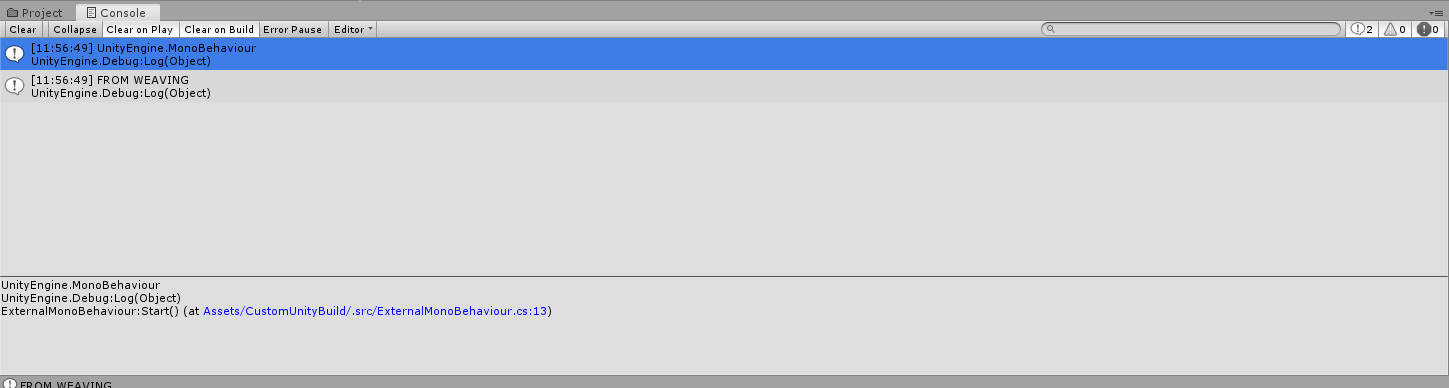
So Fody is weaving the assembly pretty well!
andreiborodin commentedon Nov 21, 2019
Awesome of the result, but could you tell me if you are still able to repro the Unity editor issues. If you check-in your changes to the proj file, do a git clean, and then open Unity again, what do you get?
I would like to work out those kinks.
loic-lopez commentedon Nov 21, 2019
Andrei Borodin (@andreiborodin) I always use the Unity editor, and also I have pulled the latest change on the custom branch.
andreiborodin commentedon Nov 21, 2019
Ok, well just to be pedantic I will try that again, but I have been doing various testing and not seeing anything regarding failing to parse the template.
I wonder if there is something about my context that is different from yours, one you said you re-installed VS and that changed the behavior.
I appreciate you trying this and finding issues, it helps me fix the few issues.
loic-lopez commentedon Nov 21, 2019
Thanks you again for helping me to integrate Fody.
andreiborodin commentedon Nov 22, 2019
Closing this issue, opened another issue to track supporting this concrete scenario.