Repository navigation
Rows of text seem clipped at certain font sizes on Catalina #905
Description

Running 8.1.950 on Catalina, when I start MacVim, some lowercase letters are getting clipped:
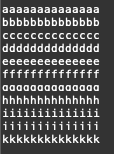
If I adjust the font size and then adjust it back, things are rendered correctly:

This started as soon as I upgraded to Catalina -- Mojave was fine. My font settings are English/Menlo/Regular/11
Activity
ychin commentedon Jun 11, 2019
I will need to see if I can repro this under the new Xcode. Otherwise could be tricky as I don't have a beta Catalina install with me.
adamjacobmuller commentedon Jun 14, 2019
Happens for me after upgrading to catalina, but, only with Core Text renderer enabled.
With Core Text renderer disabled things are actually considerably worse.

actual:eirnym commentedon Jun 14, 2019
I'd wait for first public beta. Before that point macOS is not really usable at all
adamjacobmuller commentedon Jun 14, 2019
Aside from the MacVim issue my workflow is fine and I've just been running
viminstead.eirnym commentedon Jun 15, 2019
I'm really surprised to read it! This release will be the first one with relatively stable betas, since it wasn't a case since macOS 10.7 Beta 1
eirnym commentedon Jun 26, 2019
Public Beta is out…
eirnym commentedon Jun 26, 2019
It's interesting, I can reproduce it with
guifont=Menlo-Regular:h11, but not withguifont=Fira\ Code\ Light:h12jjgod commentedon Jul 28, 2019
This is a duplicate of #883.
jjgod commentedon Jul 28, 2019
Oh, @eirnym, it's because the comparison sees that the new font
Menlo-Regular:h11is the same as the default font initialized by-[MMCoreTextView initWithFrame:]and skip rest of the initialization:That's why in this case
fontDescentis still properly initialized.jjgod commentedon Jul 28, 2019
eirnym commentedon Jul 28, 2019
I've tried it after Fira Code, to guarantee that it's a different one
jjgod commentedon Jul 28, 2019
That's why you are not hitting the problem with Fira Code.
eirnym commentedon Jul 28, 2019
and what's about Menlo?
I've set Fira Code first, then Menlo, and issue still exists. This doesn't neglect your issue on
fontDescent, though. Probably, in macOS Catalina this parameter becomes more valuable to set if it's not.jjgod commentedon Jul 28, 2019
How exactly did you do that? Did you execute multiple
set guifontcommand?8 remaining items
ychin commentedon Oct 10, 2019
Next update will be out this weekend.
hoke-t commentedon Oct 14, 2019
Any updates on this?
isaki commentedon Oct 14, 2019
As per @eirnym, I am posting this here and closing my issue.
I can confirm this is still an issue after the weekend.
I am running the latest release:

And can confirm fonts still look strange:

And that the changing the font size back and forth fixes things:

My macOS version:
eirnym commentedon Oct 15, 2019
@isaki Thank you for an addition, Please, write which distribution of MacVim do you use (e.g. GitHub, Homebrew, MacPorts, etc) and which font are you using (
:set guifont?)tobireif commentedon Oct 15, 2019
Here it fixes it temporarily for that one buffer/window, but not permanently.
(I'm using the distribution from https://github.com/macvim-dev/macvim/releases plus auto-updates.)
:set guifont?saysguifont=Menlo:h16hoke-t commentedon Oct 15, 2019
I have the exact issue as well. I always have to increase and then decrease the font size upon opening a file to fix the clipping.
Using macOS 10.15 build version 19A583, Homebrew distribution of MacVim, and
set guifont?givesguifont=Menlo-Regular:h11.isaki commentedon Oct 15, 2019
@eirnym I am using the GitHub distribution of MacVim.
I apparently have no font set once so ever:

Also, commands are also being chopped off:

Finally, this is the font setup that seems to be in use when I run

set guifont=*:I hope this information helps!
eirnym commentedon Oct 15, 2019
Thank you, this is fixed in
HEAD. So I hope @ychin will find the time to prepare a release.jimsiff commentedon Oct 17, 2019
Thank you @eirnym and @ychin. It's fixed for me after building 8.1.2102 on Catalina.
MacVim Snapshot 158
MacVim Snapshot 159
ychin commentedon Oct 17, 2019
This should be fixed in snapshot-159. Let me know if it isn't.
isaki commentedon Oct 17, 2019
This has indeed fixed it, thank you!
hoke-t commentedon Oct 17, 2019
Can confirm as well. Thanks!