Repository navigation
Unicode characters clipped #1110
Description

Unicode characters display as clipped in MacVim, which doesn't happen in terminal Vim.
Bug description
In MacVim unicode characters such as 𝒜𝒞𝒫𝑸𝒁 are clipped off (the first lines have these characters being rendered by tex-conceal), the last few lines are just unicode in the textfile, if this matters.

This is how it looks in terminal Vim, not perfect (these characters overlap their neighbours... see the "𝒫(Ω)" for instance), but much preferred to the clipping

If I turn off the "Preferences > Advanced > Use Core Text Renderer" option, then this particular issue goes away, but I know this is deprecated, and it has lots of other problems, like introducing weird line-spacing issues.
Is there a solution for this?
Environment:
- Vim version 8.2 [MacVim 8.2.1719 (166)], Included patches: 1-1719, Compiled by Homebrew
- macOS Catalina 10.15.6 (19G2021)
- Terminal iTerm2
Activity
ychin commentedon Oct 18, 2020
Please don't turn off Core Text Renderer. As you said it's deprecated and doesn't work properly and the option will be removed soon.
#858 should fix this but we are still ironing some issues with it.
Ultimately though, with how Vim rendering works, every character has to be aligned on the column, and it doesn't really do well on things like 𝒫(Ω) because the "𝒫" just takes up too much space. Even with the space it will still look a little weird with it poking into the next character.
ychin commentedon Oct 18, 2020
Alternatively, you can use the new-ish feature and do
call setcellwidths([[0x1d4ab, 0x1d4ab, 2]]).0x1d4abis the unicode number for "𝒫", and doing this allows you to make it take up two columns instead of one to reduce any clipping and make it look nicer as well. You can use Vim commandgawhen cursor is on a character to see what the code is.postylem commentedon Oct 18, 2020
I see, thanks for the response! For now, is there a way to get macvim to just show the characters overlapping, rather than clip them (that is, to get the same behaviour as in terminal vim, in my second screenshot)?
Custom-adjusting the width with
setcellwidths()for each glyph I want to use for my primary use-case it isn't useful, because it doesn't work for the glyphs which are put there by tex-conceal (it seems it only works for glyphs that are typed in as unicode characters, not ones that are displayed to 'conceal' tex code... I don't know enough about that to understand why).ychin commentedon Oct 18, 2020
No, not for now until the pull request I mentioned above gets merged.
Examples? I think it should work regardless how the text gets there. If you are using Terminal Vim for example, you can shift-select to select the raw text and paste it here.
postylem commentedon Oct 19, 2020
Ah it does work, I was messing up the syntax. Thanks!
There's still a small difference betwen the characters that show up because of tex-conceal, and the characters that are entered directly, when there is a newline after (see below).
I'll continue to work with this for now, setting a list of characters to display as double width as I need.
For reference:
To make both 𝓟 (0x1d4d0) and 𝓐 (0x1d4df) be double-wide, I call
:call setcellwidths([[0x1d4d0, 0x1d4d0, 2], [0x1d4df, 0x1d4df, 2]])This is before:

As you can see,
and this is after calling setcellwidths for those two unicode codepoints
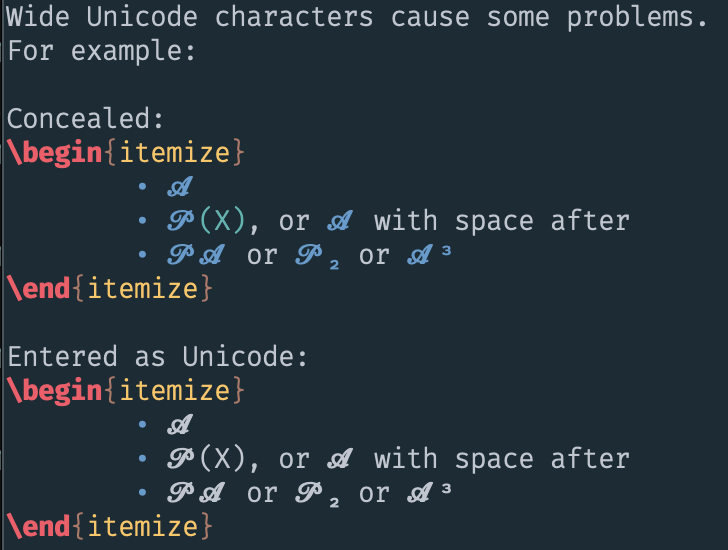
For comparison, this is what it looks like in terminal Vim (iTerm2). No clipping ever, just overlap.

Note: if I call

:call setcellwidths([[0x1d4d0, 0x1d4d0, 2], [0x1d4df, 0x1d4df, 2]])in terminal vim I get some odd things:It seems not to be playing very well with the conceal stuff.
ychin commentedon Oct 20, 2020
So I'm confused. Both screenshots look similar. Are they both done in the terminal? Can you provide more info? It's hard to debug through screenshots.
Info include:
If one screenshot is GUI and the other one is terminal that just means it's a terminal issue, not conceal-related. (And I could repro that in terminal as well)
I think the actual issue is
setcellwidthis buggy, and tbh should the discussion should be at Vim itself instead of this issue.postylem commentedon Oct 22, 2020
Sorry to be confusing. To clarify: the first two screenshots in my previous post were with macvim, and the second two were with terminal vim (iTerm2).
The setcellwidth solution works for me. But just to document clearly the behaviour I was decribing, for the benefit of anyone reading this later, here goes:
Here is a .tex document:
When I use macvim to edit this file, I see the following (with tex-conceal), where

and after running my cursor across the text:Now, if I run

:call setcellwidths([[0x1d4d0, 0x1d4d0, 2], [0x1d4df, 0x1d4df, 2]])to set the cellwidths to double for the two offending characters (U+1D4DF: MATHEMATICAL BOLD SCRIPT CAPITAL P, and U+1D4D0: MATHEMATICAL BOLD SCRIPT CAPITAL A), then I seeThis is a workable fix for me. I'll close the issue. Thank you.
There is still a question about why the unicode characters rendered from tex-conceal show a slightly different behaviour than the plain unicode characters, but I suppose that's due to something related to the fact that when I pass my cursor over the text the clipping shows up (I can't pass the cursor over the concealed text, because it becomes un-concealed when the cursor is on that line).
My possibly relevant vimrc lines