You signed in with another tab or window. Reload to refresh your session.You signed out in another tab or window. Reload to refresh your session.You switched accounts on another tab or window. Reload to refresh your session.Dismiss alert
Now that KT-11618 appears to be fixed, it would be awesome to add a Run configuration to either the build.gradle or the idea project to run the script launched via "kscript --idea script"
It would be indeed great to do so. However this would be rather an independent (sub)project.
I've created a few extensions for Idea, but I'm not sure if it would be possible to extend the Kotlin Script Runtime Config to use a custom classpath and to use runtime-opts as defined in the script. This is because in order to do so we would need to declare a dependency on another plugin.
Currently my preferred way to run a kscript is to launch a tmp-project with --idea and run the script with a regular script run configuration in there.
I tried kscript --idea and it is kind of slow to launch and doesn't work at all unless I first close idea. Also it does not pick up any dependencies I add to the kscript. This is not really a great setup because it means I lose a minute every time I tinker with that because I have to close idea and regenerate another project and open that. This gets tedious really quickly. Also, I noticed the version of gradlew is a couple of versions behind (4.8 is current).
I'd also prefer a more vanilla kotlin/gradle/idea setup with generated files simply added to .gitignore.
IMHO some of the syntactic sugar comes at too great of a cost without really adding a lot of value for me. I don't really mind having e.g. a main method or having my dependencies in a build.gradle file (actually think I think this is easier to manage). Also, recent gradle versions actually allow using kotlin as the language instead of groovy. This might solve a few integration issues that you currently solve with annotations and comments. Maybe consider letting gradle do what it does best and scripting around that instead of working around it and then trying to fight an uphill battle to get intellij to do sane things.
The key added value of kscript is the REPL and an easy & fast way to run it from the command line. However, intellij is key to any serious editing so if that is not flawless, it becomes an obstacle. So, generating this on a need to have basis every time you want to do some edits is kind of painful. Instead it would be nice to be able to just generate an opinionated gradle file in kotlin format that intellij understands.
I tried kscript --idea and it is kind of slow to launch and doesn't work at all unless I first close idea.
Hmm, it is rather quick for me. Like between 2sec (no dependencies) to 10sec (with some dependencies).
Also it does not pick up any dependencies I add to the kscript.
Indeed that's a problem, once the project has been opened there is no currently no way to sync dependencies between the script and the gradle.file. It's also annoying me.
Also, I noticed the version of gradlew is a couple of versions behind (4.8 is current).
kscript does not bundle gradle but simply uses what's present on your machine.
IMHO some of the syntactic sugar comes at too great of a cost without really adding a lot of value for me.
If so, kscript might be not the tool for you.
Also, recent gradle versions actually allow using kotlin as the language instead of groovy.
Imho, the gradle build script and kscript have different scopes. The former is for build scripts, the latter for arbitrary user logic.
intellij is key to any serious editing so if that is not flawless,
I fully agree that streamlining the integration with IJ is important. Most likely the correct solution will be a dedicated plugin for IJ that understands the syntactic sugar of kscript, and is able to translate it into a run-configuration.
Thanks; just trying to give some constructive criticism here based on my first impressions.
To be clear, it's not using my local gradle and instead is using the gradle wrapper for 4.4. I guess this is intellij being a bit silly about not detecting the gradle that I have on my path and insisting on an old version when you select the wrapper. Normally, I would use the project gradle wrapper. So I was assuming this is part of what you generate but I guess I was wrong. In any case, that import dialog only pops up when I close intellij. It does not work with my normal setup where I have multiple projects open. Having to do that every time I change a dependency is kind of a bummer.
IMHO kscript and gradle overlap quite a bit when it comes to things like managing classpaths, dependency management, building, and running stuff. Also, IDEs like intellij are already integrated with gradle. I get your point that your design goals are different with kscript. But still, why not work with tools that already do that job well? Obviously, intellij integration is a bit lacking currently and I'd say this is a big reason. The kotlin integration in gradle is of course a recent thing and I appreciate your work predates that; but it might make things easier for you to integrate now that it is there. E.g. they have a dsl for dependencies that is probably a bit nicer to deal with than doing things in comments or annotations.
I was assuming this is part of what you generate but I guess I was wrong. In any case, that import dialog only pops up when I close intellij.
It might be an IJ issue then. I think the expected behavior when you launch idea <some_dir_with_a_gradle_build_file> is to always show the gradle import dialog. Just incase there is no gradle file, it would skip the dialog and import the directoy in to a dummy project.
IMHO kscript and gradle overlap quite a bit when it comes to things like managing classpaths, dependency management, building, and running stuff.
Indeed both are some kind of build tool. Having a bidirectional sync kscript<->gradle_in_project would be a great addition, but it requires a non-trivial IJ plugin which is build around APIs which were just finished in the last couple of months (and which are still in flux imho).
Feel welcome to jump in here with a bold PR/project implementing some basic version of such a plugin! :-)
they have a dsl for dependencies that is probably a bit nicer to deal with than doing things in comments or annotations.
Declaring dependencies is just one among many aspects of gradle which is designed to cover a complete build-test-deploy process.
In contrast, kscript is just designed for running scripts with dependencies in a concise way by allowing for annotation-driven script configuration.
Concerning a DSL for dependencies you could check out Kotlin/KEEP#75 I'm watching this ticket, and as soon as there is some kind of community convergence towards a common set of annotations, kscript is likely to adopt them.
From what I've experienced, the only feature which is missing in kscript with respect to dependency declaration, is exclusion (see #12 ). Feel welcome to file ticket if some other aspect should be supported as well.
My .0001 Euro, I have found more obvious to me lately that kotlin is so subtle that its difficult to author outside an IDE -- primarily due to (IMHO) non-local scope and context. E.g when I type
variable<dot>let {
80% + of the time Im not entirely sure what "it" or "this" is, and if I am , Im certianly not sure what extension functions are in scope -- let alone what 'globals' (unqualified properties/functions). Add to that the 'normal' Java library monolith -- what package IS Files in ? java.io? java.nio? java.io.paths? I cant remember them all -- in fact at any given time, even though I've been programming in java for 20+ years, Id give myself a 10% chance of guessing the package, class, and method correct for a given function I need. Then multiply by a 10% chance of spelling it right -- and it comes to a halt quickly.
I have found that the classic iterative method of compile/build/edit/compile etc with kotlin is slower then java (which was slow to begin). And MUCH more so with kscript ! Why ? because kscript raises the bar by another 10x of hiding all the hints and scope etc -- without all those import statements cluttering the view good luck knowing if you have imported the right thing :)
The end result -- to do more then a single short expression -- I am less productive with kscript + no IDE then with no kscript + IDE. Which is annoying because I love the concept of scripting in a static typed
language.
Solutions:
better IDE integration (above issues, and others such as kscript 'projects') so that I can stay in the IDE if I want to and still do scripting ..
Ramp it up another level and build more DSL's so you don't need to remember the subtle stuff (only now you need to remember the DSL :) LIke Gradle ... I get by with Gradle without IDE assistance.
Narrow my use case -- the strongest use case myself is for expression parsing at runtime -- allowing users interactively (or in config files) to include runtime expressions where otherwise constants (or long complex property files) are used. That is a very focused version of DSL.
An example: I have a program which uses AWS SQS to manage email routing. I populate a handful of headers from the email then call a kotlin script that returns a boolean indicating "send" vs "drop" .
Much like procmail -- but instead of inventing yet more clever and subtle syntax, just use kotlin.
I'd be mostly in favor of (1). But having "just" a Run Configuration for kscripts won't solve the problem of coding assistance which is an entirely different part of Intellij's API.

Activity
holgerbrandl commentedon May 23, 2018
It would be indeed great to do so. However this would be rather an independent (sub)project.
I've created a few extensions for Idea, but I'm not sure if it would be possible to extend the Kotlin Script Runtime Config to use a custom classpath and to use runtime-opts as defined in the script. This is because in order to do so we would need to declare a dependency on another plugin.
Also usability would be (at least initially) limited because debugging is still not supported https://youtrack.jetbrains.net/issue/KT-11473
Currently my preferred way to run a kscript is to launch a tmp-project with
--ideaand run the script with a regular script run configuration in there.jillesvangurp commentedon Jun 19, 2018
I tried kscript --idea and it is kind of slow to launch and doesn't work at all unless I first close idea. Also it does not pick up any dependencies I add to the kscript. This is not really a great setup because it means I lose a minute every time I tinker with that because I have to close idea and regenerate another project and open that. This gets tedious really quickly. Also, I noticed the version of gradlew is a couple of versions behind (4.8 is current).
I'd also prefer a more vanilla kotlin/gradle/idea setup with generated files simply added to .gitignore.
IMHO some of the syntactic sugar comes at too great of a cost without really adding a lot of value for me. I don't really mind having e.g. a main method or having my dependencies in a build.gradle file (actually think I think this is easier to manage). Also, recent gradle versions actually allow using kotlin as the language instead of groovy. This might solve a few integration issues that you currently solve with annotations and comments. Maybe consider letting gradle do what it does best and scripting around that instead of working around it and then trying to fight an uphill battle to get intellij to do sane things.
The key added value of kscript is the REPL and an easy & fast way to run it from the command line. However, intellij is key to any serious editing so if that is not flawless, it becomes an obstacle. So, generating this on a need to have basis every time you want to do some edits is kind of painful. Instead it would be nice to be able to just generate an opinionated gradle file in kotlin format that intellij understands.
holgerbrandl commentedon Jun 19, 2018
Hmm, it is rather quick for me. Like between 2sec (no dependencies) to 10sec (with some dependencies).
Indeed that's a problem, once the project has been opened there is no currently no way to sync dependencies between the script and the gradle.file. It's also annoying me.
kscript does not bundle gradle but simply uses what's present on your machine.
If so, kscript might be not the tool for you.
Imho, the gradle build script and kscript have different scopes. The former is for build scripts, the latter for arbitrary user logic.
I fully agree that streamlining the integration with IJ is important. Most likely the correct solution will be a dedicated plugin for IJ that understands the syntactic sugar of kscript, and is able to translate it into a run-configuration.
jillesvangurp commentedon Jun 19, 2018
Thanks; just trying to give some constructive criticism here based on my first impressions.
To be clear, it's not using my local gradle and instead is using the gradle wrapper for 4.4. I guess this is intellij being a bit silly about not detecting the gradle that I have on my path and insisting on an old version when you select the wrapper. Normally, I would use the project gradle wrapper. So I was assuming this is part of what you generate but I guess I was wrong. In any case, that import dialog only pops up when I close intellij. It does not work with my normal setup where I have multiple projects open. Having to do that every time I change a dependency is kind of a bummer.
IMHO kscript and gradle overlap quite a bit when it comes to things like managing classpaths, dependency management, building, and running stuff. Also, IDEs like intellij are already integrated with gradle. I get your point that your design goals are different with kscript. But still, why not work with tools that already do that job well? Obviously, intellij integration is a bit lacking currently and I'd say this is a big reason. The kotlin integration in gradle is of course a recent thing and I appreciate your work predates that; but it might make things easier for you to integrate now that it is there. E.g. they have a dsl for dependencies that is probably a bit nicer to deal with than doing things in comments or annotations.
holgerbrandl commentedon Jun 20, 2018
You can configure the gradle in IJ under
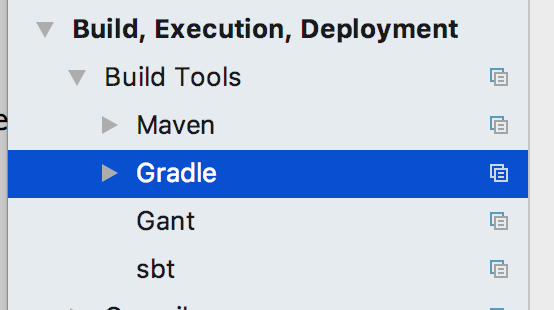
It might be an IJ issue then. I think the expected behavior when you launch
idea <some_dir_with_a_gradle_build_file>is to always show the gradle import dialog. Just incase there is no gradle file, it would skip the dialog and import the directoy in to a dummy project.Indeed both are some kind of build tool. Having a bidirectional sync kscript<->gradle_in_project would be a great addition, but it requires a non-trivial IJ plugin which is build around APIs which were just finished in the last couple of months (and which are still in flux imho).
Feel welcome to jump in here with a bold PR/project implementing some basic version of such a plugin! :-)
Declaring dependencies is just one among many aspects of gradle which is designed to cover a complete build-test-deploy process.
In contrast, kscript is just designed for running scripts with dependencies in a concise way by allowing for annotation-driven script configuration.
Concerning a DSL for dependencies you could check out Kotlin/KEEP#75 I'm watching this ticket, and as soon as there is some kind of community convergence towards a common set of annotations, kscript is likely to adopt them.
From what I've experienced, the only feature which is missing in kscript with respect to dependency declaration, is exclusion (see #12 ). Feel welcome to file ticket if some other aspect should be supported as well.
DALDEI commentedon Jul 17, 2018
My .0001 Euro, I have found more obvious to me lately that kotlin is so subtle that its difficult to author outside an IDE -- primarily due to (IMHO) non-local scope and context. E.g when I type
variable<dot>let {80% + of the time Im not entirely sure what "it" or "this" is, and if I am , Im certianly not sure what extension functions are in scope -- let alone what 'globals' (unqualified properties/functions). Add to that the 'normal' Java library monolith -- what package IS Files in ? java.io? java.nio? java.io.paths? I cant remember them all -- in fact at any given time, even though I've been programming in java for 20+ years, Id give myself a 10% chance of guessing the package, class, and method correct for a given function I need. Then multiply by a 10% chance of spelling it right -- and it comes to a halt quickly.
I have found that the classic iterative method of compile/build/edit/compile etc with kotlin is slower then java (which was slow to begin). And MUCH more so with kscript ! Why ? because kscript raises the bar by another 10x of hiding all the hints and scope etc -- without all those import statements cluttering the view good luck knowing if you have imported the right thing :)
The end result -- to do more then a single short expression -- I am less productive with kscript + no IDE then with no kscript + IDE. Which is annoying because I love the concept of scripting in a static typed
language.
Solutions:
An example: I have a program which uses AWS SQS to manage email routing. I populate a handful of headers from the email then call a kotlin script that returns a boolean indicating "send" vs "drop" .
Much like procmail -- but instead of inventing yet more clever and subtle syntax, just use kotlin.
holgerbrandl commentedon Jul 18, 2018
I'd be mostly in favor of (1). But having "just" a Run Configuration for kscripts won't solve the problem of coding assistance which is an entirely different part of Intellij's API.
holgerbrandl commentedon Aug 17, 2018
Closed in favor of #148
forrestbice commentedon Oct 13, 2019
I put up a PR which accomplishes this. For those curious it can be found here: #244