Repository navigation
Clarification on Windows prereqs #4688

Description

I was just addressing our (slightly variable) prereq story in the aspnet/Docs, and I noticed that the Windows topic in dotnet/docs is calling for the 2.0 SDK after the VS install. Looks like the topic needs an update for VS's latest install behavior. Note that the workload claims that it will install the .NET Core 1.0 - 1.1 development tools. I wish it said "SDK." My machine has had all of this stuff installed forever (and I was on VSC before I installed VS, so I had the SDK in place when I installed VS), so I can't really tell. Online MS docs regarding what that workload installs aren't clear (for example, here).
https://docs.microsoft.com/en-us/dotnet/core/windows-prerequisites?tabs=netcore2x
https://github.com/dotnet/docs/blob/master/docs/core/windows-prerequisites.md
Here's the correct (current) screenshot to replace the one in the topic:
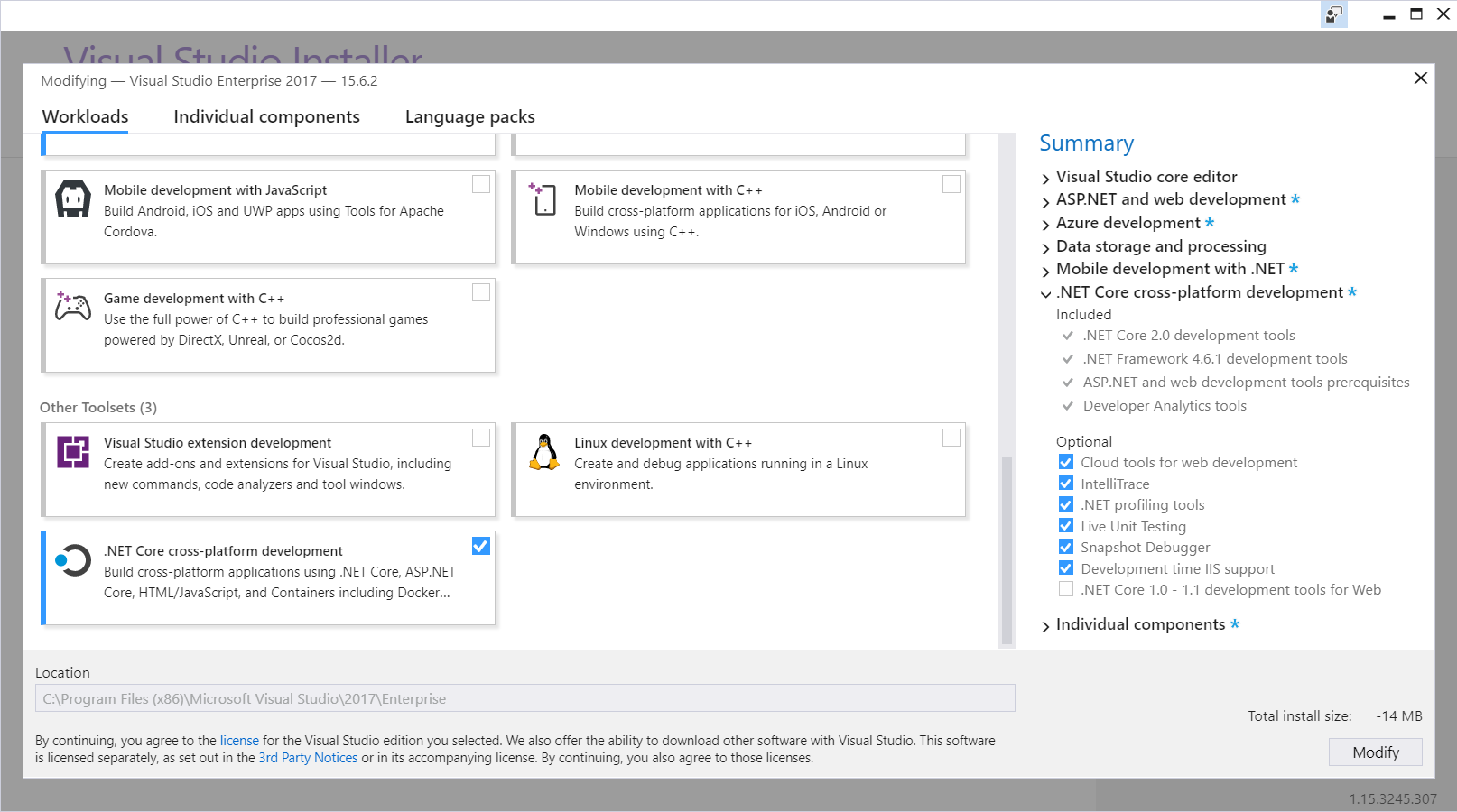
Also in passing, I wish the aspnet/Docs could link every "prereqs" section to one page in the dotnet/docs (an index page) that could then link to each of Windows, macOS, Linux pages. On the Windows page, it would be cool if it were cleanly broken down for CLI, VS, and VSC.
Activity
mairaw commentedon Mar 16, 2018
@JRAlexander can you take a look at this one?
@KathleenDollard FYI on a feedback about the VS installer
guardrex commentedon Mar 16, 2018
Seems strange: VSC works great on Windows, but the page seems to suggest that MS doesn't want devs to even consider it ... https://www.microsoft.com/net/download/windows
[EDIT] Same deal for the macOS panel: https://www.microsoft.com/net/download/macos
VSC 💔
Another ?: Does VS for Mac install the SDK on macOS? According to this topic, the answer is 'yes.'
JRAlexander commentedon Mar 16, 2018
Yeah, but it will need to be next sprint. :)
guardrex commentedon Mar 16, 2018
Sorry for all the noise 👂 over here. I'm trying to clean up our prereqs story in aspnet/Docs. I've created a set of three INCLUDES (Windows, macOS, VSC) to standardize what we show in many topics. They can't be used in all topics because some of the topics have particular combos of installers to run. The includes will show ...
Windows
[Visual Studio for Windows](https://www.microsoft.com/net/download/windows)
* **ASP.NET and web development** workload
* **.NET Core cross-platform development** workload
macOS
[Visual Studio for Mac](https://www.microsoft.com/net/download/macos)
VSC
Install the following:
[EDIT] Updated to show what we finally settled on ...
I'm also removing the "2.0 or later" language from references to the .NET Core SDK download. I'm just going to call that the ... well ... .NET Core SDK 😄 Versions have been tough for the community to grok. I suggest we keep it simple.Those links will go like this ...[EDIT] I'm updating this to show what we finally settled on ...
[.NET Core SDK 2.0 or later](https://www.microsoft.com/net/download)
mairaw commentedon Mar 16, 2018
Didn't say it had to be done today 😄
JRAlexander commentedon Mar 16, 2018
Let's not remove the version references.
guardrex commentedon Mar 16, 2018
I don't think it's critical, since they're going to be given one option on the downloads page, the latest stable. The purpose of removing it is to simplify the versioning by not describing it where it has no real bearing.
However, I'm cool with [.NET Core SDK 2.0 or later](https://www.microsoft.com/net/download) ... they're still only going to get one option on the download page. They'll have to dig if they actually want to go back for 1.x.
I think I'll make that an include. If we get to the point where we must require 2.1 (or for when we reach 3.0), then we'll only need to change it in one spot. I'll name that file plainly something like net-core-sdk-download-link.md.
Rick-Anderson commentedon Mar 21, 2018
That's what I thought too, but
@rowanmillerdid extensive testing and found it it only confuses newbies. See https://www.microsoft.com/net/learn/apps/web/get-started/windowsAt least for the most introductory tutorials, an install link w/o version is simpler. For the other tutorials, it might be best to have a version number.
JRAlexander commentedon Mar 21, 2018
We need to consider more than getting started scenarios. If someone is on an older version, they see a prereq for .NET Core w/o version number, but the tutorial requires, for example, 2.1 or higher, the experience will be negative. How do you solve that without version number?
@Rick-Anderson - Can you send me the thread from Rowan about the testing? I'd really like to read that and learn more.
9 remaining items
mairaw commentedon Sep 24, 2018
Moving this one to the backlog for now.