Skip to content

nbin: Make extract location more robust #1287

Closed

Description

@robpurdue
  • code-server version: 2.1698-vsc1.41.1
  • OS Version: linux-x86_64

Description

When running VS Code, the "Open Folder" command produces the error

"Unable to open {folder}: Unable to read file (Error: File not found)..."

Version 2.1692-vsc1.39.2 works correctly.

Steps to Reproduce

  1. Launch VS Code
  2. Choose "Open folder" from Welcome window or from File menu

Examples

Expected Behavior (2.1692-vsc1.39.2):
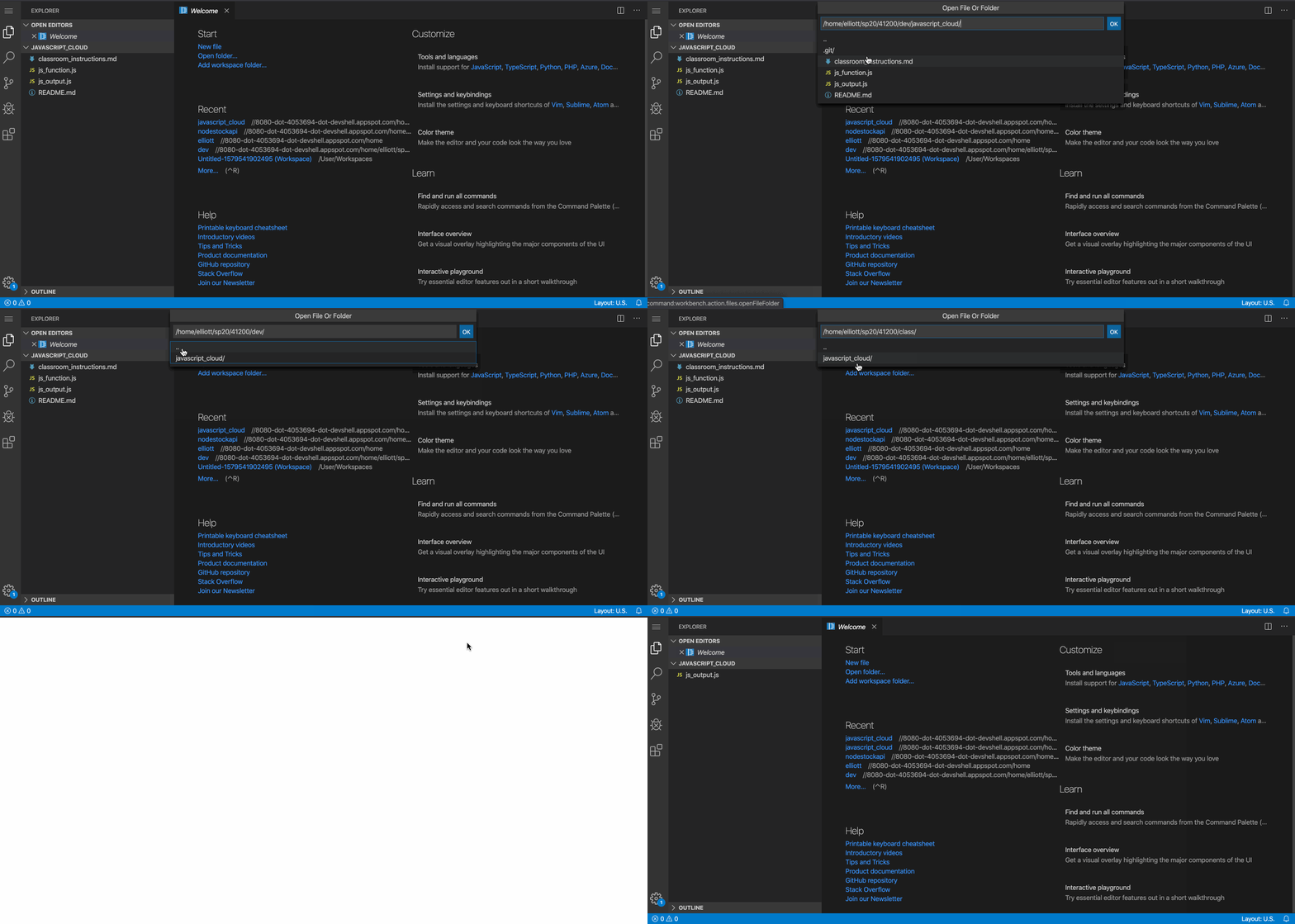
1 39 2_open_folder

Current Behavior (2.1698-vsc1.41.1):

1 41 1_open_folder

Activity

  1. changed the title [-]Cannot open folders in VS Code in 2.[/-] [+]Cannot open folders in VS Code in 2.1698-vsc1.41.1[/+] on Jan 20, 2020
  2. 4oo4 commented on Jan 20, 2020

    @4oo4

    I'm having this same behavior too. Not sure if it's related but I'm also unable to open a terminal, it's stuck at "Starting...". If that's something different I can open a separate issue. I see this in docker logs:

    Error: The module '/home/code/.cache/nbin/1.2.7/spdlog.node'
    was compiled against a different Node.js version using
    NODE_MODULE_VERSION 64. This version of Node.js requires
    NODE_MODULE_VERSION 72. Please try re-compiling or re-installing
    the module (for instance, using `npm rebuild` or `npm install`).
        at Object.Module._extensions..node (internal/modules/cjs/loader.js:1076:18)
        at Module.load (internal/modules/cjs/loader.js:832:32)
        at Function.Module._load (internal/modules/cjs/loader.js:744:14)
        at Module.require (internal/modules/cjs/loader.js:869:19)
        at Module.patchedRequire [as require] (/src/build/code-serverdaily-vsc1.41.1-linux-x86_64-built/node_modules/diagnostic-channel/dist/src/patchRequire.js:14:46)
        at require (internal/modules/cjs/helpers.js:74:18)
        at bindings (/src/build/code-serverdaily-vsc1.41.1-linux-x86_64-built/node_modules/bindings/bindings.js:112:48)
        at Object.<anonymous> (/src/build/code-serverdaily-vsc1.41.1-linux-x86_64-built/node_modules/spdlog/index.js:3:35)
        at Module._compile (internal/modules/cjs/loader.js:976:30)
        at Object.Module._extensions..js (internal/modules/cjs/loader.js:1018:10)
        at Module.load (internal/modules/cjs/loader.js:832:32)
        at Function.Module._load (internal/modules/cjs/loader.js:744:14)
        at Module.require (internal/modules/cjs/loader.js:869:19)
        at Module.patchedRequire [as require] (/src/build/code-serverdaily-vsc1.41.1-linux-x86_64-built/node_modules/diagnostic-channel/dist/src/patchRequire.js:14:46)
        at require (internal/modules/cjs/helpers.js:74:18)
        at t.load (/src/build/code-serverdaily-vsc1.41.1-linux-x86_64-built/out/vs/loader.js:16:119)
        at e.load (/src/build/code-serverdaily-vsc1.41.1-linux-x86_64-built/out/vs/loader.js:13:586)
        at i (/src/build/code-serverdaily-vsc1.41.1-linux-x86_64-built/out/vs/loader.js:29:189)
        at Object.errorback (/src/build/code-serverdaily-vsc1.41.1-linux-x86_64-built/out/vs/loader.js:29:313)
        at e.triggerErrorback (/src/build/code-serverdaily-vsc1.41.1-linux-x86_64-built/out/vs/loader.js:13:955)
        at /src/build/code-serverdaily-vsc1.41.1-linux-x86_64-built/out/vs/loader.js:13:659
        at /src/build/code-serverdaily-vsc1.41.1-linux-x86_64-built/out/vs/loader.js:16:494
        at nbin.js:670:13 {
      phase: 'loading',
      moduleId: 'spdlog',
      neededBy: [ '===anonymous3===' ]
    }
    
  3. mirekphd commented on Jan 20, 2020

    @mirekphd

    There seems to be a root requirement newly introduced by nbin in version 2.1698 of code-server. I managed to restore runs under arbitrary UIDs (an Openshift requirement) only after creating and making modifiable by any user the /home/coder/.cache folder that raises EACCES error:

    Error: EACCES: permission denied, mkdir '/home/coder/.cache/nbin'

  4. 4oo4 commented on Jan 20, 2020

    @4oo4

    @mirekphd Interesting, I got that too but figured it was something weird with my build process. That error goes away when I chown the .cache directory, but then I get that error with spdlog.

  5. code-asher commented on Jan 21, 2020

    @code-asher
    Member
  6. mirekphd commented on Jan 22, 2020

    @mirekphd

    The most common permissions for /tmp are:
    777 = rwxrwxrwx

    Therefore I would reverse the default cache location, defaulting to /tmp as before (where majority have all rights by default) and alowing the "special needs" users to set a non-standard location within /home/coder (where UID and thus access rights can vary with every user on secure platforms such as Openshift). Not only for backward compatibility, but also for frequency of use - only minority cannot execute from /tmp folder, most users can.

  7. 4oo4 commented on Jan 22, 2020

    @4oo4

    @code-asher I'll give that a try and let you know. Thanks for the tip

  8. code-asher commented on Jan 23, 2020

    @code-asher
    Member

    Opened coder/nbin#40 to address this.

  9. added
    blockedThis issue cannot proceed due to external factors
    and removed
    bugSomething isn't working
    on Jan 27, 2020
  10. changed the title [-]Cannot open folders in VS Code in 2.1698-vsc1.41.1[/-] [+]nbin: Make extract location more robust[/+] on Jan 27, 2020
  11. nhooyr commented on Feb 3, 2020

    @nhooyr
    Contributor

    See #1306

Sign up for free to join this conversation on GitHub. Already have an account? Sign in to comment

Metadata

Metadata

Assignees

No one assigned

    Labels

    blockedThis issue cannot proceed due to external factors

    Type

    No type

    Projects

    No projects

      Milestone

      No milestone

      Relationships

      None yet

      Development

      No branches or pull requests

      Issue actions