This repository was archived by the owner on Dec 15, 2022. It is now read-only.
Repository navigation
This repository was archived by the owner on Dec 15, 2022. It is now read-only.
Constants no longer marked #597
Description

Prerequisites
- Put an X between the brackets on this line if you have done all of the following:
- Reproduced the problem in Safe Mode: http://flight-manual.atom.io/hacking-atom/sections/debugging/#using-safe-mode
- Followed all applicable steps in the debugging guide: http://flight-manual.atom.io/hacking-atom/sections/debugging/
- Checked the FAQs on the message board for common solutions: https://discuss.atom.io/c/faq
- Checked that your issue isn't already filed: https://github.com/issues?utf8=✓&q=is%3Aissue+user%3Aatom
- Checked that there is not already an Atom package that provides the described functionality: https://atom.io/packages
Description
Constants and constant properties (all caps) are no longer marked as constants in the scope.
Steps to Reproduce
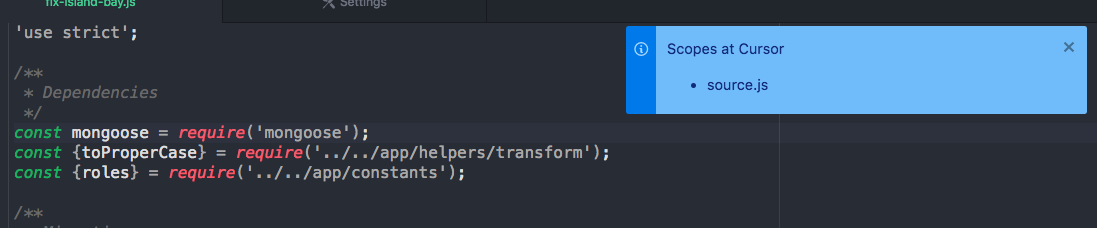

Expected behavior: [What you expect to happen]
Scopes at cursor should be constant and for the constants and constant properties to have correct syntax highlighting.
Actual behavior: [What actually happens]
All syntax highlighting for constants is gone, scope is reduced to source.js.
Reproduces how often: [What percentage of the time does it reproduce?]
100%
Versions
Atom : 1.32.0-nightly13
Electron: 2.0.9
Chrome : 61.0.3163.100
Node : 8.9.3
apm 2.1.2
npm 6.2.0
node 8.9.3 x64
atom 1.32.0-nightly13
python 2.7.10
git 2.14.1
OS X
Other information
Last worked correctly in Atom 1.32 nightly 6 iirc.
Activity
Arcanemagus commentedon Sep 20, 2018
adamreisnz commentedon Sep 20, 2018
Also incorrectly marking constants as
meta.classnow:These used to be marked as constants.
adamreisnz commentedon Sep 20, 2018
@Arcanemagus the 3 different screenshots are different code that exhibits the same problem now.
Please try either of these three examples:
const Foo = require('foo')Now incorrectly marked asmeta.classconst foo = require('foo')Now no longer marked as constant, not even variable, justsource.jsobj.FOO, theFOObit was marked as constant property, now just generic object propertyliatreis commentedon Sep 20, 2018
This is what the scopes used to be in the above examples:
So seems like
constant.other.jsandconstant.property.other.jsare no longer identified.adamreisnz commentedon Sep 20, 2018
Unchecking the Tree Sitter parser checkbox fixed the issue.
Arcanemagus commentedon Sep 21, 2018
Interesting, it looks like the toggling of Tree-sitter parsers wasn't working for me the first few times I toggled it, so in the above GIF I posted it was simply using Tree-sitter for both.
TextMate:


Tree-sitter:
I'd say this is more it is now correctly marked as class, generally when it is a capital first letter, and lower case for the rest it isn't a constant.
Textmate:


Tree-sitter:
This definitely looks like a bug to me at least, thanks!
TextMate:


Tree-sitter:
Looks like a regression to me as well, thanks!
Arcanemagus commentedon Sep 21, 2018
As a note, it looks like some of this was fixed/changed in #587.
maxbrunsfeld commentedon Sep 21, 2018
Yeah, these are both intentional changes. The TextMate scope that you're describing is really not a good feature in my opinion. Consider this code:
With the TextMate behavior, the two occurrences of
foowould have two different scopes; the second occurrence would not have theconstant.otherscope. This would usually result infooappearing in two different colors, which is really counterproductive to the overall purpose of syntax highlighting.It's not always 100% achievable, but with ideal syntax highlighting, different kinds of names would appear in different colors, but any given name would always appear the same color.
adamreisnz commentedon Sep 21, 2018
Thanks for confirming.
Yes, this generally holds true, but not in all cases. There will be some cases where the capitalised output of a 3rd party package is a singleton service instead of a class. For example, when using destructured importing like this, you have little control over how to name the variable:
I know you can do something like
const {FooService: fooService}but that's quite frankly a bit of a time waster and ugly, andFooServicewill still incorrectly be marked as a class.I can live with this one though.
This is correct, and this is exactly what happens. And while I agree that this behaviour is not ideal, I disagree with the solution being to just strip out constant marking altogether. Because while we have gotten used to the constants being coloured like plain variables further down the track in the code, it was still great to at least see clearly when a variable is defined, that it was a constant and not a plan mutable variable:
This made it clear at a glance with visual grepping that you're defining a constant, and not a mutable variable. Making them the same colour is reversing that and making it harder to distinguish. So despite the shortcomings of current syntax highlighting to be able to "keep track" of a constant further down the line, I don't think it's a good idea to get rid of it.
Same holds for
foo.BAR. Having theBARmarked as a constant property really aids in finding constants like this in our code. We use structures our constants like that extensively, e.g.:Later, it's very convenient to have syntax highlighting identify them as constants, when used like:
Once again if
areaStates.modeandareaStates.MODEget the same highlighting, it reduces visual grepping and the ability to quickly distinguish constant and variable properties on an object.maxbrunsfeld commentedon Sep 21, 2018
Yeah, applying the
constant.other.propertyscope to all-caps properties likefoo.BARwould be an easy change, and it actually doesn't have the problem that I mentioned about inconsistency; we can definitely highlight those in a consistent manner.Want to open a PR adding this scope @adamreisnz? The API is described in this section of the flight manual. You could pretty much copy what we do for regular
identifiernodes and apply the same thing toproperty_identifiernodes.maxbrunsfeld commentedon Sep 21, 2018
At some point, we'll add a new form of syntax highlighting that will be able to perform arbitrary javascript queries on the syntax tree. When this happens, we'll actually be able to correctly distinguish
constvariables from mutable variables, including all of their usages. This actually shouldn't be too hard now that we have the syntax tree available, but it will take some design work to ensure that it's fast and reliable.In the meantime, restoring the highlighting of
constvariable declarations is doable (thought it would require a small change to thetree-sitter-javascriptparser), but it's not something I'd want to ship with Atom. I really think that it harms readability and visual grepping much more than it helps.adamreisnz commentedon Sep 21, 2018
@maxbrunsfeld I'd love to, but as it is my time is spread between our own startup, several other open source projects and 3 freelance projects, so I can't really spread myself any thinner at this stage :(
I've disabled the Tree Sitter parser for now which brings back the expected behaviour for us, as long as this setting is available I'm happy to wait until the fixes/improvements you describe make it in.
It'd be great to finally properly differentiate constants and variables throughout the code.
Use `constant.other.property` scope for all-caps property names
maxbrunsfeld commentedon Nov 9, 2018
All-caps (constant) properties are now highlighted the same way they used to be. I'm going to close this out, since the remaining changes from the TextMate highlighting are intentional.
adamreisnz commentedon Nov 26, 2018
This is still an issue in Atom 1.34 nightly.
FelixVicis commentedon Apr 24, 2019
This is still occuring in 1.36.0
I've been sitting at an older version waiting for this to be fixed. This might seem like a small problem from the language parser, however, this is a large problem as a consumer.
Please, until you get the tree parser where you want it, return the highlighting back.
Arcanemagus commentedon Apr 24, 2019
Please file a new issue outlining how you believe this isn't correctly being highlighted, making sure you fill out the template, so we can look into it there.
As described in #597 (comment) the part of this that was a bug has already been fixed, and the rest is an intentional change as determined by the team.