This repository was archived by the owner on Dec 15, 2022. It is now read-only.
Repository navigation
This repository was archived by the owner on Dec 15, 2022. It is now read-only.
Remove "Undo Discard" affordance after committing #605
Description

Once I have discarded once in a project, the "undo discard" button seems to hang around forever. This seems unnecessarily distracting. I like that this button hangs around even after edits, but it seems like we should maybe clear the discard history after committing the containing file.
/cc @kuychaco
Activity
simurai commentedon Mar 16, 2017
After observing myself for a while, I tent to not trust that button unless I just discarded something a few seconds ago. If discarding happened a few hours ago, I'm never sure what that button does and if it's the "right" discard or if there was another discard after. So ya, I think it's ok to keep this button temporary and only for accidental discards.
For a more longer lasting "backup", we might could do the following that came up in #611:
jnunemaker commentedon Oct 21, 2017
I'd really like to see undo discard go away at some point as well or have a way to dismiss it. I feel like it hangs around for a while and several times I've hit it instead of the file I wanted to stage which can cause some pain.
nathansobo commentedon Oct 21, 2017
At the very least the button should be moved.
the-j0k3r commentedon Oct 26, 2017
my +1 here, Why cant the discard cached memory just be cleared? like a dismiss option in the dialog options that pops up?
the-j0k3r commentedon Nov 3, 2017
@nathansobo hows that a solution?
dpehrson commentedon Jan 17, 2018
I would like to add a note that never once have I wanted to use that button for its intended purpose, but I regularly click it by mistake and end up with a very confusing file state.
Ideally this button would be dismissable, at the very least the prominence of this button should be reduced significantly. It's certainly not more important then "Stage All"
ben-z commentedon Jan 18, 2018
Would it be difficult to add an option to disable that button in the settings?
the-j0k3r commentedon Jan 18, 2018
@ben-z have a read at #1242 discussion. But short answer is they wont add what you suggest.
andreidobrinski commentedon Feb 16, 2018
May have found a workaround.
...
Haven't seen the Undo Discard button since. Hope that helps!
the-j0k3r commentedon Feb 17, 2018
@andreidobrinski sorry if this sounds flippant, since #1242 discussion covers alternatives and a solution that is likely to be accepted. See #1242 (comment) and #1242 (comment)
I think the discussion going on in #1242 applies to this ticket and should be had here though. For that end Ill make a friendly post there.
Meanwhile, Ill try your workaround. Thx for letting us know. ;)
simurai commentedon Feb 20, 2018
Even when discarding again? If so, that sounds more like a bug.
Here another idea: Move undo into the context menu:
It's a bit harder to discover, but if it's not your first discard, you might remember that there is an "Undo Last Discard" option.
Or even show "Undo Last Discard" all the time, but disable it if no undos are possible. Electron has an
enabled: falseoption: https://electronjs.org/docs/api/menu-itemBoboss74 commentedon Feb 20, 2018
I missclicked again on this evil button...
It took me so long to find out where the change came from T-T
winstliu commentedon Feb 20, 2018
This is pretty close to what I suggested in #1242 (comment) and almost exactly what @BinaryMuse suggested in #1242 (comment).
andreidobrinski commentedon Feb 20, 2018
@simurai good point. I checked again and what happened is that the Undo Discard affordance moved from the global git tab to the file-specific one.
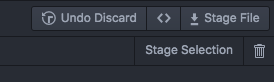
would be nice to have an option to "permanently discard these changes, remove them from the Undo stash, and don't remind me again".
Boboss74 commentedon Feb 20, 2018
Manual fix to hide the Undo Discard button. In your ~/.atom/style.less add this:
mingelz commentedon May 3, 2018
You can remove Undo Discard button via remove
undoDiscardHistorymanually:.git/configfile in project directory,[atomGithub]section, and save this file,smashwilson commentedon Oct 6, 2018
#1702 makes this much less prominent and harder to click on by mistake, so this is less of an issue now. We might iterate further on the UX here in the future, but it's not in our immediate roadmap, so we're going to close these. We'll open new issues in the future when we're ready for that 👌