Repository navigation
Multi-File Diff #1689
Description

We're accumulating several places where we have a need to present a diff that spans multiple files in a single view, a la the "files changed" tab on a GitHub pull request:
- The pull request details item proposed by the RFC in RFC for Pull Request Review #1706.
- The CommitPaneItem proposed in Commit pane item #1655.
The easiest place to introduce this is by modifying the FilePatchItem to display diffs for multiple files at once when you cmd- or ctrl-click multiple files in the unstaged or staged changes lists in the git tab, so let's use that as our first use case.
We can't really start building this until the FilePatchItem is revamped in #1512, but let's start talking about what the design for a multi-file diff view should look like, so we can hit the ground running once it lands 🐎 .
Essentially what we need to design is a re-usable React component that:
- Shows the list of files contained in a multi-file diff.
- Shows the combined diff, with some kind of prominent divider between each file's portions of the diff.
- Makes it easy to jump quickly to a specific file you care about, or back to the file list to get to another file.
- Makes it apparent which file a part of a long diff belongs to, so you don't lose track of what file you're looking at if its diff is larger than you can fit in the pane at once.
/cc @annthurium, @kuychaco, and @simurai for input on what this should look like and how it should behave 😄
Activity
kuychaco commentedon Sep 11, 2018
@smashwilson thanks for starting the conversation!
One question I have upfront is -- where does it make sense to replicate what dotcom has, and where does it make sense to deviate?
For instance, for the following I think we can draw heavy inspiration from dotcom...
... and create a similar sort of dropdown menu that is in a floating header that is always visible:
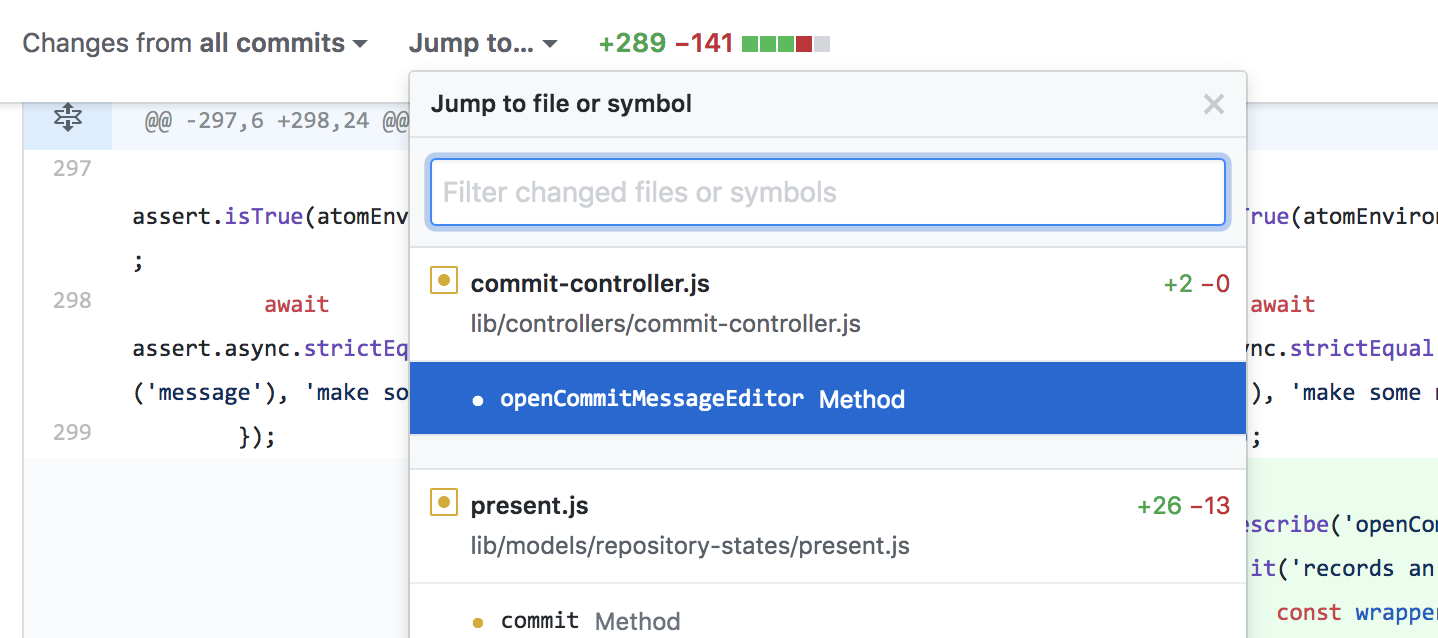
From what I can tell dotcom doesn't really do this...
... so maybe we can add the filename as another floating header that remains visible while scrolling (located right below the header that contains the file-navigator)
simurai commentedon Sep 13, 2018
That might be helpful. Make them sticky, like:
Another use-case for a multi-file diff: Like the
GitHub: View Unstaged Changes For Current Filecommand...... but for multiple files. Then you could keep a diff open even when switching to other files and still get an overview of all changes.
kuychaco commentedon Sep 20, 2018
@simurai I love that mockup 😍
Yeah! So were you thinking like a
GitHub: View All Staged/Unstaged Changes. I think I remember seeing someone make a feature request of being able to view all staged changes before committing to get an overview of the whole commit they're about to make.What might be cool is showing a multi-file diff for whatever files users have selected in the Changed Files list. So you could select all files under "Staged Changes" to see the contents of your next commit. Or you could select multiple files under "Unstaged Changes" and see the multi-file changes you're about to stage.
smashwilson commentedon Oct 4, 2018
Based on our discussions we've agreed that this is the easiest way to introduce this capability:
I've updated the issue description to match 👌
simurai commentedon Oct 20, 2018
In #1725, you can collapse all files and then only uncollapse the ones you want:
In addition, you can start filtering the list, which could have an "autocomplete" and show all files, like .com's "jump to". But that seems a lot more work and could be added at a later point.
vanessayuenn commentedon Oct 26, 2018
Closing this in favor of keeping discussion in #1753.