Repository navigation
VM operation fail after storage drs in VMware datastore cluster #5091

Description

ISSUE TYPE
- Bug Report
COMPONENT NAME
VMware
CLOUDSTACK VERSION
4.15.1.0-rc
CONFIGURATION
- Hypervisor: VMware, 2x VMware 6.7.0 ESXi hosts
- datastore cluster:
| id | name | uuid | pool_type | port | data_center_id | pod_id | cluster_id | used_bytes | capacity_bytes | host_address | user_info | path | created | removed | update_time | status | storage_provider_name | scope | hypervisor | managed | capacity_iops | parent |
|---|---|---|---|---|---|---|---|---|---|---|---|---|---|---|---|---|---|---|---|---|---|---|
| 59 | iosctx01_1504_fp01_ns_0393 | 39c0a3b5-203c-3ee3-8703-4af20d640eac | PreSetup | 0 | 1 | 1 | 3 | 4695523328 | 1099243192320 | iosvvct1.esx-tst.os.itelligence.de | NULL | /DC_Salzenforst/iosctx01_1504_fp01_ns_0393 | "2021-05-27 14:07:57" | NULL | "2021-06-09 07:10:18" | Up | DefaultPrimary | CLUSTER | NULL | 0 | NULL | 63 |
| 63 | DatastoreCluster_CS | 9cd3cb24-a43a-338d-a61b-d7fb0abf3556 | DatastoreCluster | 0 | 1 | 1 | 3 | 626064883712 | 2198486384640 | iosvvct1.esx-tst.os.itelligence.de | NULL | /DC_Salzenforst/DatastoreCluster_CS | "2021-06-08 15:51:05" | NULL | "2021-06-09 07:10:18" | Up | DefaultPrimary | CLUSTER | NULL | 0 | NULL | 0 |
| 64 | iosctx01_1504_fp01_ns_0394 | b4f65ef4-8ee3-3776-a14a-d209c498204b | PreSetup | 0 | 1 | 1 | 3 | 621369360384 | 1099243192320 | iosvvct1.esx-tst.os.itelligence.de | NULL | /DC_Salzenforst/iosctx01_1504_fp01_ns_0394 | "2021-06-08 15:51:05" | NULL | "2021-06-09 07:10:18" | Up | DefaultPrimary | CLUSTER | NULL | 0 | NULL | 63 |
OS / ENVIRONMENT
SUMMARY
After storage DRS (volumes were migrated to different datastore in same datastore cluster) volume swere not found during next stop/start of vm (maybe related to #4674).
STEPS TO REPRODUCE
- ingest VM online with only root volume and afterwards create new volume via CloudStack and attach to ingested vm
- simulate storage DRS recommendation run (migrate volumes to other datastore in same datastore-cluster on vCenter)
- stop instance
- start instance
volumes on DB after each step
| id | account_id | domain_id | pool_id | last_pool_id | instance_id | device_id | name | uuid | size | folder | path | pod_id | data_center_id | iscsi_name | host_ip | volume_type | pool_type | disk_offering_id | template_id | first_snapshot_backup_uuid | recreatable | created | attached | updated | removed | state | chain_info | update_count | disk_type | vm_snapshot_chain_size | iso_id | display_volume | format | min_iops | max_iops | hv_ss_reserve | provisioning_type |
|---|---|---|---|---|---|---|---|---|---|---|---|---|---|---|---|---|---|---|---|---|---|---|---|---|---|---|---|---|---|---|---|---|---|---|---|---|---|
| 5329 | 10 | 2 | 64 | NULL | 1727 | 0 | drs-test-02_2 | 42734603-a177-409b-92ac-ae15ca38d92a | 10737418240 | NULL | drs-test-02_2 | NULL | 1 | NULL | NULL | ROOT | NULL | 182 | 214 | NULL | 0 | "2021-06-09 07:29:10" | NULL | NULL | NULL | Ready | "{"diskDeviceBusName":"scsi0:0","diskChain":["[iosctx01_1504_fp01_ns_0394] drs-test-02/drs-test-02_2.vmdk"]}" | 0 | NULL | NULL | 214 | 1 | OVA | NULL | NULL | NULL | fat |
| 5330 | 10 | 2 | 64 | 55 | 1727 | 1 | drs-test-02-data-01 | 265333cd-3676-4e2e-bf70-b42b5f8e1ee5 | 5368709120 | /DC_Salzenforst/iosctx01_1504_fp01_ns_0394 | drs-test-02 | 1 | 1 | NULL | NULL | DATADISK | NULL | 54 | NULL | NULL | 0 | "2021-06-09 07:42:01" | "2021-06-09 07:42:15" | "2021-06-09 07:44:10" | NULL | Ready | 6 | NULL | NULL | NULL | 1 | OVA | NULL | NULL | 0 | fat |
| id | account_id | domain_id | pool_id | last_pool_id | instance_id | device_id | name | uuid | size | folder | path | pod_id | data_center_id | iscsi_name | host_ip | volume_type | pool_type | disk_offering_id | template_id | first_snapshot_backup_uuid | recreatable | created | attached | updated | removed | state | chain_info | update_count | disk_type | vm_snapshot_chain_size | iso_id | display_volume | format | min_iops | max_iops | hv_ss_reserve | provisioning_type |
|---|---|---|---|---|---|---|---|---|---|---|---|---|---|---|---|---|---|---|---|---|---|---|---|---|---|---|---|---|---|---|---|---|---|---|---|---|---|
| 5329 | 10 | 2 | 64 | NULL | 1727 | 0 | drs-test-02_2 | 42734603-a177-409b-92ac-ae15ca38d92a | 10737418240 | NULL | drs-test-02_2 | NULL | 1 | NULL | NULL | ROOT | NULL | 182 | 214 | NULL | 0 | "2021-06-09 07:29:10" | NULL | NULL | NULL | Ready | "{"diskDeviceBusName":"scsi0:0","diskChain":["[iosctx01_1504_fp01_ns_0394] drs-test-02/drs-test-02_2.vmdk"]}" | 0 | NULL | NULL | 214 | 1 | OVA | NULL | NULL | NULL | fat |
| 5330 | 10 | 2 | 64 | 55 | 1727 | 1 | drs-test-02-data-01 | 265333cd-3676-4e2e-bf70-b42b5f8e1ee5 | 5368709120 | /DC_Salzenforst/iosctx01_1504_fp01_ns_0394 | drs-test-02 | 1 | 1 | NULL | NULL | DATADISK | NULL | 54 | NULL | NULL | 0 | "2021-06-09 07:42:01" | "2021-06-09 07:42:15" | "2021-06-09 07:44:10" | NULL | Ready | 6 | NULL | NULL | NULL | 1 | OVA | NULL | NULL | 0 | fat |
| id | account_id | domain_id | pool_id | last_pool_id | instance_id | device_id | name | uuid | size | folder | path | pod_id | data_center_id | iscsi_name | host_ip | volume_type | pool_type | disk_offering_id | template_id | first_snapshot_backup_uuid | recreatable | created | attached | updated | removed | state | chain_info | update_count | disk_type | vm_snapshot_chain_size | iso_id | display_volume | format | min_iops | max_iops | hv_ss_reserve | provisioning_type |
|---|---|---|---|---|---|---|---|---|---|---|---|---|---|---|---|---|---|---|---|---|---|---|---|---|---|---|---|---|---|---|---|---|---|---|---|---|---|
| 5329 | 10 | 2 | 64 | NULL | 1727 | 0 | drs-test-02_2 | 42734603-a177-409b-92ac-ae15ca38d92a | 10737418240 | NULL | drs-test-02_2 | NULL | 1 | NULL | NULL | ROOT | NULL | 182 | 214 | NULL | 0 | "2021-06-09 07:29:10" | NULL | NULL | NULL | Ready | "{"diskDeviceBusName":"scsi0:0","diskChain":["[iosctx01_1504_fp01_ns_0394] drs-test-02/drs-test-02_2.vmdk"]}" | 0 | NULL | NULL | 214 | 1 | OVA | NULL | NULL | NULL | fat |
| 5330 | 10 | 2 | 64 | 55 | 1727 | 1 | drs-test-02-data-01 | 265333cd-3676-4e2e-bf70-b42b5f8e1ee5 | 5368709120 | /DC_Salzenforst/iosctx01_1504_fp01_ns_0394 | drs-test-02 | 1 | 1 | NULL | NULL | DATADISK | NULL | 54 | NULL | NULL | 0 | "2021-06-09 07:42:01" | "2021-06-09 07:42:15" | "2021-06-09 07:44:10" | NULL | Ready | 6 | NULL | NULL | NULL | 1 | OVA | NULL | NULL | 0 | fat |
| id | account_id | domain_id | pool_id | last_pool_id | instance_id | device_id | name | uuid | size | folder | path | pod_id | data_center_id | iscsi_name | host_ip | volume_type | pool_type | disk_offering_id | template_id | first_snapshot_backup_uuid | recreatable | created | attached | updated | removed | state | chain_info | update_count | disk_type | vm_snapshot_chain_size | iso_id | display_volume | format | min_iops | max_iops | hv_ss_reserve | provisioning_type |
|---|---|---|---|---|---|---|---|---|---|---|---|---|---|---|---|---|---|---|---|---|---|---|---|---|---|---|---|---|---|---|---|---|---|---|---|---|---|
| 5329 | 10 | 2 | 64 | NULL | 1727 | 0 | drs-test-02_2 | 42734603-a177-409b-92ac-ae15ca38d92a | 10737418240 | NULL | drs-test-02_2 | NULL | 1 | NULL | NULL | ROOT | NULL | 182 | 214 | NULL | 0 | "2021-06-09 07:29:10" | NULL | NULL | NULL | Ready | "{"diskDeviceBusName":"scsi0:0","diskChain":["[iosctx01_1504_fp01_ns_0394] drs-test-02/drs-test-02_2.vmdk"]}" | 0 | NULL | NULL | 214 | 1 | OVA | NULL | NULL | NULL | fat |
| 5330 | 10 | 2 | 64 | 55 | 1727 | 1 | drs-test-02-data-01 | 265333cd-3676-4e2e-bf70-b42b5f8e1ee5 | 5368709120 | /DC_Salzenforst/iosctx01_1504_fp01_ns_0394 | drs-test-02 | 1 | 1 | NULL | NULL | DATADISK | NULL | 54 | NULL | NULL | 0 | "2021-06-09 07:42:01" | "2021-06-09 07:42:15" | "2021-06-09 07:44:10" | NULL | Ready | 6 | NULL | NULL | NULL | 1 | OVA | NULL | NULL | 0 | fat |
EXPECTED RESULTS
instance is booted properly without any errors
ACTUAL RESULTS
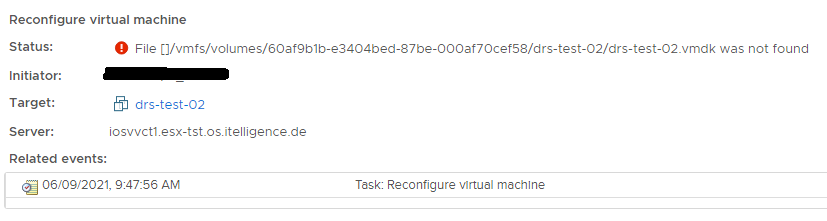
vm cannot be started, since volumes were not found anymore (_better say, were expected to be on its old location_)
Activity
yadvr commentedon Jun 9, 2021
@mib1185 I could be wrong but generally it's not a good idea for storage DRS to be enabled as well as CloudStack (two sets of control planes doing operations). Did this use to work for you in older versions.
cc @harikrishna-patnala @nvazquez @sureshanaparti @andrijapanicsb @borisstoyanov @vladimirpetrov
mib1185 commentedon Jun 9, 2021
@rhtyd storage DRS is one of the main reason, why to use datastore clusters, those this should work absolutely transparent to CloudStack. Honestly there were already issues with that functionality -> #4674
In addition - as I know - CloudStack does not control load balancing of data between datastores inside a datastore cluster 🤔
This could not work on older version, since support for datastore cluster was introduced with 4.15 (see #4248).
harikrishna-patnala commentedon Jun 9, 2021
@mib1185 may I know if this is happening only with ingested VMs or also on VMs deployed directly in CloudStack?
mib1185 commentedon Jun 9, 2021
@harikrishna-patnala issue also ocurs with cloudstack deployed instances - tested like follows
andrijapanicsb commentedon Jun 9, 2021
@harikrishna-patnala I don't recall we ever supported "STORAGE DRS" vs the regular "DRS" (which just live migrates VMs)
@mib1185 can you test Storage DRS with other "regular" datastore type (i.e. NFS or iSCSI etc) - I'm not aware we support this, but I might be wrong.
cc @rhtyd ^^^
harikrishna-patnala commentedon Jun 9, 2021
@andrijapanicsb for specifically datastore clusters if the volumes are migrated within the datastore cluster, the management server syncs the volume state (not for the other datastore types)
mib1185 commentedon Jun 9, 2021
@andrijapanicsb I'm sorry, but we do not have iSCSI nor NFS datastores available on our test lab (even not in our productive environment). Nevertheless, I guess it is independent on used child-datastore-technology, since Storage DRS is part of datastore cluster logic on top of the child-datastores.
andrijapanicsb commentedon Jun 9, 2021
@mib1185 NFS is so easy to add (on any Linux box, for testing purposes), but @harikrishna-patnala has just advised that this should work, if I read his reply correctly, so I will back up to my cave now and slowly disappear :)
harikrishna-patnala commentedon Jun 9, 2021
@mib1185 how did you simulate DRS on data volume ? I tried to move it manually on vCenter but failed with lock issues since it is attached to the VM
On the other hand, I tried these steps and it is successful to me.
I also observed chain_info is missing in the "volumes" table entries that you posted. Can you observe the chain_info column of the "volumes" table and let us know
mib1185 commentedon Jun 9, 2021
Simulating storage DRS is very simples as you would only drag&drop the vm from one datastore to the other:
There was no manipulating of any db entries done by us.
Yeah, I also noticed that
chain_infois empty for data volume.Meanwhile I observed, that
chain_infogot lost (alsofolderandpathis changed) right some moments after migrating data volume to data store cluster:harikrishna-patnala commentedon Jun 9, 2021
I suspect the chain_info being empty is the reason for failure, can you please try this. Before applying storage DRS on the data disk, can you detach and attach the data disk to the VM to reflect the chain info and then apply storage DRS. That should work.
By the way, I tried the same, migrating the data disk from nfs primary storage to datastore cluster but chain_info is not empty in my case. I'll try it again.
mib1185 commentedon Jun 9, 2021
Please find attached the log file from management server for migration job execution, where afterwardy
chain_infogot lost:MigrateVolumeCmdByAdmin.log
7 remaining items
harikrishna-patnala commentedon Jun 9, 2021
No @mib1185 I also see these lines in my testing. In my case chainInfo is there in the volume response
79-37b2-83d7-cb872d359959","chaininfo":"{"diskDeviceBusName":"scsi0:0","diskChain":["[9480106731023fc0a1e342a76a2e7128] i-2-6-VM/i-2-6-VM_7.vmdk"]}","quiescevm":"false","clusterid":"6b1679e3-4c38-
But in your logs it is missing
a43a-338d-a61b-d7fb0abf3556","chaininfo":"","quiescevm":"false","clusterid":"ee84917e-73fa-4022-915a-5e
I'll check if there is any case like that from the code analysis.
mib1185 commentedon Jun 9, 2021
@rhtyd we using our own fork based on aaac4b1 (4.15.1.0-rc1) with some additional commits/backports - for details I need to ask our developer @DK101010 .
yadvr commentedon Jun 9, 2021
I see @mib1185 can you try the RC1 pkgs instead just to confirm if it's a valid issue to be fixed or something that is caused by your fork? Without being able to reproduce the issue, or information on how to it would be not possible to fix it.
mib1185 commentedon Jun 9, 2021
@rhtyd yeah I see, but need to check if we can go with the rc1 packages, since we are using "multiple host tags" (backport of #4398) on our test lab. Nevertheless I will ask @DK101010 to have also a look into this issue from developer point of view
mib1185 commentedon Jun 9, 2021
UPDATE:
chain_infogot lost on every volume migration, it doesn't matter if from regular datastore to datastore-cluster, or between two regular datastores, therefor I guess it is more an specific issue with our environment, maybe since we are using multiple Tags for our primary storages and therefore (not to be mixed up with #4398) also in the used disk-offerings 🤔mib1185 commentedon Jun 9, 2021
@harikrishna-patnala could you please try to reproduce it, but this time with Tags on primary storages and disk-offerings?
harikrishna-patnala commentedon Jun 10, 2021
@mib1185 may I know the datastore names on vCenter and the chain_info you got after detach and attach workaround?
harikrishna-patnala commentedon Jun 10, 2021
I think I found the problem with how we handle migrate answer. I'm working on the fix.
yadvr commentedon Jun 10, 2021
Great thanks for sharing @harikrishna-patnala
harikrishna-patnala commentedon Jun 10, 2021
Just to update PR#5097 is already raised to fix the issue
yadvr commentedon Jun 11, 2021
Fixed in #5097