Repository navigation
Redundant VRouter guest network on wrong interface #3179
Description

ISSUE TYPE
- Bug Report
COMPONENT NAME
redundant VPC Offering
CLOUDSTACK VERSION
master
CONFIGURATION
Standard cluster deployment regarding this issue. No changes made to sytemvm or the offerings involved.
OS / ENVIRONMENT
Seems to work only with OvS bridges.
KVM with OvS
Projects with VPCs
SUMMARY
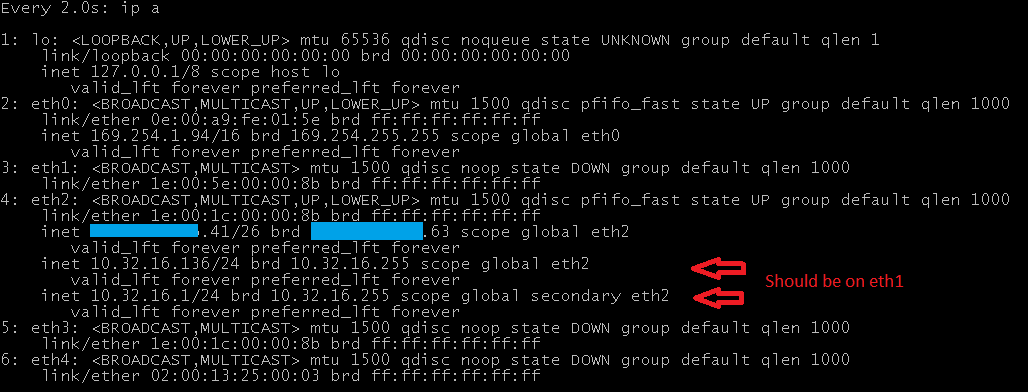
Redundant vRouter Offering doesn't work because guest network is on wrong interface in vRouter
STEPS TO REPRODUCE
- Add VPC; choose Redundant VPC Offering
- Create a guest network/instance to allow for redundancy to build up
- some network is created on the wrong interface:

EXPECTED RESULTS
The guest network should be added on eth1 because this is the interface where both vRouters share the MAC address.
ACTUAL RESULTS
Redundancy state of the redundant routers changes from UNKNOWN to FAILED because conntrackd and keepalived cannot establish the VRRP redundancy between the two vRouters.
Activity
svenvogel commentedon Feb 14, 2019
@fmaximus can you help to debug this case? you helped already with this pr #2304 by vpc. maybe you can help with redudant vpc. i hope. thx
fmaximus commentedon Feb 14, 2019
@DennisKonrad Can you post the contents of /etc/cloudstack/ips.json on the VR.
DennisKonrad commentedon Feb 15, 2019
@fmaximus Thank you for helping. This is the content of the ips.json:
{
"eth0": [
{
"add": true,
"broadcast": "169.254.255.255",
"cidr": "169.254.2.133/16",
"device": "eth0",
"gateway": "",
"netmask": "255.255.0.0",
"network": "169.254.0.0/16",
"nic_dev_id": "0",
"nw_type": "control",
"one_to_one_nat": false,
"public_ip": "169.254.2.133",
"size": "16",
"source_nat": false
}
],
"eth2": [
{
"add": true,
"broadcast": "xxx.xxx.xxx.xxx",
"cidr": "xxx.xxx.xxx.xxx/26",
"device": "eth2",
"first_i_p": true,
"gateway": "xxx.xxx.xxx.1",
"netmask": "255.255.255.192",
"network": "xxx.xxx.xxx.0/26",
"new_nic": true,
"nic_dev_id": 2,
"nw_type": "public",
"one_to_one_nat": false,
"public_ip": "xxx.xxx.xxx.56",
"size": "26",
"source_nat": true,
"vif_mac_address": "1e:00:93:00:00:9a"
},
{
"add": true,
"broadcast": "10.32.64.255",
"cidr": "10.32.64.45/24",
"device": "eth2",
"gateway": "10.32.64.1",
"netmask": "255.255.255.0",
"network": "10.32.64.0/24",
"nic_dev_id": "2",
"nw_type": "guest",
"one_to_one_nat": false,
"public_ip": "10.32.64.45",
"size": "24",
"source_nat": false
}
],
"id": "ips"
}
svenvogel commentedon Feb 18, 2019
@fmaximus Hi Frank, thank you for help. do you need additional informations?
ustcweizhou commentedon Feb 19, 2019
@svenvogel Are you using kvm ?
DennisKonrad commentedon Feb 19, 2019
@ustcweizhou Yes we do
fmaximus commentedon Feb 19, 2019
@DennisKonrad What I can see in the ips.json, is that mac address is missing.
The lookup uses the mac address to find out the device id.
svenvogel commentedon Feb 19, 2019
@fmaximus Yes you are right. do you know where in the code is the problem so why redundant router is missing some mac adresses?
DennisKonrad commentedon Feb 28, 2019
@fmaximus @svenvogel
Hi ,
does this mean when the code that's responsible for updating the "ips.json" would also insert the mac address this could fix the problem?
I searched for the ips.json in the code but wasn't able to locate the code responsible for it.
Any hints are much appreciated
ustcweizhou commentedon Feb 28, 2019
@DennisKonrad
could you provide more information ?
(1) which cloudstack version ?
(2) Do you use official systemvm template ?
some other comments
(1) eth1 should be public ip, and vpc tier ip will be attached to eth2/eth3, etc
(2) ips are saved into ips.json in systemvm/debian/opt/cloud/bin/merge.py
(3) restart VPC with cleanup might fix your problem.
DennisKonrad commentedon Mar 1, 2019
@ustcweizhou
info
(1) we are running more or less the master on the agents and mgmts
The systemvm template is built from master too but from december 2018
(2) There are no modifications done to the systemvm template
other comments
(1) yes, eth1->public, eth2++ -> guest networks, VRRP->lowest guest nic
_!! Do you think the problem is, that the public ip is on the wrong interface when using redundant vrouters? (And not the guest ips as I thought...) _
(2) I tried to read through this but got lost. It's really hard to see from where some functions are supposed to be called. Is there someone who knows this code?
(3) I will try to do that today
ustcweizhou commentedon Mar 1, 2019
@DennisKonrad
when apply a new configuration in VR, it will create a file in VR and execute the update in VR.
see code in ./core/src/com/cloud/agent/resource/virtualnetwork/VirtualRoutingResource.java below
json files will be created in server, then scp to VR through 169.254.X.X/port 3922 on VR.
then execute /opt/cloud/bin/update_config.py in VR
json file will be processed in following part
QueueFile is defined in /opt/cloud/bin/merge.py
ips.json will be updated if json file contains new ip.
svenvogel commentedon Mar 2, 2019
@fmaximus does the info from @ustcweizhou help for a deeper look from you? maybe you have the time.
DennisKonrad commentedon Apr 17, 2019
I found some more time looking into this. @ustcweizhou Do you also think the problem originates in
cloudstack/core/src/main/java/com/cloud/agent/resource/virtualnetwork/VirtualRoutingResource.java
Line 401 in 52f68a2
DennisKonrad commentedon Apr 17, 2019
The root cause seems to be that the interfaces (eth1, eth2, eth3) share the same mac address.
I'm not really sure where this originates. Somehow when the redundant router is created and the nics are added all of them get the same mac.
The "createRedundantAssociateIPCommands" seems to assign the ips to the wrong interface then.
@ustcweizhou Can you give me a hint where in the code new vrouters get their nics?
53 remaining items
DennisKonrad commentedon Dec 9, 2019
@weizhouapache I'll build and test it for OvS today. Anything you want me to test?
DaanHoogland commentedon Jan 3, 2020
there is a lot of text here. Do we have plans for 4.13 @weizhouapache @DennisKonrad @svenvogel ?
weizhouapache commentedon Jan 6, 2020
@DaanHoogland what's the plan for 4.13.1 and 4.14 ?
sorry I came back from holiday today and missed some discussion.
svenvogel commentedon Jan 12, 2020
@weizhouapache Hi ... back from holiday. i dont know whats tested. there are things from your side they needs to be tested so that we come ready to a PR?
svenvogel commentedon Jan 17, 2020
@weizhouapache ping 😄
weizhouapache commentedon Jan 18, 2020
@svenvogel I will create a PR next week.
I did not fully test it. Hope it will be good :-D
svenvogel commentedon Jan 18, 2020
@weizhouapache Thanks. Wei ...i think so 😁 we will test it again its maybe easier but what i saw was very good!
DennisKonrad commentedon Jan 20, 2020
@weizhouapache Hi, sorry for the long delay. The last time I tested this I couldn't find any problems. The two setups I tested (KVM with Linux Bridge and KVM with OVS) looked very good
DaanHoogland commentedon Jan 21, 2020
@DennisKonrad i read in your text above we can close this?
DennisKonrad commentedon Jan 21, 2020
@DaanHoogland I would like to wait for the PR of wei to be tested and merged. If the community accepts it then we can close the issue.
this-tech commentedon Jan 23, 2020
This is still an issue for me. Non redundant routers work fine, redundant routers do not.
weizhouapache commentedon Jan 27, 2020
@DennisKonrad @svenvogel @DaanHoogland
I am testing my changes. If everything goes fine I will create pr tomorrow.
svenvogel commentedon Jan 27, 2020
@weizhouapache that sounds great. Big thanks! 👍
DaanHoogland commentedon Feb 29, 2020
solution merged with PR #3847