Repository navigation
VMware basic zone VR fails to start and get private IP #3031
Description

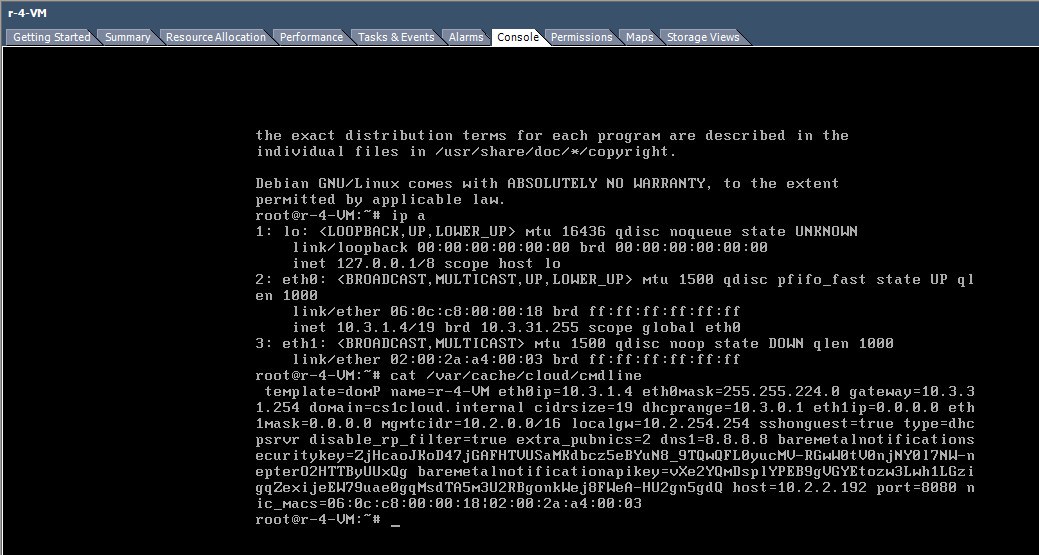
VMware basic zone does not support host-level firewall (SG), but there could be a use-case to have a basic zone setup with no isolation. Currently, the VR for the default basic zone guest network VR fails to start (gets stuck in Starting state for a long time) due to incorrect eth1 IP/netmask. Screenshot from 4.9 VR:
ISSUE TYPE
- Bug Report
COMPONENT NAME
VR, Basic Zone, VMware
CLOUDSTACK VERSION
Found in 4.9, 4.11, master
CONFIGURATION
Basic zone with VMware 5.5u3, 6.5
SUMMARY
STEPS TO REPRODUCE
- Deploy basic zone in VMware
- Deploy a guest VM
- Guest network VR will be stuck
- The /var/cache/cloud/cmdline will have 0.0.0.0 as eth1 ip/netmask
EXPECTED RESULTS
While SG does not work for VMware+basic zone, VR should start and get a private IP (eth1)
ACTUAL RESULTS
VR stuck in starting state, guest VM eventually fails to start. VR's eth1 does not get a valid IP.
Activity
yadvr commentedon Nov 15, 2018
/cc @mike-tutkowski @PaulAngus - not a regression in 4.11
andrijapanicsb commentedon Jan 4, 2020
@rhtyd do we have time for this one - or should we move it to 4.15 milestone?
DaanHoogland commentedon Jan 5, 2020
@andrijapanicsb basic zones are being phased out in favour of shared networks (with security groups) So I think postponng means canceling in this case.
andrijapanicsb commentedon Jan 5, 2020
whatever we decide, I'm fine with it.
DaanHoogland commentedon Jan 6, 2020
i think we can lower priority but not close yet. @rhtyd ?
yadvr commentedon Mar 2, 2020
I guess nobody reported this as this was perhaps broken (at least since 4.7, definitely 4.9/4.11?) and nobody uses VMware with basic zone. @DaanHoogland if it's broken indeed let's try and fix in next major release, I don't think it's a blocker if nobody uses this configuration.
8 remaining items
yadvr commentedon Mar 2, 2020
@PaulAngus that's a valid argument making it hard to not disagree with you :)
Let's try the first thing to try and reproduce this against 4.13.0.0 or latest 4.13 or master/4.14. @PaulAngus @andrijapanicsb @DaanHoogland - does Trillian support basic zone deployment with VMWare or something we would need to test manually?
DaanHoogland commentedon Mar 2, 2020
I have started a basic zone in vmware, systemvms are running. Also, unless some work or user is actually blocked, it is not a blocker. Potential problems are only problems if they arise. We cannot support features indefinitely without feedback from actual users.
yadvr commentedon Mar 2, 2020
@DaanHoogland did you try deploying a user VM that would spin up a VR, the issue was seen VR stuck in starting state.
DaanHoogland commentedon Mar 2, 2020
the smoke tests are running for an hour now. all fine ;)
health checks are failing though, not sure if these are an issue in basic zone. but the router(s?) are up. weird stuff but unrelated:

guest ip available but no public? is this the issue:

DaanHoogland commentedon Mar 2, 2020
ok, the env won't deploy a VM because network is not available, re-opening.
DaanHoogland commentedon Mar 3, 2020
reinstalled a 4.11.3; systemvm come up but the console proxy does shows consoles for neither cpvm nor ssvm.
registering a template works. (ssvm works, as it is confirmed present on the backend storage)
router is started on compute backend but never changes status to started in ACS
Same symptoms in 4.9.3.1; ip 0.0.0.0 is send for eth1.
Double checked 4.9 kvm. This works fine.
In
4.84.6 the issue is already there.4.5 vmware basic zone works.
xen not tested at all so far.xen and kvm tested in version 4.6: both work.
andrijapanicsb commentedon Mar 3, 2020
If this is broken since 4.8 and ZERO people (community users) raised a bug, I would suggest this should be addressed in the next release @rhtyd @PaulAngus @DaanHoogland, not now
yadvr commentedon Mar 5, 2020
We can all agree with @PaulAngus 's comment and ideally should be fixing this. Per git history, this regression got introduced some ~4 years ago. How about after the branch freeze, let's see if it's a quick enough fix. Otherwise, I'm okay to address in a near-term minor release or next major.
andrijapanicsb commentedon Mar 13, 2020
@rhtyd @PaulAngus we need this one done before 4.14 is out
Any suggestions? /cc @DaanHoogland
harikrishna-patnala commentedon Mar 25, 2020
Working on this to fix the issue. I could point out the exact place where nic configuring is being skipped and made the code changes accordingly in PR #3977
With that eth1 on VR is configured with private IP but VR is still stuck in starting state because it is not able to run checkSshCommand on port 3922

2020-03-25 06:57:18,683 INFO [c.c.h.v.r.VmwareResource] (DirectAgent-336:ctx-7579bce4 10.2.3.159, job-37/job-38, cmd: CheckSshCommand) (logid:b696c8c5) Trying to connect to 10.2.5.224
2020-03-25 06:57:18,686 INFO [c.c.h.v.r.VmwareResource] (DirectAgent-336:ctx-7579bce4 10.2.3.159, job-37/job-38, cmd: CheckSshCommand) (logid:b696c8c5) Could not connect to 10.2.5.224 due to java.net.ConnectException: Connection refused
VR Iptables has input chain configured on eth1 3922 port and packets are hitting.
Can someone help me debugging further on what is missing in terms of connectivity
harikrishna-patnala commentedon Mar 26, 2020
I figured out the issue and PR is updated with the fix.