Repository navigation
BadImageFormatException on Blinkie ARM64 #8
Description

I am trying to test the Demo but I get this error after successfully connecting and installing the SDK, upload the application correctly and then:
An unhandled exception of type 'System.BadImageFormatException' occurred in Unknown Module.: 'Could not load file or assembly '/home/pi/vsdbg/Blinkie/Blinkie.dll'. An attempt was made to load a program with an incorrect format.'
I have changed the version of Blinkie.csproj for using .NET 6 and line 259 of ProjectProperties.cs to this one, so it will not throw an exception for the architecture.
PackageHelper.SdkCatalog.Items.SingleOrDefault(item=> SemanticVersion.Parse(item.Name) == SemanticVersion.Parse(sdkName) && item.Architecture == targetSdk.Architecture);
RASPBERRY INFO:
[raspberry]: INFO: [pi@raspberrypi]: Verify Connection
[raspberry]: INFO: DNS lookup for: raspberrypi
[raspberry]: INFO: [raspberrypi]: Auth via SSH keys
[raspberry]: INFO: [raspberrypi]: Checking for: [unzip]
[raspberry]: INFO: [raspberrypi]: Retrieving status
[raspberry]: INFO: [raspberrypi]: Fetching status
[raspberry]: INFO: [raspberrypi]: processor: aarch64
[raspberry]: INFO: [raspberrypi]: path: /usr/local/sbin:/usr/local/bin:/usr/sbin:/usr/bin:/sbin:/bin:/snap/bin
[raspberry]: INFO: [raspberrypi]: unzip: True
[raspberry]: INFO: [raspberrypi]: debugger: True
[raspberry]: INFO: [raspberrypi]: sdks: 6.0.100, 6.0.202
[raspberry]: INFO: [raspberrypi]: model: Raspberry Pi Zero 2 W Rev 1.0
[raspberry]: INFO: [raspberrypi]: revision: 902120
[raspberry]: WARNING: [raspberrypi]: .NET SDK [6.0.100] is present on [raspberrypi] but is not known to the RaspberryDebugger extension. Consider updating the extension.
Activity
StanDeMan commentedon Jun 20, 2022
@Daniel127 Thanks a lot for your feedback.
Was working till yesterday to get 64 Bit working - still not finished. Have to test more...
There seems to be a missmatch - the used .NET version is not known to the debugger. Don't know why?
Delete the dotnet folder underneath /usr/lib completly with "sudo rm -r dotnet". Than grab the latest debugger sources, please. The debugger should take the actual .NET package with relating debugger if you deploy your solution again. Raspberry Pi Zero 2 W Rev 1.0 (500MB memory only) is pretty constrained. Take a Pi 4 Modell B with 4 or 8GB for development. Later you can deploy your stuff to Pi Zero 2W. Thanks for testing. :)
Daniel127 commentedon Jul 1, 2022
Hello @StanDeMan ,
Thanks for your work, I have updated to the latest commit and I have been able to run and debug the Blinkie console project without problems from the Raspberry Pi Zero 2 64Bits.
However with the web project I have a problem that I don't understand, I have added this to the csproj to be able to run it:
<PlatformTarget>AnyCPU</PlatformTarget><SignAssembly>True</SignAssembly>Apparently it starts correctly and I see it in the Output.
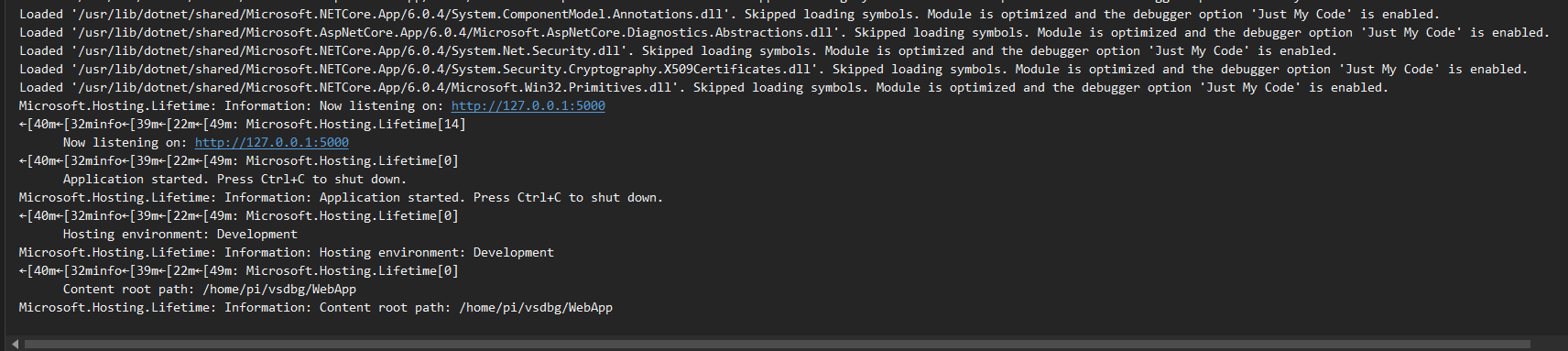
But after a while I get an exception and it ends up closing visual studio with the debugger.
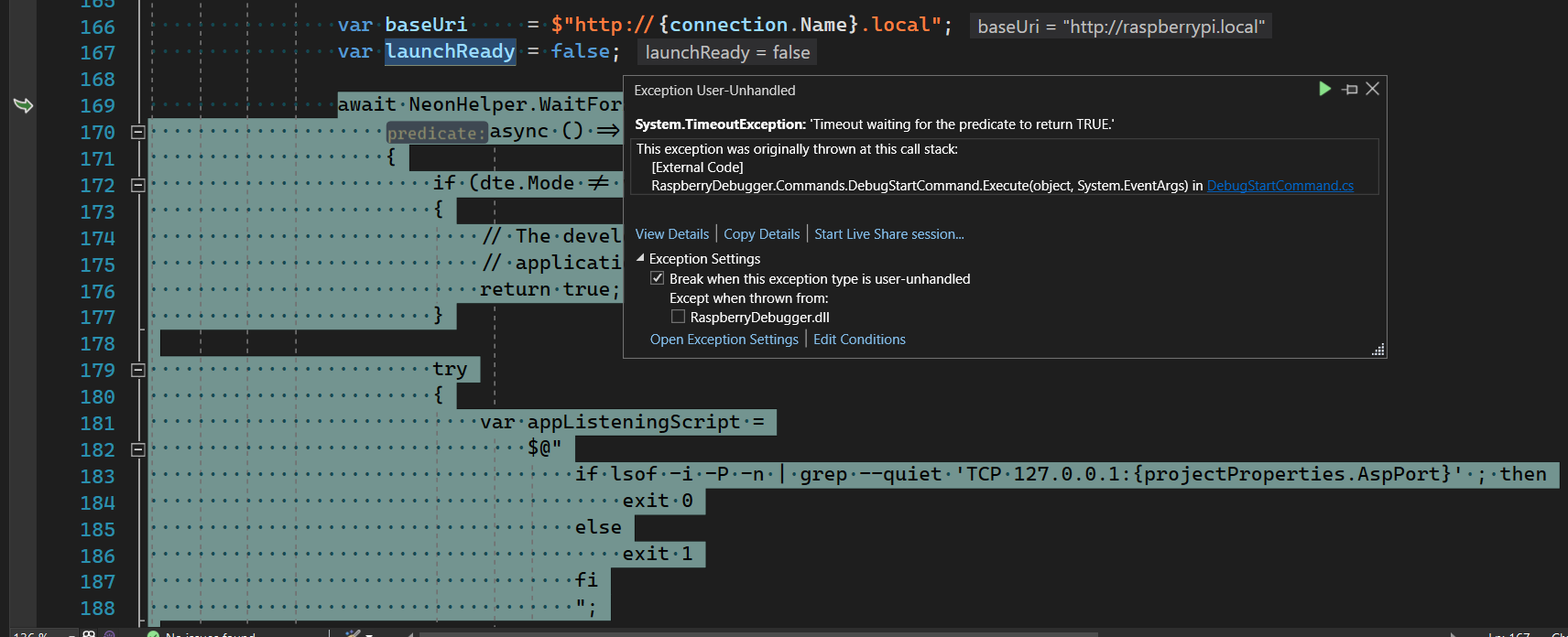
Do you know what it can be?
Again thanks for all the work, I hope that soon this a final version and can install it from the marketplace
StanDeMan commentedon Jul 2, 2022
Hi Daniel127,
glad to read that you got it running. So the .NET version scraping service I deployed to Azure and used by the debugger is working. :) Yeah! :) Even glad to read that .NET 64Bit is running so well on an Pi Zero2 - having so less memory.
I'll deploy a new debugger version to nuget asap.
Please add to your ASP.NET project this attributes:
<RuntimeIdentifier>linux-arm</RuntimeIdentifier><PlatformTarget>AnyCPU</PlatformTarget>Runtimeidentifier (linux-arm) is essential. No need to sign assemblies. Put the attributes under:
<PropertyGroup>in the project file. Double click the project file to edit it.As far as I know you cannot debug ASP.NET projects without having a working Web Server (as proxy) configured.
I think you are running in a timeout - the debugger is not reaching your deployment on raspberry pi. I'll try to eliminate the exception with an proper message, that the service cannot be reached. Thought this was working? Hm?
I'm using NGiNX. Here you can find a great example how to install and configure the web server:
https://setu677.medium.com/how-to-host-asp-net-core-on-linux-using-nginx-85339560e929
Helped me quite a lot.
Try to run your ASP.NET service directly under the pi/home/vsdbg/yourStuff??? folder with: sudo dotnet yourStuff???.dll
If you can start it - the deployment was successful - but the debugger isn't able to reach your service.
You should be able to access your page locally on the pi with Chromium starting: http://127.0.0.1:5000
If you want to access from other computers configure a web-server as Setu Kumar Basak is describing underneath chapter 2.1 and below of his doucmentation.
Short version here.
After you installed NGiNX edit /etc/nginx/sites-available/default with
sudo nano /etc/nginx/sites-available/default.server {listen 80;location / {proxy_pass http://127.0.0.1:5000/;proxy_http_version 1.1;proxy_set_header Upgrade $http_upgrade;proxy_set_header Connection keep-alive;proxy_set_header Host $host;proxy_cache_bypass $http_upgrade;proxy_set_header X-Forwarded-For $proxy_add_x_forwarded_for;proxy_set_header X-Forwarded-Proto $scheme;}}Comment everything out (use # for commenting) and add the configuration from above to it.
Read Setus' documentation carefully. You have to reload the NGiNX default config file with: sudo nginx -s reload
Hope my answer was helpful for you.
Good luck!
Kindest regards
StanDeMan
PS
Most of the work was done by Jeff Lill. He is the man! ;)
Daniel127 commentedon Jul 3, 2022
Hello @StanDeMan
I have been doing some tests, I understand what you say about using nginx as a proxy but I think it should be something optional and chosen by each developer, in a development environment and quick testing may be unnecessary.
I have created a PR #10 with the changes I made to run a WebApi and access it from my PC, the main thing is the environment variable
ASPNETCORE_URLS, it specifies that it can be accessed from outside and not only from the local environment, I had to change theappListeningScriptso it could return 0 and not throw any exception.There are some things that I don't understand why they were like that, like the
baseuriwith ".local" at the end, or the way in which I assigned the variable IsAspNet, why I was looking for IIS configuration? if in linux only the Kestrel server works.As I said before the PR is the result of testing until I got the result I wanted, surely it can be done better and more configurable, for example for those who want to start the app and allow only local connections (from the raspberry) or even not to fail to parse
applicationUrlby having several separated with ";".What do you think about these changes?
StanDeMan commentedon Jul 3, 2022
Dear Daniel127,
thanks a lot for your pull request and the changes you did.
Every raspberry pi os is configured to work with Avahi/ZeroConf/Bonjour/mDNS (https://www.avahi.org/) using the .local Domain. There is no need to handle with IP addresses or ports. The raspberry pi is accessable via given http://raspberrypiname.local out of the box - even if ip addresses are changing - the raspberrypiname.local gets found. This is handeled by mDNS/Avahi. This is great. Was developed by Appel and ported to linux and windows since Windows 10 1703 (https://www.youtube.com/watch?v=EAqTaJSCwCw).
The IIS configuration is inside because it's crossplatform. I develop often locally on my pc - sometimes using IIS. Why not? The configuration is inside, if I do so. If you don't need it - throw it away. This has nothing to do with the debugger. It's configuration. I'm working mostly with multipe platforms - on windows sending gpio accesses to an file on the windows pc. This is what I do for quick testing...
Thanks a lot for your work and hints.
Kindest regards
StanDeMan
StanDeMan commentedon Jul 4, 2022
Dear Daniel127,
thanks for your hint.
Add the 'Microsoft.Extensions.Hosting.Systemd' ([nuget (https://www.nuget.org/packages/Microsoft.Extensions.Hosting.Systemd/)) package with
dotnet add package Microsoft.Extensions.Hosting.Systemdto your project of the waether service example.Add this after CreateBuilder to your source:
var builder = WebApplication.CreateBuilder(args);builder.Host.UseSystemd() //add this to your code;Take the latest sources of the debugger. I corrected an error opening the browser - maybe caused by me - maybe no one was aware about it - missing a "/"? See latest commit: fc52741. The sources should be deployed now to raspberry pi using raspberrypiname.local and starting directly swagger. This is dependant on your configuration and the code you write and what you want to achieve. Whatever you want to do should be possible. I prefer to use a web server as reverse proxy which can deal with certificates and other important stuff.
No need to deal with ip addresses or ports! ;)
https://swimburger.net/blog/dotnet/how-to-run-aspnet-core-as-a-service-on-linux
https://docs.microsoft.com/en-us/aspnet/core/fundamentals/servers/kestrel/when-to-use-a-reverse-proxy?view=aspnetcore-6.0
Good luck. Hope it's helpful.
I think a can create a vsix now pretty soon - offering version 2.0 of debugger (having 32/64 Bit support).
Kindest regards
StanDeMan
StanDeMan commentedon Jul 4, 2022
Was fixed by commit: fc52741
StanDeMan commentedon Jul 5, 2022
Dear Daniel127,
the last step I plan to do is to have the Kestrel option better implemented.
Kestrel is working if you put this code into your sources:
After the deployment you have to start the browser at your own:
https://YourRaspiIPAddress:5001/swagger/index.htmlMaybe I can start the browser automatically to get it better integrated. Have to see...
At the moment the reverse proxy solution is the first class citizen.
Thanks for the hint.
Kindest regards
StanDeMan