Repository navigation
Going trough history after resizing the windows is causing bug #3213
Description

Prerequisites
- Write a descriptive title.
- Make sure you are able to repro it on the latest released version
- Search the existing issues, especially the pinned issues.
Exception report
Oops, something went wrong.
Please report this bug with ALL the details below, including both the 'Environment' and 'Exception' sections.
Please report on GitHub: https://github.com/PowerShell/PSReadLine/issues/new?template=Bug_Report.md
Thank you!

### Environment
PSReadLine: 2.1.0
PowerShell: 7.2.1
OS: Microsoft Windows 10.0.22000
BufferWidth: 76
BufferHeight: 19

Last 200 Keys

 UpArrow UpArrow Enter
 Ctrl+c Ctrl+c Ctrl+c c l e a r Enter
 UpArrow UpArrow Enter
 j a v a Spacebar - v Enter
 UpArrow e r s i o n Enter
 UpArrow UpArrow UpArrow Enter
 c l e a r Enter
 UpArrow UpArrow Enter
 Ctrl+c Ctrl+c c l e a r Enter
 UpArrow UpArrow Enter
 Ctrl+c c l e a r Enter
 UpArrow UpArrow Enter
 c l e a r Enter
 UpArrow UpArrow Enter
 c l e a r Enter
 c d Spacebar D : \ M E M E Enter
 y t - d Tab Spacebar " h t t p s : / / w w w . y o u t u b e . c o m / w a t c h ? v = K 4 w P H P X 9 f h U " Enter
 f f m p e g Spacebar i - Backspace Backspace - i Spacebar " A m e r i c a n Tab Ctrl+LeftArrow Ctrl+LeftArrow Ctrl+LeftArrow Ctrl+LeftArrow Ctrl+LeftArrow Ctrl+LeftArrow Ctrl+LeftArrow Ctrl+LeftArrow Ctrl+LeftArrow Ctrl+LeftArrow Ctrl+LeftArrow Ctrl+LeftArrow LeftArrow - s s Spacebar 0 0 : 0 0 Spacebar Ctrl+LeftArrow Ctrl+LeftArrow Ctrl+LeftArrow Ctrl+LeftArrow Ctrl+LeftArrow Ctrl+LeftArrow Ctrl+LeftArrow Ctrl+LeftArrow Ctrl+LeftArrow UpArrow
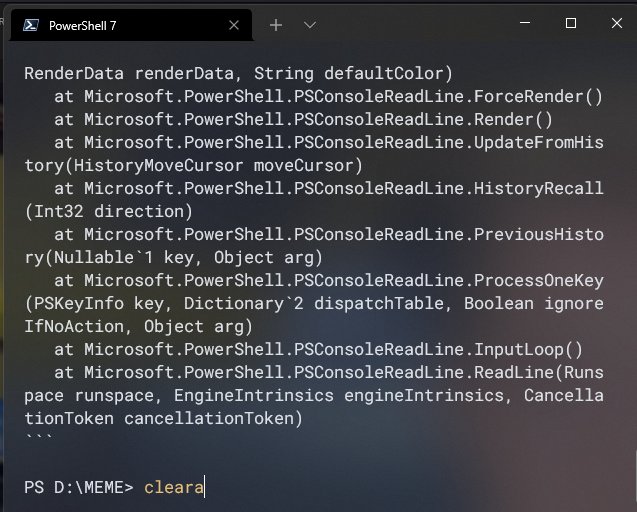
Exception
System.ArgumentOutOfRangeException: The value must be greater than or equal to zero and less than the console's buffer size in that dimension. (Parameter 'top')
Actual value was 19.
   at System.ConsolePal.SetCursorPosition(Int32 left, Int32 top)
   at Microsoft.PowerShell.PSConsoleReadLine.ReallyRender(RenderData renderData, String defaultColor)
   at Microsoft.PowerShell.PSConsoleReadLine.ForceRender()
   at Microsoft.PowerShell.PSConsoleReadLine.Render()
   at Microsoft.PowerShell.PSConsoleReadLine.UpdateFromHistory(HistoryMoveCursor moveCursor)
   at Microsoft.PowerShell.PSConsoleReadLine.HistoryRecall(Int32 direction)
   at Microsoft.PowerShell.PSConsoleReadLine.PreviousHistory(Nullable`1 key, Object arg)
   at Microsoft.PowerShell.PSConsoleReadLine.ProcessOneKey(PSKeyInfo key, Dictionary`2 dispatchTable, Boolean ignoreIfNoAction, Object arg)
   at Microsoft.PowerShell.PSConsoleReadLine.InputLoop()
   at Microsoft.PowerShell.PSConsoleReadLine.ReadLine(Runspace runspace, EngineIntrinsics engineIntrinsics, CancellationToken cancellationToken)
### Screenshot
### Environment data
```console
PS Version: 7.2.1
PS HostName: ConsoleHost (Windows Terminal)
PSReadLine Version: 2.1.0
PSReadLine EditMode: Windows
OS: 10.0.22000.493 (WinBuild.160101.0800)
BufferWidth: 186
BufferHeight: 41
Steps to reproduce
I was typing ffmpeg command, after that I resized the window. then I used the arrow up to search in my history for previous command, and it procuded this error.
I'm using Windows Terminal on top of Windows Powershell 7.2.1
Expected behavior
Nothing
Actual behavior
Output an error
Activity
daxian-dbw commentedon Feb 18, 2022
PSReadLine has made some improvements in handling window resizing in the latest 2.2 RC version, which I believe also resolves this issue. Please upgrade to the 2.2.1-rc1 version of PSReadLine and give it a try. Please let us know if you run into the same issue with the latest version, thanks!