Repository navigation
Black screen after using tui apps, but only when using Set-PSReadLineKeyHandler #2954
Description

Prerequisites
- Write a descriptive title.
- Make sure you are able to repro it on the latest released version
- Search the existing issues, especially the pinned issues.
Exception report
N/AScreenshot
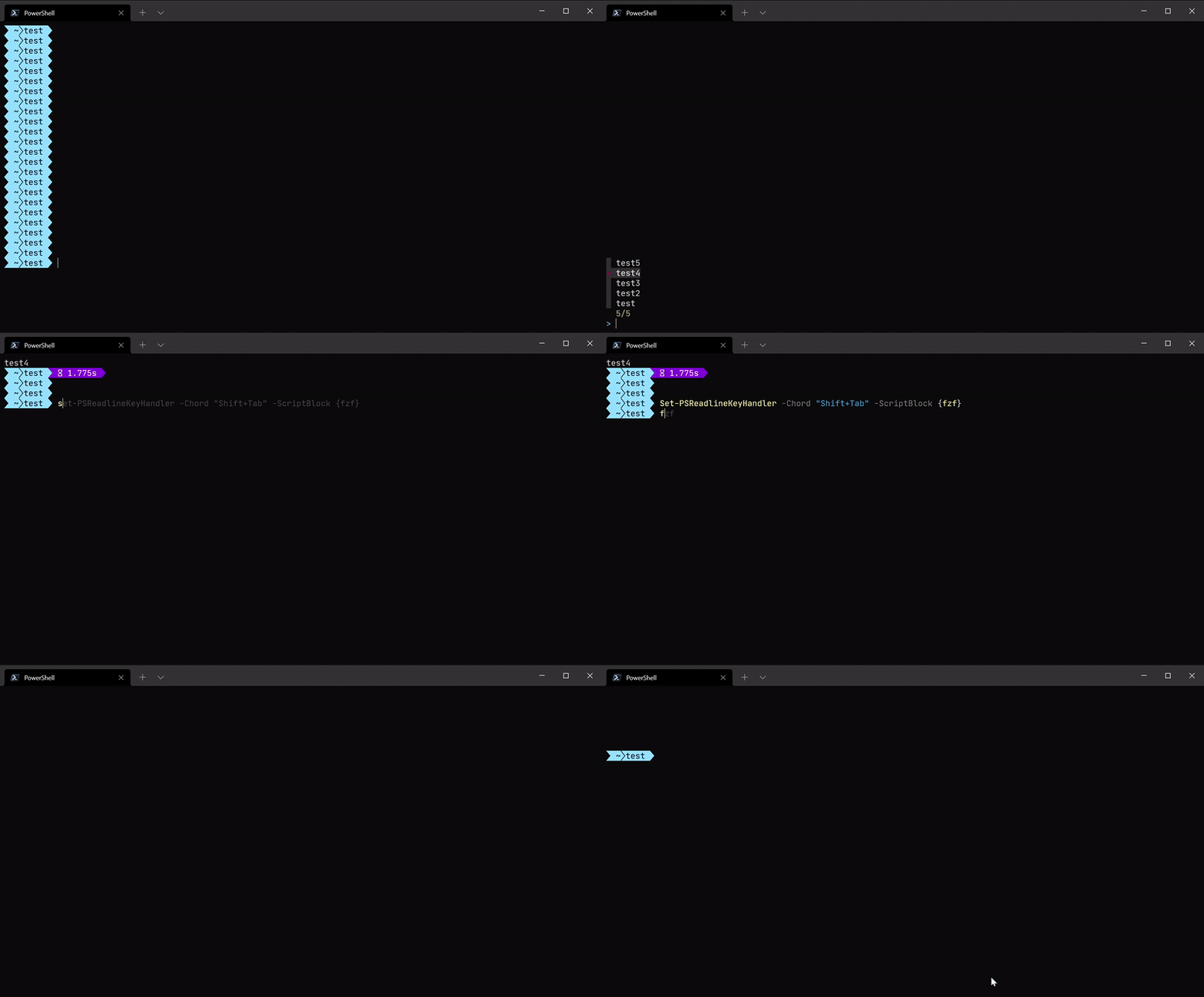
Environment data
PS Version: 7.1.5
PS HostName: ConsoleHost (Windows Terminal)
PSReadLine Version: 2.1.0
PSReadLine EditMode: Windows
OS: 10.0.22000.1 (WinBuild.160101.0800)
BufferWidth: 120
BufferHeight: 30
Steps to reproduce
#Install fzf (or any other tui app)

fzf # choose an item, it gets printed on the screen and the next prompt appears

Set-PSReadlineKeyHandler -Chord "Shift+Tab" -ScriptBlock {fzf} # Or any key
# Press the the key, select item
# Black screen, after pressing enter the next prompt appears, but the result is never printed
Expected behavior
I expect the behavior when starting the app from the hotkey to be the same as when starting directly -
When the app quits it prints its result and the next prompt appears.
Actual behavior
When quitting the app the terminal is a black screen
If the app prints something, like the result in fzf, it never gets displayed.
If you try typing, the text appears on the middle without a prompt:

When pressing enter the prompt appears again, but the result never does.
Activity
AsafMah commentedon Feb 23, 2022
I upgraded to 2.2.2:
And the issue still persists
daxian-dbw commentedon Feb 23, 2022
This was fixed.
It doesn't work that way. The output from executing the script block will be captured so
fzfwon't write to the console. I guess what you want isSet-PSReadlineKeyHandler -Chord "Shift+Tab" -ScriptBlock { $s = fzf; [Microsoft.PowerShell.PSConsoleReadLine]::Insert($s) }, so the selected item will be used as your input.AsafMah commentedon Feb 24, 2022
Thanks!
For future reference, that's the full "search history command" I have now: