Repository navigation
Settings Shortcuts Do Not Open on Win 11 #2089
Description

Describe the bug
When I go to launch any of the Windows Settings Shortcuts, almost none of them open.
For instance, when clicking on "Accessibility audio settings" and "Settings" - nothing happens (menu just disappears as though it's launched.
Only a small handful in the Settings category launch (such as "View network connections" - only the ones with colored icons launch, all of them with the monochrome icons do not. Exploring the "Open-Shell Modern Settings" folder shows me all of those same shortcuts and it's the same behavior there, only the colored icons launch everything else goes nowhere.
I've verified that "%LOCALAPPDATA%\Packages\windows.immersivecontrolpanel_cw5n1h2txyewy\LocalState\Indexed\Settings" is indexed - AND if I go to that folder and click on any items, they DO SUCCESSFULLY launch from there clicking on them.
when I look at the log, here's what it shows:
8513: Activate Item, ptr=000000004497A0A0, index=41, type=4
8555: Invoke command, ptr=000000004497A0A0, command=''
8556: Invoke command, ptr=000000004497A0A0, res=-2147024809
Seems like the command = '' may be the issue. Click on successful ones list this log line as 5875: Invoke command, ptr=000000004D9CD8C0, command='open'... whereas, any of the unsuccessful ones show command=''.
As a side note, I temporarily installed StartAllBack (which worked fine for these settings shortcuts - also the build-in Windows 11 start menu works fine with them as well. It's only Open Shell that's having the issue. I've uninstalled/reinstalled, cleared registry values manually, etc. yet nothing seems to solve this issue. I've also tried installing older versions and have had the same results.
Any insights/fix info would be great appreciated as I've spent hours trying to figure this out without success.
Screenshot shows several examples of links - none of which will open properly.
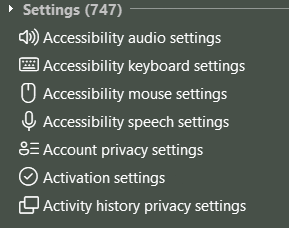
Area of issue
Start menu
To reproduce
Start -> Type in any system setting shortcut such as "Accessibility audio settings" or "Wi-Fi Settings" or whatever -> Click on that menu item. Menu disappears but nothing happens.
Expected behavior
Launch the system settings shortcut as it should.
Open-Shell version
4.4.194
Windows version
Windows 11
Additional context
No response
Activity
ge0rdi commentedon Jan 3, 2025
Good catch.
I think it is related to #2033. There was change in XML that describes settings since Win11 24H2.
I thought just the location (file name) changed, but now I see there are differences in XML structure.
Working on a fix.
Fix modern settings on Win11 24H2+
ge0rdi commentedon Jan 3, 2025
@bporl
You can test with build from PR #2091.
It seems to be working for me.
bporl commentedon Jan 3, 2025
I just downloaded and tested, works PERFECTLY! I'm wildly impressed how quickly you were able to identify and resolve this issue. Seriously, amazing job on this and very much appreciated!
bporl commentedon Jan 4, 2025
Will close this issue - along with a gigantic thank you to @ge0rdi for his excellent work in resolving it so quickly.
ge0rdi commentedon Jan 4, 2025
Fixed in
4.4.195.