Repository navigation
RFC: Apple Watch complication update algorithm #816
Description

Background
One of the primary technical challenges in the development of an Apple Watch complication for a diabetes app is the timely transmission of data from the phone to the watch: an app has only 50 guaranteed immediate complication updates per day. With a new sensor glucose data point incoming every five minutes but only enough guaranteed updates for one every ~30 minutes, keeping the complication up-to-date presents a meaningful challenge.
Present State
Currently, after a loop is completed, the decision to use one of the budgeted complication updates boils down to the fulfillment of one of the following requirements:
- Sufficient time (30 minutes) has elapsed since the last update.
- The sensor glucose value has changed significantly (20 mg/dL) since the last update.
If neither of these conditions are met, Loop requests an update to the watch via application context. The underlying framework determines an appropriate time to transfer the information based on factors such as communication strength and battery life; this transfer of data is opportunistic rather than deterministic.
Loop accommodates the restrictions on complication updates by including the time elapsed since the recorded glucose in complications providing enough space for the additional text. This information dwindles in utility over time nonetheless, often leading users to necessarily tap the complication and open the main app in order to view the most recent glucose value.
Proposed Changes
While Loop remains restricted by the confines of the existing complication update system provided by Apple, we can improve the algorithm used to update the complication to enhance the timeliness of the information presented.
I propose the following:
1. The time threshold for using an immediate complication update, rather than being fixed at 30 minutes, should be determined dynamically based on the number of remaining complication updates for that day:
(affordable update rate) = (remaining immediate updates) / (time until budget resets)
This simple adjustment has the following effects:
- If the watch is disconnected from the phone for any period of time throughout the day, the update rate increases appropriately.
- If the second immediate update condition (sufficient change in glucose value) holds when sufficient time has not yet passed, the update rate will decrease to accommodate the remainder of the day accordingly.
2. The complication update algorithm should favor the user's waking hours.
People sleep. Even if a user elects to wear their watch while sleeping, expending immediate updates during sleeping hours is an inefficient use; the amount of time spent glancing at the watch face overnight is substantially lower than during the day. To make better use of the budget, we can bias the distribution of immediate updates in favor of the user's waking hours.
With an unbiased update model and a stable connection with the watch all day, a user who sleeps for 8 hours per day utilizes one third of their budgeted updates during their sleep. If we halve the update rate overnight, we can increase the percentage of complication updates during waking hours from 66.6% to 83.3%—other factors held constant, this bias would decrease the guaranteed complication update time from ~29 minutes to ~23.5 minutes.
Taking this factor into consideration slightly complicates the simple formula listed in the first proposed change above, but the algorithm remains straightforward. Obtaining the user's waking hours also introduces some complexity to Loop's UI, but with sensible default values the effect on the user is little to none.
- An additional cell in the settings table of the iOS app is created for Apple Watch configuration (hidden if no watch is paired).
- Tapping the watch configuration cell brings the user to an additional table containing the configuration details.
- The configuration details table contains a cell for configuring the waking hours, which default to 6am...10pm.
Discussion: Workouts
Workout state could reasonably be incorporated into the complication update algorithm. Glucose values are more volatile mid-exercise, and changes can affect exercise performance. It's reasonable that a user would desire more frequent complication updates during their run, even if it meant a decreased update rate for the remainder of the day.
However, Loop's existing Workout Mode feature is insufficient to make adjustments to the algorithm. Workout Mode is simply a temporary target adjustment, so its use cases generalize beyond just exercise; it's fathomable that a user would enable Workout Mode when experiencing increased insulin sensitivity for any reason (post-exercise recovery, illness, etc.).
Pending some design decisions (#593), the enabling of a mode more thoroughly dedicated to workouts could be sufficient information to increase the update rate. The direction of such a feature is still undecided, however; it may become an improved temporary setting for insulin sensitivity nonspecific to workouts. We may consider changes to the update algorithm if this area develops in the future.
Thoughts and concerns appreciated!
Activity
elnjensen commentedon Sep 22, 2018
@mpangburn Thanks for this very thorough and thoughtful writeup. I hadn't known how Loop decides to update the complication, so this was very informative for me. I think that what you propose makes a lot of sense.
A couple of questions:
Does the 50-per-day limit reset at midnight? Or is a rolling 24-hour window? I couldn't find any documentation on this.
According to this documentation with some related discussion here it's still possible to transfer info after the complication limit is exceeded, but it is processed in a different way. What are the pros and cons of doing that, i.e. more aggressively sending data anyway?
I'm very much in favor of your idea of a separate workout app (and have even played around a little with it, though not very productively). I'd love to just have something with a stopwatch and BG value or graph.
Thanks for opening this discussion!
mpangburn commentedon Sep 24, 2018
@elnjensen Thanks for raising these great questions.
I'm glad you brought attention to this assumption, because it appears I was misguided:

The budget resets immediately, so we can have confidence it isn't a rolling window. However, it also doesn't reset right at midnight. I'll continue to log this information over the next few days, though I'm doubtful that 11:05pm would remain consistent between users. It wouldn't surprise me if the reset date were relative to an event like the user first putting the app's complication on their watch face.
It might be helpful to have a couple more people log the update resets to gain some more data points here, but it's likely that we'll have to dynamically determine the reset time on a per-user basis in code.
There are four paths provided by WatchConnectivity for communication between the phone and the watch. I'll describe each of them below for future readers of the thread, since I don't think the documentation lays them out very clearly. Your question pertains specifically to the second and third methods of communication I'll describe.
Let me know if I can clarify these any further.
elnjensen commentedon Sep 24, 2018
@mpangburn Thanks for the clarifications. I'd be happy to keep an eye on when the complication update budget is resetting, but not sure how to do it - can you share how you produced the screenshot above?
mpangburn commentedon Sep 24, 2018
@elnjensen That'd be great. Here's how you can track the update budget:
The signup process isn't too bad—create a free account at loggly.com and enter your customer token from Source Setup > Customer Tokens (along the top navigation bar) in Loop through the Settings page in-app.
WatchDataManager:init(deviceManager:)initializer near the top ofWatchDataManager.swiftto begin the observation:After you launch the app, it'll log the remaining updates to Loggly each time one is used. When that number jumps back up to 50, the budget has reset.
Loop logs a number of events via Loggly, so if you just want to see the changes in updates remaining, you can go the main Search tab at the top of Loggly and start typing "remainingUpdates". It should auto-complete and filter appropriately based on the selected date range.
If you encounter any snags along the way, please let me know.
mpangburn commentedon Sep 25, 2018
Huh, well would you look at that:

Night 2: a reset right at midnight.
mpangburn commentedon Sep 26, 2018
Day 3 findings:
Yesterday I went for a hike in the morning. When I came back, I stuck my watch on the charger while I jumped in the shower—and my update budget reset back to 50 at 10:05am. I have a hunch that one of the triggers for resetting the budget is the watch recharging to a certain battery level (my watch was still pretty high in battery, so when I put it on the charger, I suspect it was already passed that level, thus resetting the budget immediately).
To try to push the battery life theory a little more, I chose to wear my watch while sleeping last night rather than place it on the charger. The update budget did not reset right at midnight, but instead at about 5:03am. The pattern here remains ambiguous, unfortunately.
elnjensen commentedon Sep 27, 2018
@mpangburn When I try to add your code to WatchDataManager.swift, I get an error on this line:
self.log.debug(["remainingUpdates": newValue])that says "Value of type 'WatchDataManager' has no member 'log'. " I'm trying to insert the code you gave above into the class definition in that file - I assume that's what you meant by "main body." Thanks for any thoughts - I'm using 1.9.2.
mpangburn commentedon Sep 27, 2018
@elnjensen My mistake—it looks like the
logproperty was added in a more recent commit. If you use the current dev branch, that line should work fine.elnjensen commentedon Sep 27, 2018
OK - I looked at merging dev with my current apple watch code changes, and it's not simple. There is a lot going on there. So for now I'll have to pass on this, unless there's an easy replacement for that code. Sorry!
mpangburn commentedon Sep 27, 2018
@elnjensen No worries if you can't get it up and running. I'll try one more time at a code addition to integrate with your branch, since nothing in dev is needed other than the couple lines to add the logger.
In the class definition for
WatchDataManager, addand at the top of the
init(deviceManager:)initializer, initialize the log:and within that same initializer, add the following as the very last line before the closing brace:
If that works for you—great! If not, it's no problem. I appreciate you giving it a shot.
elnjensen commentedon Sep 28, 2018
Perfect! I'm up and running now with that code, and I can see the results in Loggly - I'll let you know what happens.
elnjensen commentedon Sep 30, 2018
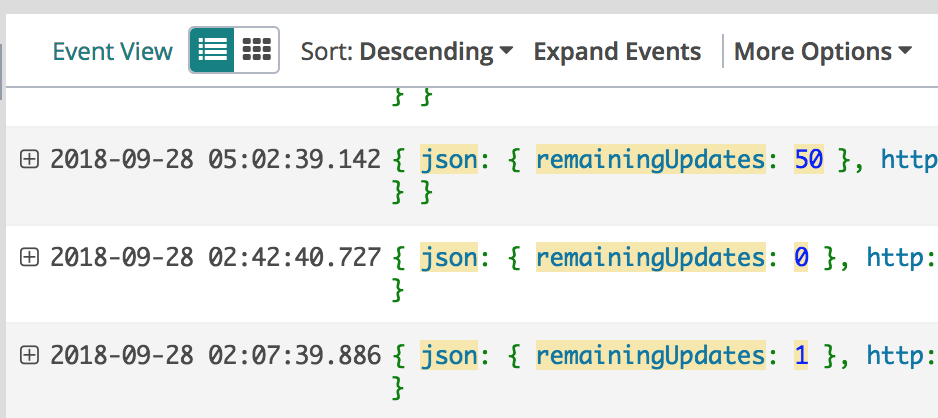
OK, I have a couple of days of data on this now; here are some preliminary results. First night, I ran out of updates at 2:42 AM, and it reset 2:20 later, at 5:02 AM:
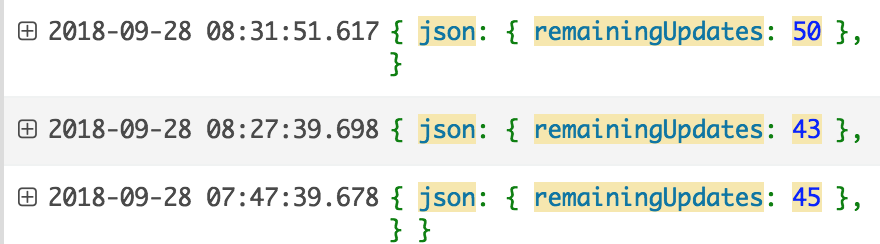
But then that morning I charged my watch while I was having breakfast, and it reset the update count:
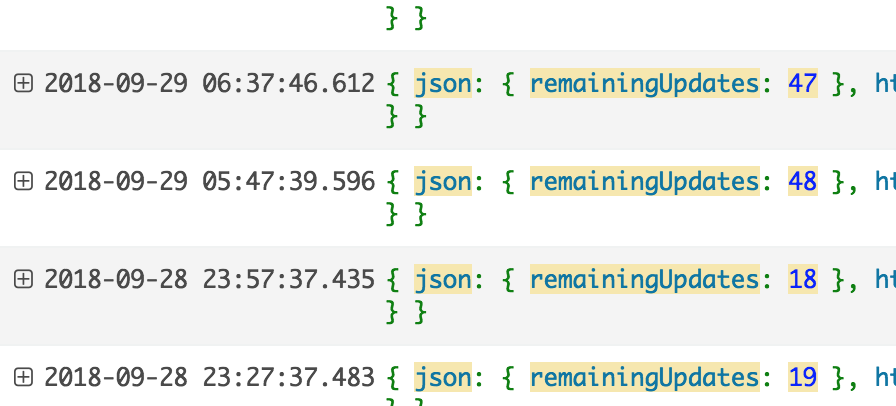
Overnight last night I was in a remote area with poor cell service so it didn't log everything, but it looks consistent with resetting around 5 AM again:
I did recharge this morning as well, though I think not all the way back to 100%, and didn't see any change during that time.
That's what I know so far - I'll keep watching it.
mpangburn commentedon Sep 30, 2018
@elnjensen Thanks for collecting this—it's validating to have more data aligning with my observations.
The budget appears to reset when one of the following conditions is met:
On the algorithm side, the action here is to monitor changes in the number of remaining updates and record whenever the budget resets, using that moment to estimate the next reset date.
I've been running some code which does exactly this in addition to biasing the updates toward waking hours. The results so far are promising. I have one more idea of an improvement to make, which I'll take a stab at after a couple more days of collecting data. Hope to have some code to share in the near future.
elnjensen commentedon Oct 3, 2018
Just a quick update: continuing to see resets at about 5 AM, plus when I charge. The main thing I'd add to your bullet points above is that it appears to me that the "bonus" resets from charging don't actually change the time of the 24-hour resets. What I see is reset at 5 AM, additional reset during the day if I charge, and then reset at 5 AM again. Is that consistent with what you're seeing? So I don't know what sets that reset time initially, and what might change it.
It's interesting to note that we've both seen resets at 5:02 - 5:03 AM. Could be a coincidence, but it's something to keep an eye on.
mpangburn commentedon Oct 12, 2018
After a couple weeks of testing, I'm happy to open the PR for this issue: #832
beached commentedon Nov 22, 2018
Is the 50 updates per day a per watch or per phone counter? I still have my old watch series 0 and use that at night for dexcom alarm vibrations.
beached commentedon Nov 27, 2018
One thing too, one way around this in certain situations is to start issuing optional alerts when events like low glucose, fast fall rate on the phone. The watch mirrors these and I don't know that the limit applies there.
sraka1 commentedon Oct 16, 2019
@mpangburn it's very likely that remainingComplicationUserInfoTransfers can be reset with a jailbroken phone (probably by hooking into the Watch.app and reloading the watch face). There are already tweaks to ping or reboot the watch (which presumably resets the counter) and this can be automated - https://repo.ayden.dev/depiction/applebetas.ios.tweak.watchreboot/. However, there is probably a way to just reset the counter without anything visibly happening on the watch itself. I'll be looking into this soon...
github-actions commentedon Nov 17, 2023
This issue is stale because it has been open for 30 days with no activity.
github-actions commentedon Dec 1, 2023
This issue was closed because it has been inactive for 14 days since being marked as stale.
Add smart complication update algorithm to conserve daily budget
LOOP-5235 Fixes/updates for scheduled presets (LoopKit#816)