Add graph to watch #537
Description

I appreciate the convenience of being able to glance down at my watch to know what my blood sugar is and where it will eventually end up. I would find it helpful to see the shape of the curve between now and BG(eventual). Is my blood sugar going to rise and then drop down to BG(eventual); drop and then rise up to BG(eventual); or almost immediately go roughly to BG(eventual) and then remain there steadily.
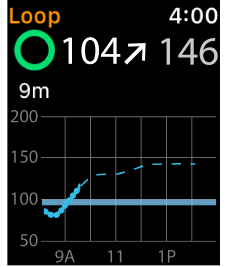
Putting a graph in Loop on the Apple Watch would help differentiate different scenarios in a glance. Below is a mock version of what this would look like as well as the data on the phone which is what I used for the mock-up.

Activity
francescaneri commentedon Sep 4, 2017
great idea @ps2
if you could also add active carbohydrates
ondrejpelak commentedon Oct 13, 2017
Cool idea, Im just looking for something like this! Is there any other way how to do it now? Nightscout probably, right?
For the watch graph - what about graph without numbers on the left side? You have actual sugar level on the top, so you know where you are, and you also haw the blue strip of ideal glycemia so you know if you are low or high... And I think there should be insulin and carbs as well - in different colors. What do you think?
Reason: Just to keep the app simple and clean.
bashem commentedon Feb 12, 2018
I wouldn't need numbers.
apabari commentedon May 29, 2018
This is definitely possible - it's been completed in Spike (https://github.com/SpikeApp/Spike). My knowledge of iOS Development is still very junior - I'm just learning now - so not sure how to add this into the Loop Watch App myself, but perhaps someone with more experience can complete it before I can.
From what I gather, the app creates an image of a graph and then displays it. This is necessary because you can't actually create a graph on the watch (yet).
bharat commentedon Jun 20, 2018
@elnjensen and I have been working on this. The latest code is here:
https://github.com/bharat/Loop/tree/dev-watch
Kdisimone commentedon Oct 17, 2018
closed with #772 #824
watch graph is in dev now
Merge pull request #537 from tidepool-org/ps2/LOOP-4371/diy-sync