Repository navigation
Integrate OpenFoodFacts food search API into Loop's "Add Carb Entry" screen (+barcode scan +voice dictation) #1939
Description

New feature request: As a Loop user I want to be able to search for food types in the Add Carb Entry bolus screen that pulls carbohydrate data from Calorie King's Food API (https://www.calorieking.com/us/en/developers/food-api/) so that I avoid using multiple apps and can improve the accuracy of bolus entries.
The search return should give me carbs per serving, serving sizes and serving type and the screen modification would also allow me to modify the serving size that then automatically recalculates the carbs needed to be entered in order to correctly bolus.
I searched and was unable to find any other feature requests for a similar capability so I am submitting this here.
(moved the bar code lookup to its own feature request)
Activity
[-]Integrate Calorie King's Food API into Loops "Add Carb Entry" screen (+barcode scan support)?[/-][+]Integrate Calorie King's Food API into Loop's "Add Carb Entry" screen (+barcode scan support)?[/+]taylorpatterson007 commentedon Mar 21, 2023
Additional research uncovered this free open source Food API: https://world.openfoodfacts.org/
Hitting a sample URL for Coke Zero with the barcode in the URL (https://world.openfoodfacts.org/api/v0/product/5449000131805.json) results in a very usable response.
Add barcode camera capture button in carb entry form, scanned barcode puts code in a preformed URL, response is read and the carbohydrates and serving sizes extracted, plugged into the carb entry screen, can be adjusted and recalculated by chaning the serving size, press the give insulin button and bob's your uncle!
More API documentation and options: https://world.openfoodfacts.org/data
[-]Integrate Calorie King's Food API into Loop's "Add Carb Entry" screen (+barcode scan support)?[/-][+]Integrate Calorie King (like) Food lookup via API into Loop's "Add Carb Entry" screen (+barcode scan +voice dictation support)?[/+]taylorpatterson007 commentedon Mar 22, 2023
Adding wireframe and additional barcode/voice documentation for the iPhone/Watch
Additional research found to integrate a food search and carb and servings lookup into Loop
Add a food search bar
Add a serving size bar with adjusters that when pressed, adjust the Amount Consumed entry accordingly
User can use normal manual carb entry, or a new dictation feature to enter words to search the food database with, or a barcode scanner for code lookup. Within the barcode scan screen they can manually enter a barcode number if they wish.
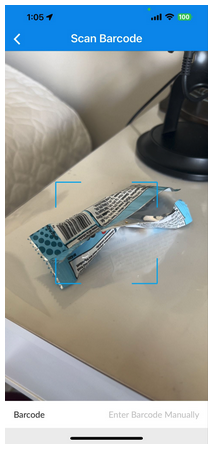
Scanning, dictating or entering a barcode number manually into the search bar hits the OpenFoodFacts API and returns the Description (product_name), Serving Size (nutriments:carbohydrates_serving) and Carbs Per Serving (nutriments:carbohydrate) and automatically enters them into the UI for fine tuning by user.
The following URL format using v3 of the API results in just the information we want (product name, carbohydrates per serving, the serving size, and a thumbnail image:
https://world.openfoodfacts.org/api/v3/product/894700010045&fields=product_name,carbohydrates_serving,serving_size,image_front_thumb_url
As the user adjusts the serving count, Loop automatically updates Amount Consumed until the user is satisfied with the entry and then hits Continue for injection.
Example URL for Kirkland Soft & Chewy Granola Bar: https://world.openfoodfacts.org/api/v0/product/096619313952.json
Additional research found here how to integrate a barcode reader dictation capability with carb/servings lookup into Loop for iPhone OS
Apple Developer barcode reader documentation: https://developer.apple.com/documentation/vision/vnbarcodeobservation
Declaration
var results: [VNBarcodeObservation]? { get }
Additional research on how to use Apple dictation calls:
Apple Developer speech recognition documentation: https://developer.apple.com/documentation/speech
[-]Integrate Calorie King (like) Food lookup via API into Loop's "Add Carb Entry" screen (+barcode scan +voice dictation support)?[/-][+]Integrate OpenFoodFacts food search API into Loop's "Add Carb Entry" screen (+barcode scan +voice dictation)[/+]github-actions commentedon Jul 7, 2023
This issue is stale because it has been open for 30 days with no activity.
github-actions commentedon Jul 22, 2023
This issue was closed because it has been inactive for 14 days since being marked as stale.
taylorpatterson-T1D commentedon Jul 6, 2025
Developed and submitted pull request for AI-Enabled Food Search here: #2325