Repository navigation
Bolus Recorded Twice In Event History #1115
Description

Describe the bug
Using Dev 1.10.1, Minimed 722, Dexcom G6 it appears that boluses are being recorded twice in the Event History. My only two boluses so far using this version have done this. Deleting the entry from event history does not work, as the entry is re-added.
This is my first ever Github bug report, so if I have forgotten anything, please let me know.
FYI - I have reverted to Jojo since this is affecting my health.
Attach an Issue Report
Loop Report 2019-09-19 11:39:35-04:00.md.zip
To Reproduce
Steps to reproduce the behavior:
- Bolus
- View Event History and Apple Health
- See bolus recorded twice
Expected behavior
A clear and concise description of what you expected to happen.
Screenshots
If applicable, add screenshots to help explain your problem.
Phone
- Hardware: iPhone X
- OS Version: ios 13.1 Beta 4
Loop Version
- Version Number: 1.10.1
- Repo: Dev
CGM
- Device: Dexcom G6
- Manager app: Dexcom
Pump
- Manufacturer: Medtronic
- Model: 722
- Firmware version: 2.4A 1.1 0B 0B
Additional context
None


Activity
Kdisimone commentedon Sep 19, 2019
Line 1608 in your Issue Report only shows one bolus event being read.
Line 1916 in your Issue Report shows only one bolus event being recorded.
A pump event and a dose entry are not duplication of IOB. One is a pump event, the other is an insulin recorded into Health app. Go check your Health app's insulin data records for what Loop recorded as your insulin delivery. That is where it is storing information. Did you actually get 2 entries with 10.1 units bolused in Health? Because I'm not seeing it...sorry
ljcaswell commentedon Sep 19, 2019
Hi Katie. Thanks for checking. Yes, there were two bolus entries in health. Not sure why the picture didn't attach to the first post.
Kdisimone commentedon Sep 19, 2019
can you click on the 7:51pm and post the details on that?
ljcaswell commentedon Sep 19, 2019
So sorry, but I had to stop using this branch and switch back to Jojo. I ate my normal meal this AM, bolused, and my sugar shot up from 95 to 260. The entry in health is no longer there.
Kdisimone commentedon Sep 19, 2019
Next time when you delete a Loop app, you can answer No to the question about deleting Health data (it’s the second question when you delete the app). That way your old entries are retained 👍
cyoung1024 commentedon Sep 20, 2019
I'm also experiencing this. Loop 1.10.1-spike with personal, local repo for rileylink_ios that's up to date with remote dev but has the x15 fix. I can push it to GitHub if needed. All boluses are recorded twice regardless of amount of open versus closed loop. Using Medtronic 715 firmware 2.3A 1.1 0B0B, Dexcom G5 with Spike. iOS 13. Here's my issue report.
No matter how many times I delete the readings in Health, they come back. What I've been trying to do is delete both in Health and delete only one from Event History, but both come back in each location. If I delete both from Event History and leave only one in Health that will either solve the problem and only one will reappear in Event History or the bolus will get deleted entirely from Event History - meaning active insulin is correct but there will be no bolus triangle on the Insulin Delivery graph.
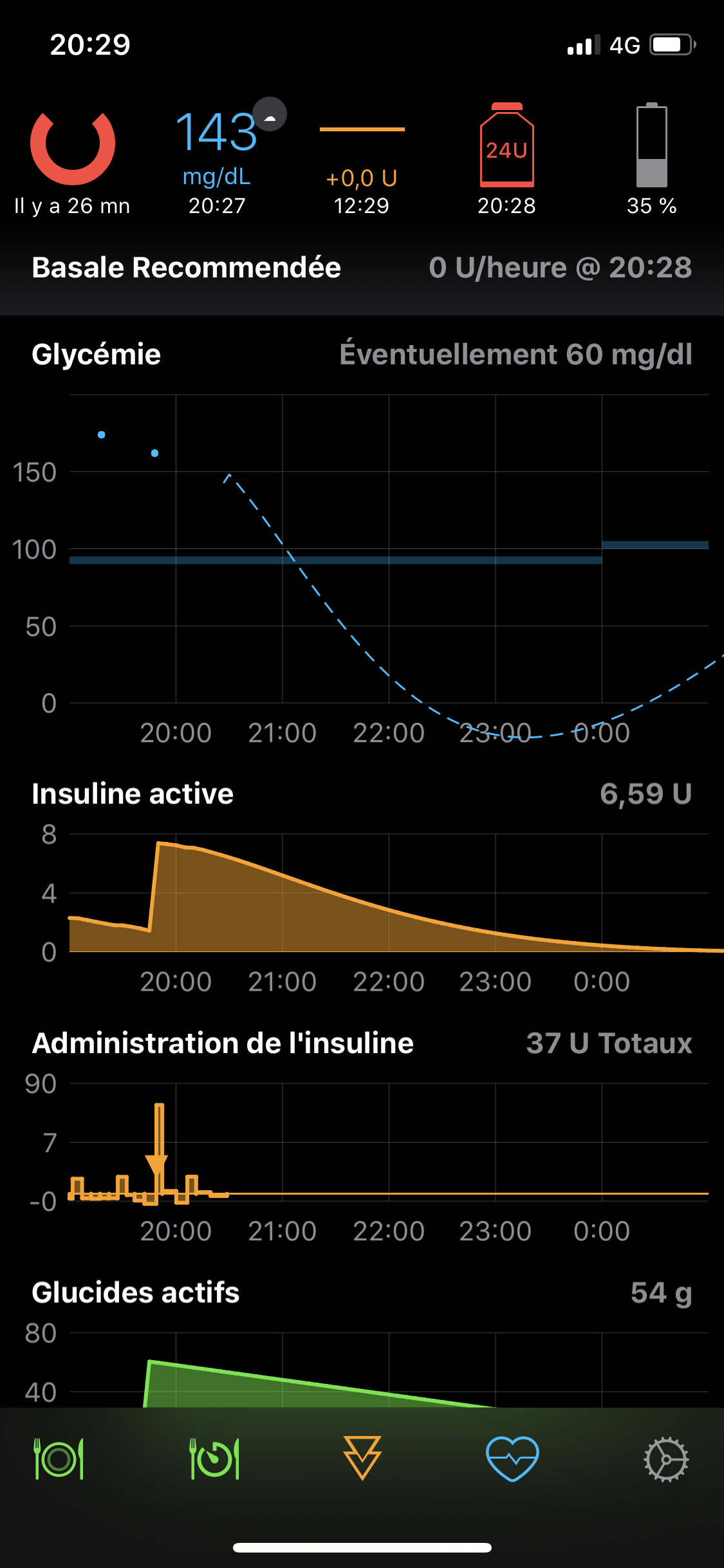
Sometimes when there are multiple instances of double bolus recordings the Insulin Delivery graph will show a sharp peak in insulin, one bar being above 50u, sometimes with and sometimes without a triangle. I'll post back later in the day if I observe this again. I'm going to try my best to not delete data and get a full report by the end of the day with all double boluses for the day recorded, but I expect I'll need to start deleting things at some point in order to bolus for meals. These two boluses are for breakfast.
Here's the link to the Spike repo if that could help as well.
Edit : everything looks pretty obvious but if you need any translating just let me know
Edit # 2 for after dinner : me being me I decided the easiest route would, of course, be to have pasta for dinner during this glitch. Spike has also been off this evening so I'm also on finger pokes, as I love to complicate my life (hence the CGM error in my issue report). I caught the large spike in the Insulin Delivery graph so wanted to give another update. I also wanted to confirm that the easiest way to get this error to go away, at least for the longest amount of time, is to delete both recordings in Event History and leave only one recording in Health. Then only one will come back in Event History, and the second Health recording does not come back. After observing more closely today I also noticed that it takes one or two loop cycles for the data to be duplicated, and they do not both show up immediately after bolus. There will be a short time when only one is present and it gets your hopes up, only to cruelly destroy them a cycle or two later (as the universe does dictate with all things relating to T1 though, right ?) Please don't hesitate to let me know if I've forgotten anything or if a debug output from Xcode while taking a bolus could also help.
rumil commentedon Sep 22, 2019
I can also confirm the issue. Below you can find 2 Issue reports:
The duplication is:
and
This happens for every bolus. @cyoung1024 workaround works for me fine 👍
dm61 commentedon Sep 22, 2019
I can also confirm the same issue (dev 1.10.1 commit f798c8e, Minimed 523). Bolus duplications look the same as reported above. Wonder if this may be an issue only with Medtronic pumps?
lydiaoxley commentedon Sep 22, 2019
Same issue with Lydia. We deleted duplicate entry from Health App and it was put back in next Dexcom cycle. Dev 1.10.1 MT 722
We turned Face ID off because her phone was not always recognizing her face, but that made no difference.
dm61 commentedon Sep 22, 2019
Here is some more data to hopefully help identify the problem. The duplicate bolus entries are:
Pump Event 1.txt
Pump Event 2.txt
Interestingly, the first one has start at 17:00:03 and end at 17:00:03, probably based on the time when the bolus of 1.0 U was initiated, while the second one has start at 17:00:07 and end at 17:00:47, probably corresponding to the time captured from pump history.
I've captured debug stream from Xcode for couple of cycles before the bolus was issued, and for several Loop cycles after the bolus:
duplicate-bolus-debug-capture.txt
Here is also an Issue Report captured after the duplicate bolus appeared in Loop:
Loop Report 2019-09-22 11-11-15-06-00.txt
The duplicate bolus appeared some time after the second Loop cycle after the bolus was issued. An attempt to delete just from Health failed - duplicate bolus reappeared. Deleting the duplicate bolus from both Health and Event History succeeded - duplicate bolus did not reappear.
adamd9 commentedon Sep 23, 2019
I noticed on mine that the "offending" duplicate has a different syncIdentifier length.
Standard / pre-update id has a length of 15 chars:
syncIdentifier: Optional("1601b85c0e5513")
Duplicate entry id has a length of 33 chars
syncIdentifier: Optional("4dc3cf943be34b84af5eb76bcd57074c")
Looking back at my historical data, these 33 char syncIdentifiers were not appearing.
ps2 commentedon Sep 23, 2019
The identifiers are part of the dose tracking system. Longer identifiers are identifiers for doses that Loop is tracking that it initiated. The short identifiers should only show up for events that are either a) not doses, or b) doses that Loop did not initiate. Seeing short identifiers here is symptomatic of Loop losing track of matching up a dose it issued with the dose in the pump's event history.
adamd9 commentedon Sep 24, 2019
Ahh interesting @ps2, so I assume normally that Loop has to reconcile the pump "raw" bolus events with the loop bolus events and only end up with one, and this is what might be broke somehow?
github-actions commentedon Oct 23, 2023
This issue is stale because it has been open for 30 days with no activity.
github-actions commentedon Nov 6, 2023
This issue was closed because it has been inactive for 14 days since being marked as stale.