Skip to content

Add print previews with poster overlap and booklet layouts - #46

Merged
mberman84 merged 2 commits into
Forward-Future:mainfrom
rscoopcur:codex/print-preview-dpi-overlap
Nov 5, 2026
Merged

mberman84 merged 2 commits into
Forward-Future:mainfrom
rscoopcur:codex/print-preview-dpi-overlap

Conversation

@rscoopcur

@rscoopcur rscoopcur commented Nov 3, 2026 •

Copy link
Copy Markdown
Contributor

Problem

Folio's desktop Print command sends the current PDF directly to a hidden browser frame. It does not provide an in-app sheet preview or controls for poster tiling, booklet imposition, multiple pages per sheet, or output resolution. Users cannot inspect those layouts before continuing to the system print dialog.

Change

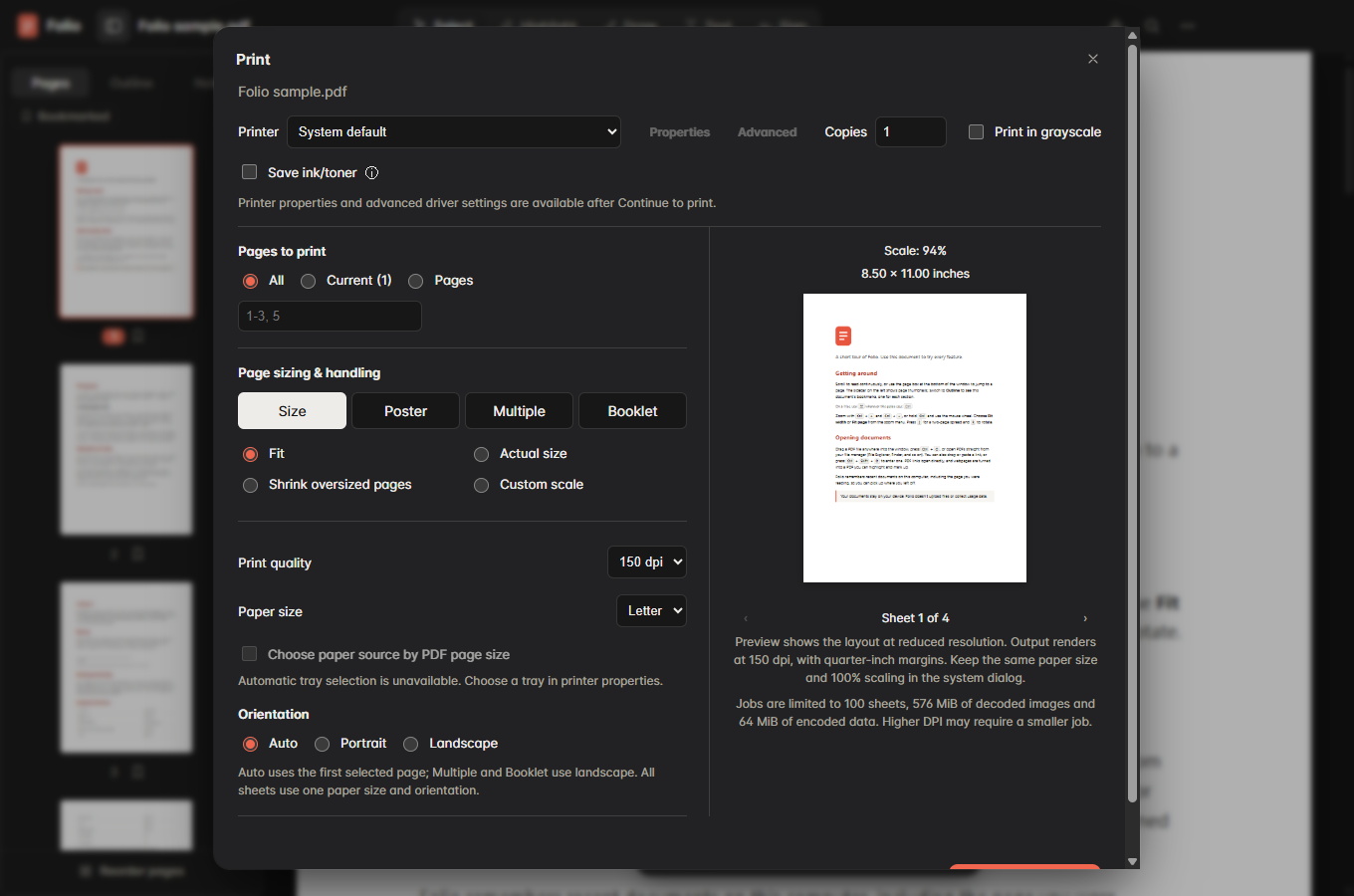
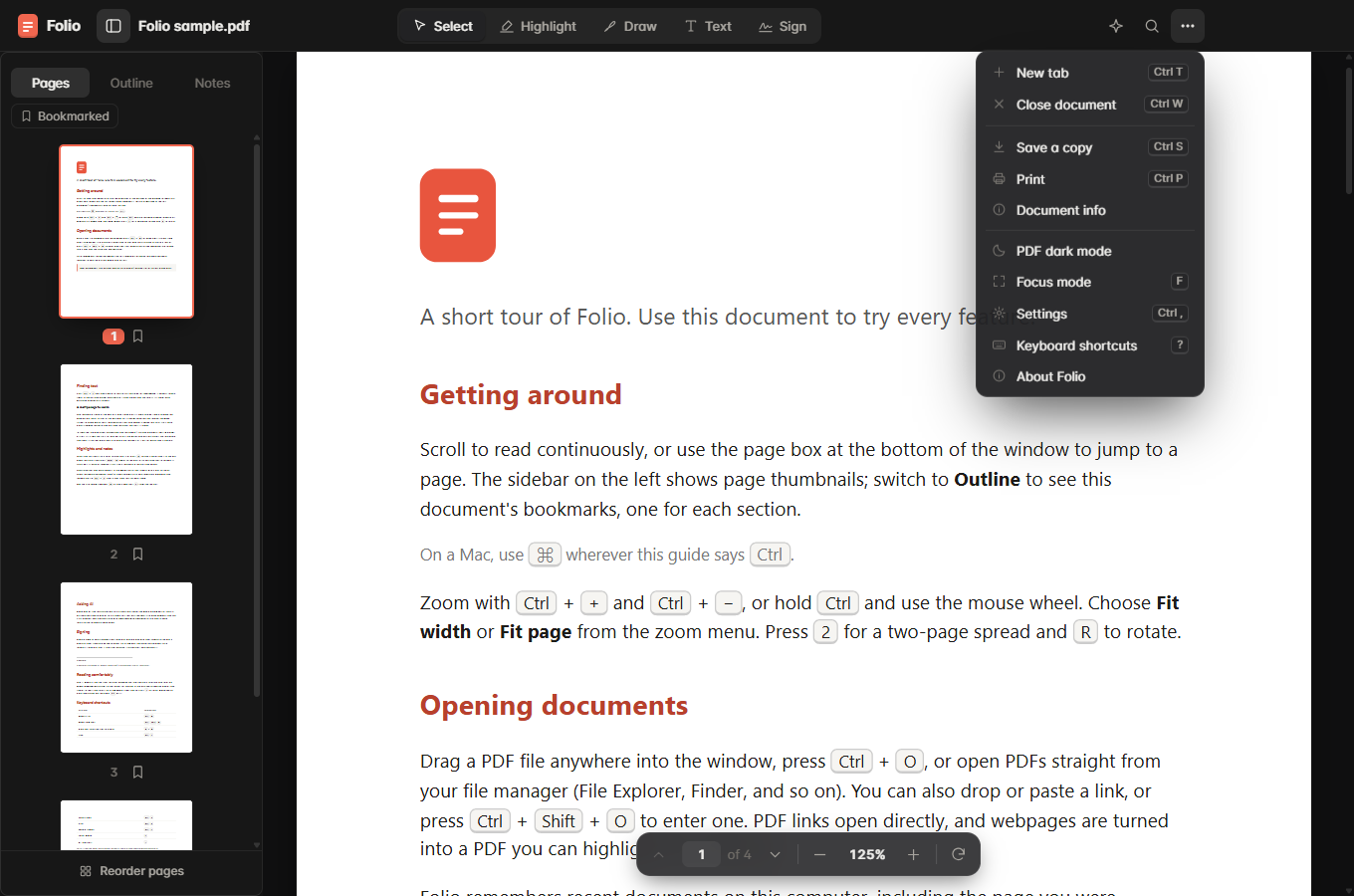
Add a desktop print-setup dialog, opened from More > Print or the platform's Print shortcut. It uses an annotated snapshot, respects reordered pages, and preserves the document's unsaved marker. The browser edition retains its existing print path.

Print controls and preview

  • Enumerate system printers and choose a printer and copy count.
  • Select all pages, the current page, or comma-separated page numbers/ranges, with validation and duplicate removal.
  • Choose Letter, A4 or Legal paper and automatic, portrait or landscape orientation.
  • Preview and navigate the generated sheets, including dimensions and content scale. Preview and output use the same layout plan.
  • Render grayscale output or lighten content to 70% opacity with Save ink/toner. The latter is a rendering option, not a printer hardware setting.
  • Keep keyboard focus inside the dialog, preserve text-editing shortcuts, restore focus on close, and allow preparation to be cancelled.

Page sizing and handling

  • Size: Fit, Actual size, Shrink oversized pages, and Custom scale from 10% to 400%.
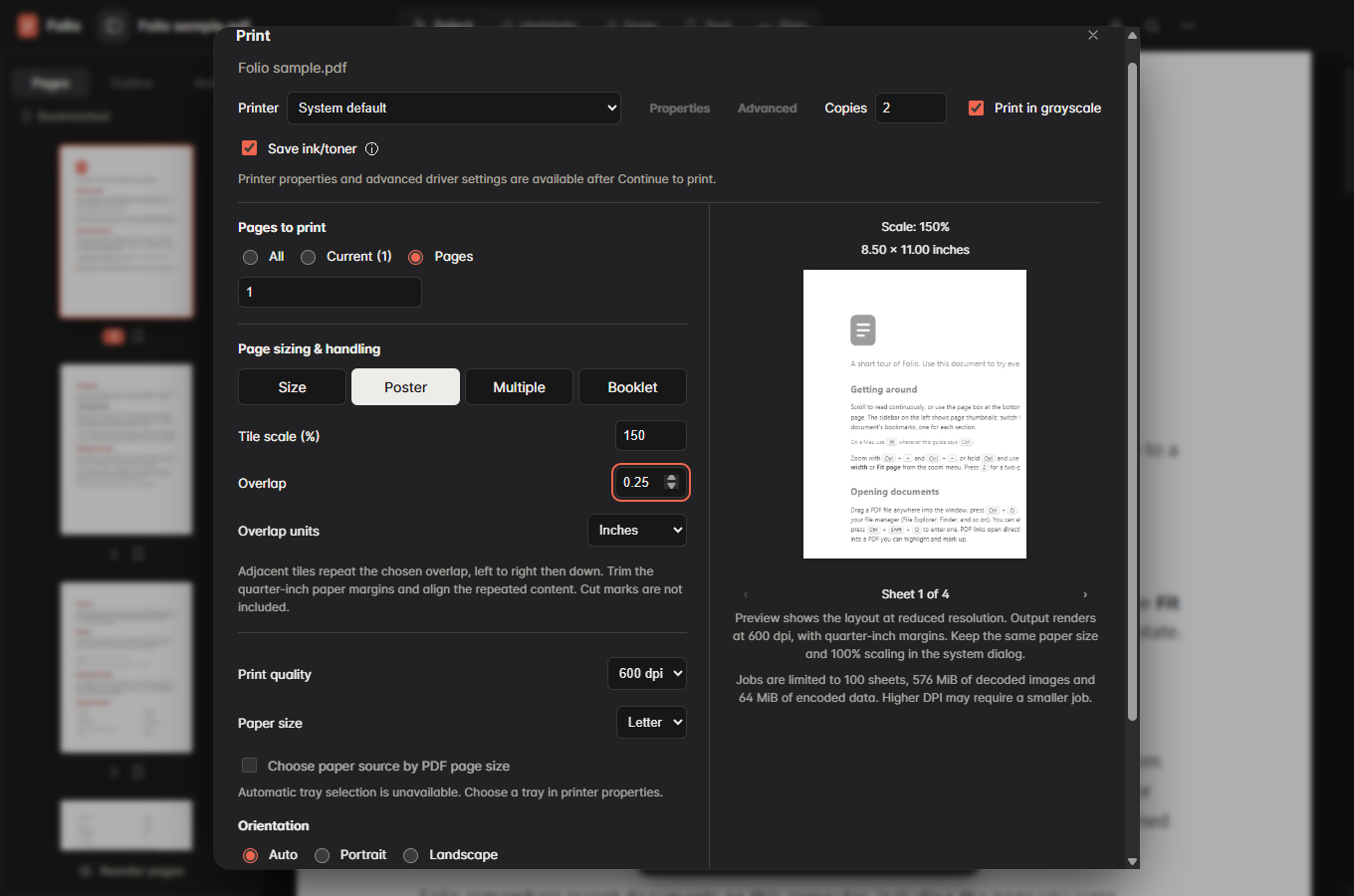
  • Poster: Tile enlarged pages left to right and then top to bottom. Adjustable overlap accepts inches or millimeters, preserves the physical amount when switching units, defaults to 0.25 inches / 6.35 mm, and supports zero overlap. Tile counts account for overlap and cover the final page edges.
  • Multiple: Place 2, 4, 6, 9 or 16 pages on each sheet in row order.
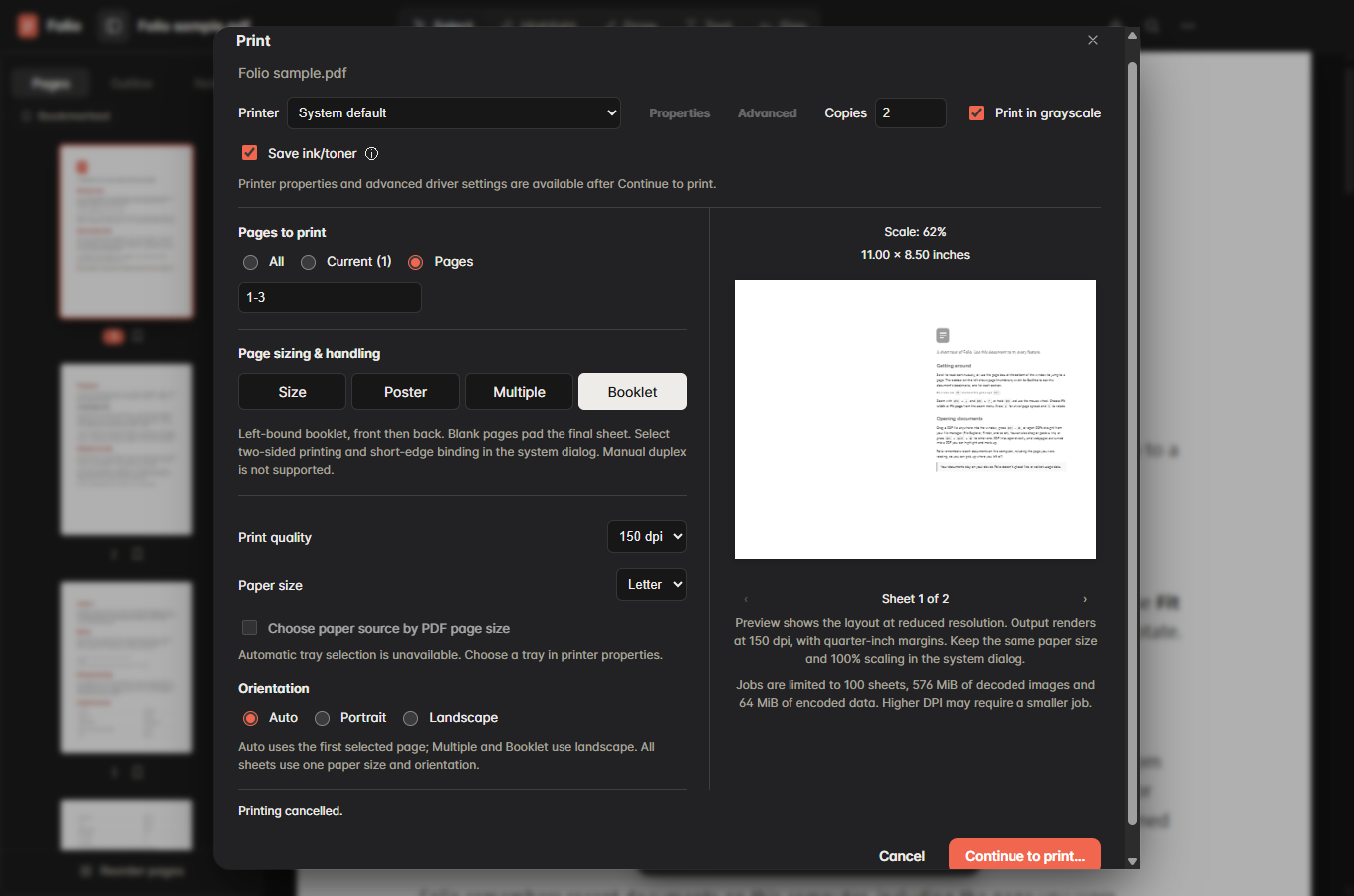
  • Booklet: Impose left-bound page pairs, front then back, and pad the final signature with blank pages. Eight input pages become 8/1, 2/7, 6/3 and 4/5. Request short-edge duplex for landscape or long-edge duplex for portrait, and explain the required driver setting.

Output quality and resource handling

  • Let users choose 150, 300 or 600 dpi. A Letter sheet renders at 1,275 × 1,650, 2,550 × 3,300 or 5,100 × 6,600 pixels respectively.
  • Render each visible page region into a cropped canvas at the selected resolution. The source viewport is not capped or silently downscaled, including enlarged poster pages.
  • Render one sheet and cropped region at a time, release their canvases, encode PNGs asynchronously, and discard cancelled work before native print handoff.
  • Check a 48-megapixel per-sheet limit, 576 MiB decoded-image job budget, 64 MiB encoded-image job budget, and 100-sheet limit. Oversized jobs receive actionable errors instead of a quality downgrade. The desktop boundary independently validates settings, PNG headers and dimensions.
  • Load the prepared document through a short URL handled by the print window's private in-memory protocol. This avoids Chromium's inline-URL length limit for high-DPI jobs without writing print content to disk.
  • Use a hidden sandboxed print window, deny new windows and permission requests, apply a restrictive content policy, and require the system print dialog with silent: false.

Deliberate limits

  • Printer Properties and Advanced controls are unavailable inside Folio; driver settings are handled in the subsequent system dialog. Automatic tray selection by PDF page size is not implemented.
  • All sheets in one job use one paper size and orientation, with quarter-inch margins. Actual/custom sizing can clip content, which is reflected in the preview.
  • Poster cut marks and tile labels are not included. Users trim the paper margins and align the repeated overlap content.
  • Booklet printing requires supported duplex settings. Manual duplex and right-bound booklets are not implemented.
  • Output is rasterized. Higher DPI cannot recover detail missing from a scanned image. The preview uses a lower display resolution while retaining the output geometry.
  • The decoded-image budget is not a total process-memory cap; PDF resources, temporary rendering surfaces and driver allocations add overhead. Drivers can override requested paper, scaling, DPI and duplex settings.

Usage, implementation limits and test commands are documented in docs/printing.md. No new dependency, version bump, changelog entry, installer, generated PDF, screenshot or machine-specific path is included in the commit.

Issue or approval

This is a contributor-requested draft for upstream scope review. No upstream issue or maintainer approval comment has been obtained. CONTRIBUTING.md requires agreement on new features before implementation; this draft does not claim that approval and should remain a draft pending maintainer feedback.

How I checked it

Tested on Windows 11 x64, with Node.js 24.19.0 and Electron 45.1.0. macOS and Linux have not been tested locally.

  • npx tsc --noEmit
  • node scripts/test-print.mjs: page ranges, sizing, poster coverage and exact-fit tile counts, booklet ordering/padding, DPI dimensions, resource limits, PNG validation and inch/mm conversion.
  • npm run build
  • npm run smoke: existing Windows reader regressions, including preservation of unsaved annotations while preparing/cancelling a print snapshot.
  • node scripts/smoke-print.mjs: hidden desktop interaction tests for ranges, focus, DPI/overlap controls, invalid input and memory-limit errors, preparation cancellation, and native print handoff. Generated Multiple and Booklet PDFs have the expected sheet counts and paper dimensions; the four-sheet 600 dpi poster PDF contains 5,100 × 6,600-pixel page images.
  • node scripts/smoke-print-resolution.mjs: actual PDF rasterization at all three DPIs, effective source viewport scale beyond the former 6,000-pixel cap, cropped canvas allocation, preview geometry, encoding and cancellation. Adjacent tiles had zero mismatched pixels in the tested overlap strips at 150, 300 and 600 dpi.
  • git diff --check

The print tests intercept native printer calls. No physical print job was submitted. Printer-specific dialogs, physical alignment, duplex behavior and device resolution remain unverified. No merge or release is requested by this draft.

Before/after screenshots show the upstream Print menu and the new Size, Poster and Booklet setup using Folio's bundled sample PDF. They are attached to the PR and are not committed.

Implementation and tests prepared with OpenAI Codex, GPT-6, in the Windows Codex execution environment.

@rscoopcur

Copy link
Copy Markdown
Contributor Author

Screenshots using the bundled Folio sample PDF. Before: upstream More > Print entry. After: Size setup, Poster at 600 dpi with 0.25-inch overlap, and Booklet preview. Native printer calls were intercepted during testing; no physical print job was sent.
print-before print-size print-poster print-booklet

@mberman84
mberman84 marked this pull request as ready for review November 5, 2026 01:38

mberman84 commented Nov 5, 2026 •

Copy link
Copy Markdown
Collaborator

Thanks for the poster tiling and booklet work. We’ve approved the feature with a simpler default and pushed the maintainer changes directly to this PR in e206e3f.

Basic opens first. The preview takes the dimensions of the page you’re viewing. Print… sends the complete annotated PDF to the system dialog, where you choose the printer, pages, and copies. Advanced has poster tiling, booklet layouts, multiple pages per sheet, scaling, and output quality.

The build and off-screen smoke suite passed on Windows, macOS, and Linux. The regression checks that Basic hands off all 101 pages byte-for-byte, that a saved signature reaches the print snapshot, and that the preview fits portrait, landscape, and 11 × 17 pages. Native printer calls were intercepted.

The after screenshots are print-basic.png and print-advanced.png. The five-second silent recording is print-preview.webm in the same artifact.

After screenshots and recording · Original print setup screenshots · Windows, macOS, and Linux validation

Maintainer implementation and verification with GPT-6 in Codex Desktop.

@mberman84
mberman84 merged commit 3eb44ca into Forward-Future:main Nov 5, 2026
3 checks passed
Sign up for free to join this conversation on GitHub. Already have an account? Sign in to comment

Labels

None yet

Projects

None yet

Development

Successfully merging this pull request may close these issues.

2 participants