Repository navigation
CORS issue when blocking all unencrypted requests #18099


Description

Type: code issue
Summary: The issue concerns the modification of the value of the CORS response header Access-Control-Allow-Origin, where http: is replaced with https:
This is done in the onHeadersReceived function n the file background-scripts/background.js
- You may be allowing unauthorized cross-origin requests.
Assume that I checked the button "Encrypt All Sites Eligible is ON"
Then, I visit a web page https://example.com
which makes a cross-origin request to https://third.com which replies with the following header
Access-Control-Allow-Origin: http://example.com
Without HTTPS-EVERYWHERE, this cross-origin access will be disallowed by the browser.
With HTTPS-EVERYWHERE, this cross-origin access will be allowed by the browser since the header is changed to
Access-Control-Allow-Origin: https://example.com
By doing so, the extension is giving https://example.com, unauthorized access to data from https://third.com
I think that there is no need to modify the Access-Control-Allow-Origin header. In fact, the browser sets the Origin header in cross-origin requests. So if a server is supporting CORS, it may check this header and allows or disallows cross-origin requests.
- Another issue that arises from changing http: to https: in the value of the Access-Control-Allow-Origin (ACAO) header is that you may be disallowing authorized cross-origin accesses.
Assume the same settings as above.
Then, I navigate to a website that does not have a secure version, say http://example.com, which makes a cross-origin request to https://third.com, which replies with
Access-Control-Allow-Origin: http://example.com
Without HTTPS-EVERYWHERE, this is a successfull cross-origin request.
With HTTPS-EVERYWHERE, this becomes an unsuccessfull cross-origin request, because the response header becomes
Access-Control-Allow-Origin: https://example.com
By doing so, you are denying access to authorized cross-origin requests.
Just to mention that this second issue occurs only until the extension is disabled on the insecure website.
Again, we do not see it necessary to change the value of the ACAO header this way.
- Minor issue, regards the way you match header names to ACAO, and the replacement of all occurrences of http: by https: in the header value.
Nothing prevents a web server from responding to a cross-origin request with the following headers
Access-Control-Allow-Origin-Headers:
Access-Control-Allow-OriginSOMETHING:
These headers, as well has ACAO itself, are matched by the expression /Access-Control-Allow-Origin/i
Then, by replacing all occurrences of http: by https:, you may be changing the semantics of those headers.
I guess the matching should be done with ACAO header precisely.
In this case, one may argue that there will be only a single occurrence of http: in the value of the ACAO header.
But, what about a web page whose origin is https://example.https:44300 requesting access to https://third.com, which replies with
Access-Control-Allow-Origin: http://example.http:44300
Since the extension will change this header to
Access-Control-Allow-Origin: https://example.https:44300,
it will be granting access to data from https://third.com, while this was not the intended outcome.
Activity
pipboy96 commentedon Jun 18, 2019
It's hard for me to understand the issue you just reported. Can you show an example of this issue happening and how it could be fixed?
cschanaj commentedon Jun 18, 2019
The modification of header was introduced in #14600 to avoid mixed content breaking page in EASE mode. Will look into this issue later.
pipboy96 commentedon Jun 18, 2019
@cschanaj Please do, this issue seems serious.
cschanaj commentedon Jun 19, 2019
Update: this is partly introduced in #14600 and mainly in #15606
HTTPSE modifies the
access-control-allow-originheader only if it is already presented in a request. In the case where the protocol in the header is upgraded, it is an expected behavior to avoid mixed content issue caused by themain_frameupgrade (i.e. http://example.com/ to https://example.com/). Since the third party site https://third.com/ has already allowed CORS from http://example.com/. The implications from the header upgrade is small compared to the breakage EASE mode could bring.This seems like a regression from #16546 which introduced a new feature to disable HTTPSE on a per site basis. HTTPSE should not modify any child request when HTTPSE is disabled on the
main_frame.Agree, this should match the full header name.
This is because the
access-control-allow-originheader might take several forms, see #15606 (comment)P.S. If I am understanding this issue correctly,
unauthorizedin this issue refers to the fact that HTTPSE do not respect to theaccess-control-allow-originheader sent by the servers. In particular, it has little security implications.P.S.2 I will file a PR to fix some of the issue a little bit later. thanks for reporting.
cc @Hainish @zoracon just in case I missed something.
cschanaj commentedon Jun 19, 2019
@mesolido On further inspection, there was no regression since HTTPSE properly ignored the child requests. Could you provide any test url which you encountered the 2nd issue?
mesolido commentedon Jun 22, 2019
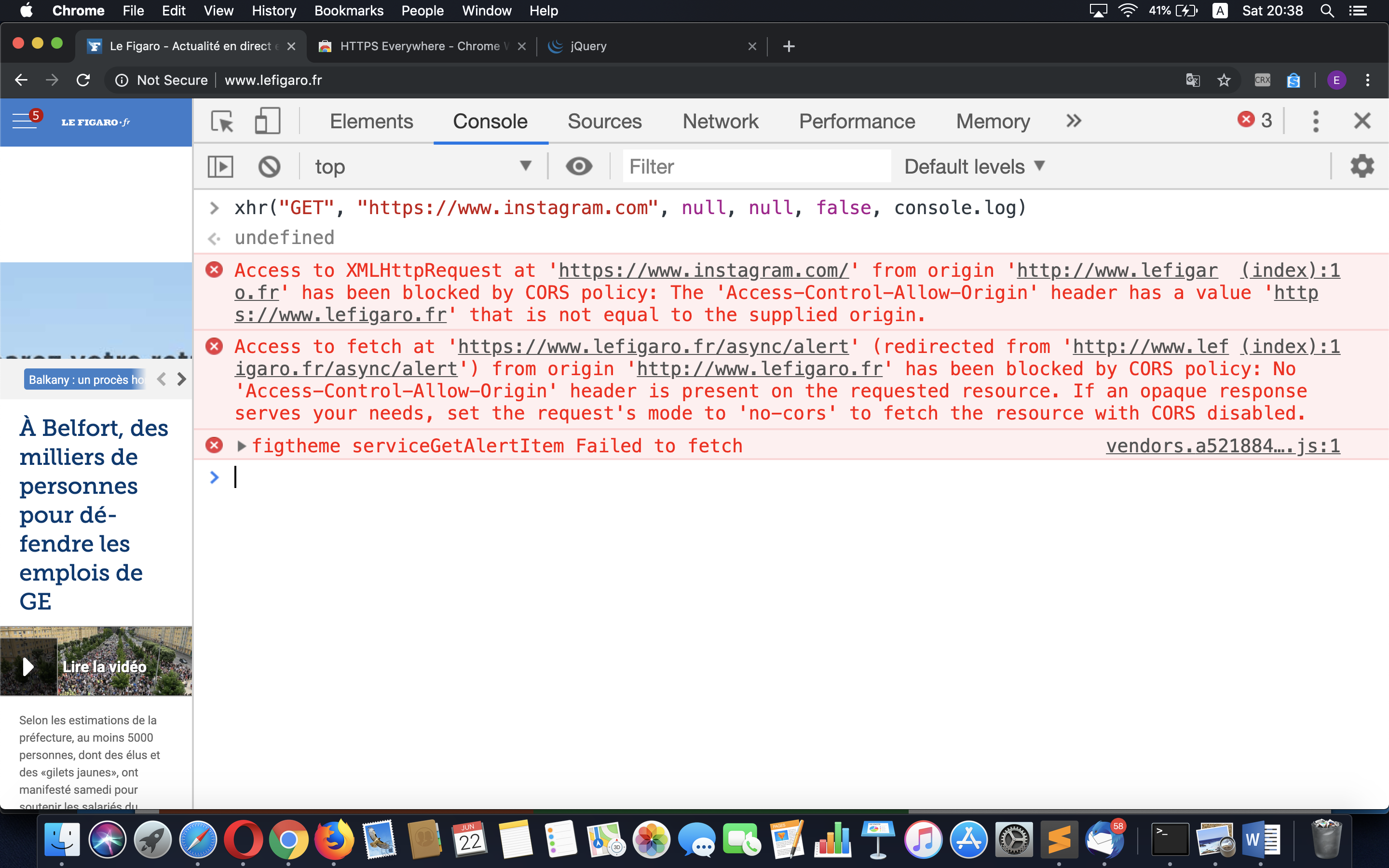
@cschanaj Here is how you I found the second issue (A screenshot is attached)
You can see this in the console of the attached screenshot (First error). The second error is also due to the extension. It is blocking some legitimate content of the site.
Normally, if I installed HTTS Everywhere before going to lefigaro.com, the extension would have disabled itself on this site, thereby causing no cross-origin request to fail.
So the problem is that HTTPS Everywhere does not disalbe itself when activating an already-opened-insecure-tab-without-secure-version. I guess a fix would be to analyze the active tab, check whether it is insecure and without secure counterpart, then disable HTTPS Everywhere on it.
cschanaj commentedon Jun 23, 2019
This is happening because when EASE mode is activated, only the current active tab is reloaded. It sound reasonable to me to make each insecure background tab reloaded/ to block all requests from insecure background tabs. @Hainish @zoracon would there be any concern if insecure background tabs are reloaded when they are activated?
Hainish commentedon Jun 24, 2019
@cschanaj we should probably be doing that when EASE is enabled, but we should do testing to ensure that content being created (e.g. via a form) is not lost when insecure background pages are reloaded.
v6ak commentedon Aug 16, 2019
I have encountered this issue with accessing Google Sheets from localhost. The Google server properly allows
http://localhost:9000(see the screenshot below), but Firefox then complainshttps://localhost:9000:Environment: Firefox 68.0.1 (64-bit) from Snap, HTTPS Everywhere 2019.6.27.
zeorin commentedon Mar 27, 2020
Just came across this issue when enabling EASE mode after an upgrade brought that mode to my attention. Developing webapps on
localhostwith a cross-origin API is effectively not possible when EASE mode is on.pipboy96 commentedon Mar 27, 2020
@zeorin We are aware of this issue. We can't make a hotfix release due to COVID-19 lockdown. See #19029 (comment) for details.